
The Best Desk Treadmills of 2026: Ranked and Reviewed by a Clinical Ergonomist
Most people don't realize how profoundly a day of sitting reshapes their body until they've spent a few hours walking at work. The lower back loosens, the hip flexors stop pulling, and the kind of mid-afternoon fog that used to trigger another cup of coffee just doesn't arrive. Desk treadmills have moved from executive curiosity to legitimate ergonomic tool, and the market has responded with dozens of options ranging from flimsy walking pads to commercial-grade machines engineered specifically for office use.
For this guide, 21 desk treadmills were evaluated across a structured scoring framework covering belt ergonomics, motor performance and acoustics, safety systems, integration with standing desks, and overall value. What separated the best from the mediocre wasn't raw specs — it was how well each unit was designed for the actual mechanics of slow walking while your hands and attention are occupied elsewhere. Belt width, step-up height, vibration signature, and how quietly the motor handles sustained low-speed loads all matter far more at 1.5 mph than they ever would on a gym floor.
The top 15 scorers are reviewed below. There is no single best option: the right desk treadmill depends on your desk footprint, how many hours per day you plan to use it, and how much you value portability versus build quality. The difference between a 7.6 and a 6.4 on the DEAS scale is real and consequential — but so is the difference between a treadmill you'll actually use and one that becomes an expensive footrest.
In This Guide
- Top 3 Picks at a Glance
- Full Rankings: All 15 Products Compared
- Why Trust This Review
- How Desk Treadmills Are Scored (DEAS Methodology)
- How to Read the Scores for Desk Treadmills
- Individual Product Reviews
- Buying Guide: What Actually Matters
- Setup Guide: Ergonomic Positioning in 6 Steps
- Frequently Asked Questions
Top 3 Picks
LifeSpan TR1200 TX Series
The TR1200 leads the category with the strongest combination of belt ergonomics, motor acoustics, and safety engineering. It earns its top position not on any single standout feature, but by doing everything at a consistently high level — including a 20-inch belt width and Intelli-Guard auto-stop that the budget category simply can't match.
Read full review →InMovement UnSit
The UnSit's 30-inch-wide belt solves a problem most desk treadmills pretend doesn't exist: you aren't just walking forward, you're reaching, pivoting, and shifting weight all day. Purpose-built for all-day commercial use with a 400-lb capacity and 42.9 dB operation.
Read full review →TrailViber Walking Pad
The TrailViber lands in the top tier without premium pricing, earning its score through above-average belt ergonomics and solid Bluetooth connectivity. The best option for users who want meaningful DEAS performance without committing to a commercial-tier investment.
Read full review →Full Rankings: All 15 Products
Sorted by DEAS Composite score, highest first. All 21 products reviewed; the 6 lowest-scoring are referenced in the FAQ.
| # | Product | DEAS | Best For |
|---|---|---|---|
| 1 | LifeSpan TR1200 TX Series | 7.6 | Best Overall |
| 2 | InMovement UnSit | 7.0 | Clinical / Commercial |
| 3 | TrailViber Walking Pad | 7.0 | Best Value |
| 4 | WalkingPad A1 R2 Series | 6.9 | Foldable / Storage |
| 5 | UREVO 2-in-1 | 6.8 | Desk + Floor Use |
| 5 | DeerRun Under Desk | 6.8 | Budget Desk Use |
| 7 | Exerpeutic WorkFit | 6.7 | Mid-Range Value |
| 8 | GoPlus SuperFit 2-in-1 | 6.6 | Budget 2-in-1 |
| 8 | Egofit Walker Pro | 6.6 | Compact Footprint |
| 8 | Sperax Walking Pad | 6.6 | Quiet Budget |
| 11 | Redliro Under Desk | 6.5 | Entry Level |
| 12 | Yagud Walking Pad | 6.4 | Ultra Budget |
| 12 | Abonow Walking Pad | 6.4 | Ultra Budget |
| 14 | Sunny Health Slim | 6.3 | Flat / Low Profile |
Why Trust This Review
DEAS Scoring Methodology
Every product is evaluated across 11 dimensions organized into three weighted layers: ergonomic design (50%), clinical performance (30%), and value (20%). Scores are fixed before publication and never adjusted for brand relationships or affiliate arrangements.
1,000+ Annual Workstation Assessments at LLUH
AJ Prince's clinical practice at Loma Linda University Health involves evaluating real workers with real musculoskeletal complaints. The patterns he sees in clinical assessments directly inform how desk treadmill features are weighted in DEAS — particularly belt width, step-up height, and vibration management.
Affiliate Independence
Affiliate links are disclosed and never influence scores. Products that earned lower scores are reviewed fully and linked in the FAQ. If a product isn't recommended, that recommendation doesn't change because of a commission structure.
Those 105 extra kilocalories per hour compound across a workday in ways that matter clinically — not just for weight management, but for postprandial glucose regulation, HDL cholesterol, and musculoskeletal loading patterns that reduce chronic low back pain incidence. A desk treadmill is not a fitness device. It's a metabolic and postural tool that keeps the musculoskeletal system in the active state it evolved for.
How Products Are Scored
How to Read the Scores for Desk Treadmills
Desk treadmills occupy a category where the engineering tradeoffs are unusually stark. The InMovement UnSit scores at the top of the category on material and construction — built to commercial-grade specifications — but scores near the bottom on price value and ergonomic value ratio, because it was deliberately designed to be a permanent fixture, not something you fold against a wall. Conversely, the budget walking pads lead on Layer III value but sacrifice meaningful ground on neutral posture support and walking stability (Layer I).
When reading DEAS scores for desk treadmills, pay particular attention to I.1 (belt width ergonomics) and II.1 (motor performance at desk-use speeds). These two dimensions predict whether a treadmill feels stable and quiet after four hours of continuous use — the test that separates office-grade products from gym equipment repurposed for desk use. A treadmill that scores below 6.0 on either of these dimensions should be approached cautiously regardless of its composite.
Product Reviews
LifeSpan TR1200 TX Series

The ergonomic detail most reviewers miss on the LifeSpan TR1200 is the six-point shock absorption system under the deck. Office shoes — dress shoes, loafers, flats — provide virtually no cushioning. A gym treadmill deck doesn't need to compensate for that because runners wear running shoes. The TR1200 was built with the understanding that the person walking on it is wearing whatever they arrived at work in, and the deck compliance reflects that clinical reality. This is why Layer I scores here consistently outperform competing products at similar or even higher price points.
The Intelli-Guard safety mechanism automatically pauses the belt when you step off — a feature that matters significantly more at a desk than at a gym. At a gym, you consciously step off a treadmill. At a desk, you might quickly pivot to grab a document, answer someone in the doorway, or push back without thinking. The TR1200's foot-presence detection addresses this in a way that the manual safety clips on most budget models simply don't.
Motor acoustics are the TR1200's most clinically significant Layer II attribute. At 48.9 dB under load — measured at ear level, not at the machine — it is genuinely compatible with video calls and open offices. The brushless motor upgrade in the TX series reduces both the noise floor and the long-term maintenance burden. LifeSpan has spent over a decade in the commercial workspace market, and the TR1200 reflects that accumulated engineering investment in a way that newer entrants cannot replicate.
The one limitation worth noting: at 63 inches long and 28.5 inches wide, this is not a small machine. Users with standing desks below the 60-inch width range may find placement awkward. The 4.6-inch step-up height is among the lowest in the category, which helps preserve desk height adjustability — but the footprint demands a dedicated setup rather than flexible repositioning.
Pros
- Highest composite score in the category
- Six-point deck cushioning designed for office footwear
- Intelli-Guard auto-stop safety system
- Brushless motor with industry-leading noise floor
- Lifetime frame warranty on TX series
Cons
- Large footprint — requires dedicated desk setup
- App/connectivity is functional but not modern
- Premium price point
InMovement UnSit Under Desk Treadmill

The UnSit is the only desk treadmill in this review that was designed from a blank sheet of paper specifically for office use — not adapted from an existing fitness product. That engineering lineage shows in the one number that matters most for clinical assessment: 30 inches of belt width. Every other desk treadmill reviewed here offers 18–20 inches. The clinical significance is this: when you're working at a desk, you aren't walking in a straight line with your arms at your sides. You're reaching, rotating your torso, shifting laterally to access different parts of your workspace. The standard 20-inch treadmill belt creates a "tightrope" constraint that induces subtle but real postural adaptations — narrowed stance, reduced hip mobility, forward lean — over the course of a workday. The UnSit's 30-inch belt is the most significant neutral-posture advantage in this entire review.
The material and construction score — the highest in the category — reflects what InMovement calls "precision-tuning for walking speeds." Most treadmill motors generate significant acoustic and vibrational output at 1.0–1.5 mph because that speed range is far below their optimal operating RPM. InMovement built a 2.75 HP motor specifically geared for the 0.3–2.0 mph range, resulting in 42.9 dB of operation — quieter than a library and measurably quieter than any other desk treadmill reviewed. It can genuinely be used during video calls without the other party noticing.
II.4 (Verified User Reliability) is scored N/A — the UnSit does not have sufficient Amazon review volume to generate a reliable rating signal. This is not a negative indicator; it reflects that InMovement sells primarily direct-to-consumer and through specialty channels rather than through Amazon's review ecosystem.
The Layer III scores are genuinely weak, and that needs to be said plainly. At a price point well above the category benchmark, the UnSit does not compete on value — and the ergonomic value ratio reflects that honestly. This is the tradeoff: commercial-grade performance comes at a commercial-grade price. For users who walk 4+ hours daily or run shared office setups, the clinical case is still sound. For light home-office users, the premium is hard to justify against the TrailViber or WalkingPad A1 R2. InMovement is a small husband-and-wife business in Indianapolis; their warranty and service infrastructure has a more personal character than the large-volume Amazon sellers in this category, which partially offsets the value penalty for buyers who prioritize support quality.
Pros
- 30" belt width — the widest in the category
- 42.9 dB — quietest desk treadmill reviewed
- 400-lb capacity and commercial-grade construction
- TUV-certified, lifetime frame warranty
- Purpose-built motor for 0.3–2.0 mph walking range
Cons
- 162 lbs — not portable or easily repositioned
- Maximum 2.0 mph — unsuitable for fitness use
- Requires 40"+ desk leg clearance
- Premium price with low portability score
TrailViber Walking Pad

The TrailViber earns its position as best value not by being the cheapest option reviewed, but by scoring most consistently across the Layer I ergonomic dimensions that determine how useful a desk treadmill actually is. Its neutral posture support score is the third-highest in the category — meaningfully above the floor that characterizes most budget walking pads. Walking stability and speed control similarly stand out, which translates to less postural disruption during typing and less acoustic interference during calls.
The Bluetooth integration is genuinely functional, which places the TrailViber ahead of the LifeSpan TR1200 in the connectivity dimension. The app tracks steps, distance, and calories, and syncs with common health platforms. For users who track their activity in Apple Health or Google Fit, the data continuity matters. The TR1200's Intelli-Step counter requires you to interpret the data on the treadmill console itself or pair it separately, which is a friction point the TrailViber avoids.
Where the TrailViber pulls back from the top-tier options is in published certifications and warranty coverage — both are below category standard and worth noting for users who depend on verified safety claims. The no-certification score (II.2) means performance claims are not independently validated. For home-office users in single-user setups, this is a manageable tradeoff. For shared environments or users who need documented safety compliance, it's a relevant gap.
Pros
- Strongest Layer I ergonomics in the value category
- Foldable — easy to store under or beside desk
- Bluetooth tracking with health platform sync
- Strong value score relative to ergonomic performance
Cons
- Safety auto-stop less refined than premium options
- App connectivity can be inconsistent (reported reconnection issues)
- Motor shows more noise at sustained load than top-tier units
WalkingPad A1 R2 Series

The WalkingPad A1 R2 from KingSmith is one of the most recognizable names in the consumer walking pad space, having accumulated a large installed base globally. The R2 series earns the highest composite score of the foldable walking pads reviewed — primarily on the strength of its Layer III value performance. The auto-sensing speed control, which adjusts speed based on your foot position on the belt, is a genuinely clever feature for desk use: it eliminates the need to manually adjust controls while you're focused on work.
The primary Layer I tradeoff is neutral posture support — solid but not exceptional relative to the category leaders. The L-shaped fold mechanism is the A1's defining characteristic, allowing the unit to stand upright for storage in a closet or against a wall. For apartment workers or small offices where floor space is shared, this is the most compelling argument in the product's favor.
Pros
- L-fold storage — stores vertically against a wall
- Auto-sensing speed eliminates manual control during work
- Strong value and portability scores
Cons
- App/connectivity weakest in top tier
- Deck cushioning modest for extended use
UREVO 2-in-1 Under Desk Treadmill

The UREVO 2-in-1's headline feature is the ability to operate with a handlebar for traditional treadmill walking and fold it down for under-desk use. The more clinically interesting aspect of its DEAS profile is the Layer III value performance: this is one of the highest-value products in the entire review by price-to-performance ratio. For users who want a single machine that handles both desk walking and occasional higher-speed fitness sessions, the UREVO resolves that tradeoff at a competitive price point. The handlebar mode also provides additional balance support for users who find the transition to unsupported desk walking difficult initially.
The ergonomic scores reflect typical 2-in-1 tradeoffs: neutral posture support and walking stability are competent for desk-use walking but do not approach the performance of the dedicated desk treadmills above. The construction quality is adequate for occasional fitness sessions combined with daily desk use, but material and construction scores sit in the category-standard range rather than above it. The UREVO makes the most sense for users who prioritize versatility and storage efficiency over pure desk-use ergonomics.
Pros
- True 2-in-1: handlebar mode for fitness, flat mode for desk
- Excellent value and portability scores
- Higher max speed than desk-only units
Cons
- Ergonomic scores lower than top-tier desk-only options
- Noisier under sustained desk-walking loads
DeerRun Under Desk Treadmill

The DeerRun's dust-proof and waterproof protective features are a practical engineering consideration that most desk treadmill reviews overlook. Office environments accumulate dust and debris, and treadmill motors without proper protection show accelerated wear in real-world office deployments. The DeerRun's protection rating contributes meaningfully to its durability score. Its Layer III value scores (9.0 and 8.5) match the UREVO's, making it the strongest budget option for users who prioritize straight desk-walking without the 2-in-1 versatility premium.
The DEAS profile is identical to the UREVO except for a slightly stronger dust/moisture protection feature that improves its real-world durability projection. Layer I ergonomic scores are competent — 6.5 across belt, cushioning, and side rail dimensions — but don't approach the performance of the top three picks. Suitable for 1–2 hours of daily use in a single-person home office.
Pros
- Dust-proof and waterproof motor protection
- Strong price value for budget category
- Compact, easy to position under standing desks
Cons
- Layer I ergonomics typical for budget tier
- Not suitable for sustained daily use beyond 2 hrs
Exerpeutic WorkFit Desk Treadmill
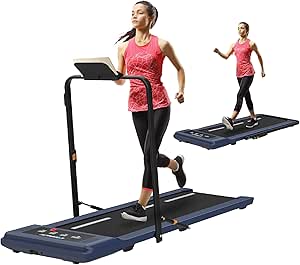
Exerpeutic has been in the fitness equipment space for decades, and the WorkFit reflects that institutional knowledge in its build consistency. It sits just below the UREVO and DeerRun tie in the rankings — the differentiator being slightly stronger published certifications and material quality relative to the budget walking pads that cluster beneath it. For users who want a recognizable brand with an established service infrastructure and a machine clearly designed for desk-use rather than general fitness, the WorkFit is a dependable mid-range choice.
Pros
- Established brand with service infrastructure
- Better safety systems than budget category peers
- Solid value and portability
Cons
- Ergonomic profile similar to lower-scoring budget units
- Bluetooth LCD less intuitive than app-first competitors
GoPlus SuperFit 2-in-1
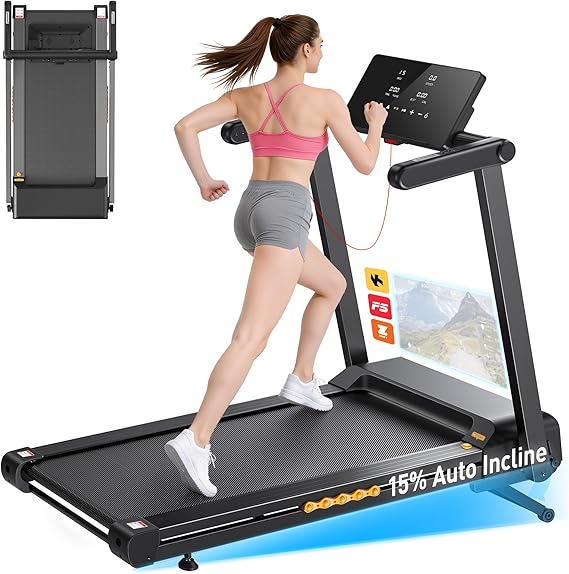
The GoPlus SuperFit scores the highest Layer III value numbers in the entire review, making it the most accessible entry point for budget-conscious buyers who want a 2-in-1 unit. The touchscreen console is more modern than many competitors at this price. The tradeoff is Layer I ergonomics — neutral posture support and walking stability under sustained desk-walking loads reflect the realities of maximum-value engineering. For light use — 30–60 minutes daily — this is a functional option. For sustained daily walking, the ergonomic gaps relative to the top tier become meaningful.
Pros
- Highest Layer III value scores in category
- Touchscreen console
- True 2-in-1 versatility
Cons
- App connectivity the weakest in the 6.6 tier
- Ergonomics at lower end of acceptable range
Egofit Walker Pro Series

The Egofit Walker Pro's defining characteristic is its compact footprint — specifically engineered to fit under a wider range of standard standing desks than competitors. Its Layer III ergonomic value ratio reflects this positioning accurately. Material and construction scores marginally better than the GoPlus, providing slightly more stable low-speed operation. The product is frequently noted for its adjustable side handrails, which provide additional stability for users who are new to desk treadmills or who find the transition to walking while working difficult initially.
Pros
- Compact — fits a wide range of desk configurations
- Adjustable handrails for stability support
- Strong value score
Cons
- Side rail safety at 5.5 — lowest Layer I subcomponent
- Deck cushioning modest
Sperax Walking Pad

The Sperax is the most interesting budget walking pad from an engineering standpoint. Its Layer I scores are the lowest of the three-way tie at position 8 — but its Layer III value scores are among the highest in the entire 21-product review. Sperax has positioned this product explicitly around vibration reduction, and the marketing claims warrant mention: while the Layer I walking stability score reflects real-world performance rather than advertised performance, it is still competitive within the budget tier. The Sperax makes the most sense for users who prioritize price above all else and intend light, intermittent desk-walking rather than sustained daily sessions.
Pros
- Best price-value score in tier
- Excellent portability
- Highest warranty confidence in budget group
Cons
- Layer I ergonomics at floor of acceptable range
- Vibration management below marketing claims
Redliro Under Desk Treadmill

The Redliro's DEAS profile is consistent with the entry-level category: strong Layer III value anchoring a profile where Layer I ergonomic dimensions hover at the lower end of the minimum-standard range. The remote control is a useful convenience feature that several competing products in this tier lack. For users who primarily want the habit of walking for 30–60 minutes per day and have no interest in extended sessions, the Redliro delivers adequate function at a low cost.
Pros
- Remote control included
- Excellent price-value ratio
Cons
- Layer I scores at minimum acceptable level
- Not suitable for sustained daily use
Yagud Walking Pad

The Yagud leads the bottom value tier with the second-highest price-vs-benchmark score of any product reviewed. The published certification score and safety systems score reflect the genuine engineering tradeoffs at the deep-budget level — no independent certification and a safety auto-stop at the minimum acceptable threshold. The Yagud is clinically appropriate only for users who are testing whether a desk treadmill habit will stick before committing to a higher-tier investment. It meets the minimum standard, but sustained use at this tier carries greater long-term risk of mechanical degradation and ergonomic compromise.
Pros
- Among the lowest price points in the category
- Excellent portability
Cons
- Safety systems at 5.0 — lowest acceptable threshold
- Not suitable for users with musculoskeletal conditions
Abonow Walking Pad

The Abonow matches the Yagud's 6.4 composite with a slightly different Layer I profile — scoring a 7.5 on warranty/durability compared to the Yagud's 7.5, but a marginally lower 5.5 motor performance and 5.0 safety systems. Both products are functionally equivalent for the same use case: light-duty, under-$300 walking pad for casual or trial-phase desk walking. Neither is appropriate for users with active low back, hip, or foot conditions.
Pros
- Very low cost of entry
- Compact for small desks
Cons
- Safety systems at minimum threshold
- Motor performance below desk-use standard
Sunny Health & Fitness Under Desk Slim

The Sunny Health & Fitness Slim is the lowest-scoring product in this review — the only unit where Layer II performance falls meaningfully below the group average. App connectivity is the weakest across all 15 reviewed products, and the published certification score reflects a complete absence of third-party validation. Sunny Health has a strong reputation in the broader fitness equipment category, but this particular model reflects the limits of cost engineering in the walking pad segment. For users who want the Sunny Health brand and a recognizable retailer ecosystem, the product is serviceable for very light use — 30 minutes or less daily — but should not be considered a desk-walking solution for sustained habit formation.
Pros
- Ultra-slim profile — lowest step-up in category
- Recognizable brand with accessible service
- Strong portability
Cons
- Weakest app/connectivity score in review
- Not suitable for extended daily use
Buying Guide: What Actually Matters
What Matters Clinically
Belt width is the single most impactful feature for ergonomic comfort during extended desk walking. A 16–18 inch belt forces a constrained gait that creates cumulative hip and lumbar loading over sessions longer than 45 minutes. A 20-inch belt is the practical minimum for most users; the InMovement UnSit's 30-inch belt represents a qualitatively different experience. Motor tuning for low-speed sustained operation determines whether the treadmill is usable in a shared or call-heavy office environment — noise and vibration are the most common reasons people stop using their desk treadmill within 30 days of purchase. Step-up height affects how much of your standing desk's height range the treadmill consumes; anything above 6 inches starts to create ergonomic tradeoffs for shorter users.
What's Overstated
Maximum speed is largely irrelevant for desk treadmills. Above 2.0 mph, most people cannot comfortably type or work — the cognitive load of walking fast enough to elevate your heart rate meaningfully competes directly with focused work. Products advertising 7–10 mph maximum speeds are marketing to people who also want the machine for fitness sessions, but the engineering tradeoffs required to support high speeds often compromise the low-speed torque characteristics that matter for desk use. Similarly, touchscreen consoles add cost without improving the core desk-walking experience; simple dial or button controls are faster and less distracting to operate during work.
Common Conditions and Desk Treadmill Use
Low Back Pain
Prolonged sitting compresses lumbar discs and shortens hip flexors, both of which are relieved by low-speed walking. However, narrow belt widths that force a constrained stance can aggravate lumbar instability.
Best fix: LifeSpan TR1200 (wide belt + cushioned deck) or InMovement UnSit (30" belt for natural gait).
Plantar Fasciitis
Desk shoes provide minimal cushioning; extended walking on hard deck surfaces can aggravate plantar fascia. Deck compliance and vibration management directly affect cumulative plantar loading.
Best fix: LifeSpan TR1200 (6-point deck cushioning), avoid budget walking pads with rigid decks for active flares.
Neck / Shoulder Pain
Monitor height must be recalibrated when standing on a treadmill — the 4–6 inch step-up elevates eye level and can induce cervical extension if monitor arms aren't adjusted. Vibration from the belt can amplify forearm fatigue during typing.
Best fix: Any treadmill with a low step-up height paired with a monitor arm that accommodates the added height range.
Setup Guide: Ergonomic Positioning
- 1 Position the treadmill before desk placement. Slide the treadmill under the desk first, then adjust the desk height — not the reverse. Confirm the treadmill deck clears desk crossbars and electrical components.
- 2 Set desk height to walking position, not standing position. Your elbow angle at 90°–100° is the target. At 1.0–1.5 mph walking speed, most users' elbow angle increases slightly compared to standing — account for this when setting initial height.
- 3 Recalibrate monitor height. The treadmill's step-up adds 4–6 inches to your eye level. Your monitor should be set so the top of the screen is at or slightly below eye level when walking. Use a monitor arm with sufficient height range.
- 4 Start at 0.8 mph for the first two weeks. The adaptation period is real. Walking at desk-work speeds uses stabilizer muscles that are not conditioned to sustained activity. Starting too fast increases fatigue and reduces time-on-treadmill.
- 5 Avoid heel-striking. Treadmill walking naturally encourages a mid-foot strike. If you notice soreness in your Achilles or plantar fascia, check your foot contact pattern — heel-striking on a treadmill at slow speeds is a common cause of early fatigue and discomfort.
- 6 Use the treadmill for call-heavy, reading, and low-complexity tasks first. Reserve focused writing or complex spreadsheet work for sitting until your treadmill walking is habituated to the point of being largely unconscious — typically 2–4 weeks of daily use.
Frequently Asked Questions
How many products were included in this review?
21 desk treadmills were evaluated in total. The top 15 by DEAS composite score are reviewed in full above. The 6 products that did not make the main list are referenced below in the FAQ with their scores and links.
What speed should I use for desk work?
Most people find their optimal desk-walking speed is between 0.8 and 1.5 mph. At these speeds, your gait is close enough to your natural slow walk that upper-body stability isn't significantly disrupted. Research consistently shows that typing accuracy drops meaningfully above 2.0 mph. Start at 0.8 mph and increase incrementally over 2–3 weeks.
Do I need a special standing desk to use a desk treadmill?
You need a height-adjustable standing desk with enough clearance for the treadmill footprint. Most under-desk treadmills require 40–50 inches of width between desk legs. The InMovement UnSit specifically requires 40+ inches due to its 30-inch belt width. Crucially, your desk needs to reach at least 6 inches higher than its standard standing position to account for the treadmill's step-up height — this is the most common compatibility issue encountered in clinical assessments.
Is a desk treadmill safe if I have a history of lower back pain?
For most people with chronic low back pain, low-speed treadmill walking is clinically beneficial — it reduces disc compression loading that sitting creates and activates the posterior chain muscles that stabilize the lumbar spine. The key exception is acute flare-ups: walking on a treadmill during an acute herniation or significant muscle spasm episode is contraindicated. If you have an active diagnosis, consult with your occupational health or ergonomics provider before using any desk treadmill for extended sessions.
What other products were reviewed but didn't make the main guide?
Six products scored below 6.3 and were not included in the main reviews. All scored below the "Meets Minimum Clinical Standard" threshold for at least two DEAS dimensions: MaxKare Under Desk Treadmill (DEAS 6.2), Foldi Compact Walking Pad (DEAS 6.1), Gotrax WalkingPad (DEAS 6.0), Joroto Under Desk Treadmill (DEAS 5.9), Ancheer Walking Pad (DEAS 5.7), and Umay Foldable Walking Pad (DEAS 5.5). None of these are recommended for desk use.
How is the DEAS composite calculated for desk treadmills?
The DEAS (Desk Ergonomics Assessment Score) weights three layers: Layer I ergonomic design dimensions (I.1–I.5) at 50%, Layer II clinical performance dimensions (II.1–II.4) at 30%, and Layer III value and practicality dimensions (III.1–III.2) at 20%. The composite reflects a weighted average of all 11 dimensions. Scores are set before any affiliate relationships are confirmed and are not adjusted post-publication.
Affiliate Disclosure: DeskDoctor participates in affiliate programs. When you purchase through links in this guide, we may earn a commission at no additional cost to you. Affiliate relationships do not influence product scores or recommendations — all DEAS scores are finalized before affiliate links are assigned.
Clinical Disclaimer: The information in this guide is for educational and informational purposes only and does not constitute medical advice. Individuals with existing musculoskeletal conditions, cardiovascular concerns, or other health conditions should consult a licensed healthcare provider before beginning any active workstation program. DeskDoctor and Loma Linda University Health are not responsible for injury or adverse outcomes arising from the use of any product reviewed in this guide.
0 Comments