

The Real Reasons Your Back Hurts at Your Desk — And What Actually Fixes Each One
Back pain from desk work is one of the most common complaints I hear — and almost always, people are fixing the wrong thing. They buy a lumbar pillow when they really need a footrest. They try a posture corrector when the actual problem is that they’ve been sitting for six hours without a break. The frustration is real, and it’s made worse by advice that treats back pain like a single problem with a single fix.
For this guide, I reviewed twelve products across six categories — chairs, standing desks, keyboard trays, desktop converters, footrests, and posture correctors — evaluating each one for how well it targets the underlying biomechanical cause it’s supposed to address. I looked at adjustability, build quality, real-world reliability data, and whether the clinical performance matched the price tag.
The result is a cause-first breakdown: five distinct reasons desk workers develop back pain, and the best-scoring product for each. Whether you’re dealing with lumbar ache, mid-back fatigue, or that nagging pull across your lower back after long days, there’s a targeted fix here for you.
Top Picks at a Glance
All Products Ranked by DEAS Score
| # | Product | Category | DEAS | Best For |
|---|---|---|---|---|
| 1 | Steelcase Gesture | Chair | 8.6 | Cause #1 |
| 1 | Herman Miller Aeron | Chair | 8.6 | Cause #1 |
| 3 | FlexiSpot E7 Plus | Standing Desk | 8.4 | Cause #2 |
| 4 | Humanscale Keyboard Tray | Keyboard Tray | 8.0 | Cause #3 |
| 5 | Herman Miller Motia Desk | Standing Desk | 7.8 | Cause #2 |
| 6 | Uplift E7 Electric Converter | Converter | 7.6 | Cause #2 |
| 7 | Humanscale FR500 Foot Rocker | Footrest | 7.0 | Cause #4 |
| 7 | ErgoFoam Adjustable Foot Rest | Footrest | 7.0 | Cause #4 |
| 7 | VariDesk Pro Plus 36 | Converter | 7.0 | Cause #2 |
| 10 | DonJoy Posture Support | Posture Corrector | 6.8 | Cause #5 |
| 11 | VIVO Premium Keyboard Tray | Keyboard Tray | 6.5 | Cause #3 |
| 12 | Upright GO 2 | Posture Trainer | 6.4 | Cause #5 |
Why Trust This Guide
Every product is evaluated using the DeskDoctor Equipment Assessment Standard (DEAS v1.0), an 11-dimension rubric covering clinical performance, product quality, and market value. Scores are structured assessments traceable to ANSI/HFES and OSHA ergonomic standards — not editorial opinions.
This guide is informed by over a decade of clinical ergonomic practice at Loma Linda University Health. Product selections and cause-specific guidance reflect patterns observed across thousands of real desk worker assessments — not manufacturer claims or crowdsourced opinions.
Some links in this guide generate affiliate commissions. DEAS scores are calculated before any commercial consideration. A product that scored poorly doesn’t move up because a commission is available, and a product that scored well doesn’t move down because it isn’t.
The Scale of the Problem
What those numbers don’t capture is how preventable most desk-related back pain actually is. Each of the five causes below has a specific biomechanical mechanism — and a product category designed to address it. Getting the right fix for the right cause is what separates lasting relief from rotating through expensive gear that doesn’t solve the actual problem.
How We Score: The DEAS Methodology
Five dimensions covering neutral posture support, adjustability range, injury risk reduction, population accommodation, and category-specific function (e.g., lumbar system quality for chairs, height range for desks). This layer gets the most weight because it’s the only one that directly determines whether a product can protect the body during a full workday.
Four dimensions covering material and construction quality, published certifications (BIFMA, GREENGUARD, FDA), warranty length relative to category benchmarks, and verified user reliability via Amazon review data (minimum 50 reviews required). A product can have excellent clinical specs and fail here through poor build quality or absent third-party validation.
Two dimensions: price relative to category median, and ergonomic value ratio — how much clinical performance the product delivers per dollar spent. This layer prevents recommending products that are clinically excellent but financially inaccessible, and catches products that are cheap only because they’re clinically inadequate.
Sitting without slight recline and full spinal contact against an ergonomically sound chair creates persistent lumbar loading. When the pelvis loses posterior support and the lumbar spine loses its natural lordotic curve, the passive structures — discs, ligaments, facet joints — absorb what the muscles can no longer actively stabilize. Over a full workday, that’s thousands of hours of low-grade compressive load on the wrong anatomy.
Both chairs in this section scored 8.6 on DEAS — the top score in this guide — but they earn it through different mechanisms. The right pick depends on how you move.
Steelcase Gesture

The Gesture’s most clinically significant feature is also its least discussed: the 360° arm movement. In my assessments at LLUH, upper-extremity position is one of the most underappreciated drivers of thoracic and cervical loading — arms that can’t follow the sitter into side-reach or device-switch positions create compensatory trunk lean that accumulates over hours. The Gesture’s LiveBack technology, which flexes to follow the spine’s natural movement, is the mechanical answer to a problem most chairs ignore entirely.
On lumbar support, the Gesture uses an adjustable-height system rather than independent depth control — which puts it fractionally behind chairs with both height and depth adjustment. In practice, this rarely matters for most of the population, but tall sitters with pronounced lordosis occasionally need more depth control than the Gesture provides. The seat depth adjustment range (16–21 inches) is best-in-class and covers the 5th through 95th percentile — a spec many nominally “ergonomic” chairs don’t even publish.
At its price point, the Gesture is competing with the Herman Miller Aeron for the clinical top spot. Where the Aeron wins on lumbar precision and long-term user reliability data, the Gesture wins on arm adaptability and dynamic movement. For a sitter who switches between keyboard work, tablet use, and phone interaction throughout the day — the profile I see most often at LLUH — the Gesture’s 360° arm system is the single most clinically useful feature in this guide.
- 360° arm movement follows posture across all task types
- LiveBack dynamic lumbar flexion matches the spine in real time
- Best-in-class seat depth range covering 5th–95th percentile
- 12-year warranty — 2.4× the category benchmark
- BIFMA + GREENGUARD Gold certified
- Price well above category median — Layer III reflects this
- No independent lumbar depth control (height adjustment only)
- Heavy chair — not ideal for frequent relocation
Herman Miller Aeron

The Aeron’s PostureFit SL is the most clinically precise lumbar system in this guide. Virtually every other chair at this price point uses a single-point lumbar pad. The PostureFit SL independently adjusts the sacral pad (lower, targeting L5–S1) and the lumbar pad (upper, targeting L3–L4). That two-point contact preserves the natural S-curve of the entire lumbar spine, not just the most prominent segment. It’s a meaningful anatomical distinction, not a marketing differentiator. No other chair in this guide does both independently.
The 8Z Pellicle mesh suspension is the second clinical standout. Unlike foam seats that degrade and lose pressure distribution over time, the Aeron’s mesh maintains consistent contact and airflow across its full rated lifespan. In clinical terms: the Aeron at year seven performs essentially identically to the Aeron at year one. For organizations running 24/7 operations — the hospital context I work in at LLUH — that durability profile changes the cost-per-assessment-year calculation significantly.
Where the Aeron falls behind the Gesture is arm adaptability. The Aeron’s arms move in four planes (height, width, depth, pivot), which is excellent, but they’re not designed for the 360° task-switching the Gesture enables. For a stationary knowledge worker — someone who sits at one monitor doing one primary task — the Aeron is arguably the better clinical choice. The PostureFit SL’s spine-contact precision is hard to replicate through any amount of dynamic movement compensation.
- PostureFit SL independently adjusts sacral and lumbar contact — unique in this guide
- 8Z Pellicle mesh maintains pressure distribution over the full warranty life
- Three sizes cover the broadest anthropometric range of any chair reviewed
- Highest II.1 (Material & Construction) score in the guide: 9.6
- Perfect 10/10 warranty coverage score
- Arms don’t match the 360° adaptability of the Gesture
- Price at the top of the category — Layer III reflects this
- Size selection is critical — wrong size eliminates most lumbar benefit
Even perfect seated posture causes cumulative hip flexor shortening and disc compression over hours. The hip flexors — particularly the iliopsoas — run from the lumbar vertebrae to the femur, and sustained shortening in seated flexion creates anterior pelvic tilt when the sitter stands. That tilt compresses the posterior lumbar spine and is the primary mechanism behind the “I sit all day and my back hurts when I stand” complaint. The fix isn’t better posture. It’s interrupting sitting volume with standing time.
FlexiSpot E7 Plus

The clinical case for the E7 Plus starts with its four-leg frame — a design choice that solves the wobble problem that limits most two-leg desks at full extension. At standing height, a two-leg desk with a loaded surface develops lateral sway that makes sustained standing work uncomfortable and discourages use. The E7 Plus eliminates this: four legs distribute the load and maintain rigidity from the 22.8-inch minimum to the 48.4-inch maximum height. That range covers the 5th through 95th percentile of both seated and standing working heights — a spec that earns a 9.2 on I.5.
The real story is in the Layer III value scores: at its price point, the E7 Plus delivers clinical performance that typically costs 50–75% more. The four-leg stability, the height range, and the motor quality represent exceptional ergonomic value for a standing desk buyer. The 15-year frame warranty — three times the category benchmark — adds long-term cost confidence that the Motia can’t match at individual purchase price.
- Four-leg frame eliminates wobble at standing height under full load
- 22.8–48.4” height range covers 5th–95th percentile
- 15-year frame warranty — 3× the category benchmark
- Best Layer III value scores among desks in this guide
- II.2 Certification (6.8) — fewer published ergonomic certs than Motia
- Assembly is more involved than two-leg alternatives
- Larger footprint may not suit smaller offices
Herman Miller Motia Sit-to-Stand Desk

The Motia is the most certification-dense product in this guide — BIFMA, GREENGUARD Gold, Cradle to Cradle, and SCS certification all on a single desk. That matters because certifications represent independent verification of claims the manufacturer can’t self-certify. Herman Miller has the most robust third-party testing infrastructure in commercial furniture, and the Motia is a direct beneficiary. Its 9.2 on II.1 (Material and Construction) is the highest of any desk in this guide.
The trade-off is straightforward: the Motia’s height range is narrower than the E7 Plus, and its II.4 score is N/A (direct-to-consumer distribution limits Amazon review data). For a corporate buyer specifying desks across a large installation — where certification chain, warranty terms, and brand service infrastructure matter as much as individual performance specs — the Motia is the stronger choice. For an individual buyer who wants the best clinical performance per dollar, the E7 Plus has the stronger case.
II.4 excluded from Layer II average — product sold primarily through direct/dealer channels with insufficient Amazon review data. Not a reliability concern.
- Most certifications of any desk reviewed (BIFMA, GREENGUARD, C2C, SCS)
- Highest II.1 construction quality score among desks reviewed (9.2)
- Herman Miller dealer and service network for enterprise/institutional buyers
- Significantly above category price benchmark — lowest Layer III of desks reviewed
- II.4 is N/A due to distribution model — no Amazon reliability data
- Height range narrower than FlexiSpot E7 Plus
For renters, shared offices, or anyone who can’t swap out their existing desk, a desktop converter delivers most of the clinical benefit of a full standing desk at a fraction of the installation complexity. The trade-offs are real — working surface area shrinks, monitor positioning is less flexible, and wobble characteristics are worse than a four-leg frame — but for interrupting cumulative seated disc load, a converter does the clinical job.
Uplift E7 Electric Standing Desk Converter

The E7’s electric lift mechanism is the distinguishing clinical feature. Most desktop converters use a pneumatic or spring mechanism that requires the user to lift the platform while pushing a lever — a 10–15 second transition that’s awkward enough that many users simply stop transitioning. The E7’s electric lift is a one-button transition. In behavior change research on sit-stand workstations, friction in the transition mechanism is one of the strongest predictors of disuse. The E7 removes that friction. Its perfect 10/10 on warranty coverage and BIFMA + GREENGUARD certification complete a quality story that earns its 7.6 composite.
II.4 excluded from Layer II average — direct-to-consumer brand with limited Amazon review footprint.
- Electric lift removes the behavioral friction that kills converter use rates
- BIFMA + GREENGUARD certified
- Perfect 10/10 warranty coverage
- Highest I.2 Adjustability score among converters (9.0)
- Priced above category median — Layer III reflects the premium
- Requires power outlet proximity on desktop
- Reduced working surface vs full standing desk
VariDesk Pro Plus 36

The VariDesk Pro Plus 36 is the most recognizable converter in this category, and its 7.0 DEAS score reflects a product that delivers on its core clinical job without reaching the performance ceiling of the Uplift. The spring-assisted lift mechanism requires no power, making it the correct choice where power routing is a constraint. BIFMA and GREENGUARD Gold certifications, combined with a 5-year warranty meeting the category benchmark, produce a solid Layer II score. The 36-inch working surface is the widest of the two converters reviewed, which matters for dual-monitor setups.
- No power required — spring-assist works anywhere
- 36” wide surface accommodates dual monitors
- BIFMA + GREENGUARD Gold certified
- Spring mechanism creates more transition friction than electric lift
- I.2 Adjustability (6.0) — fewer height stops than the Uplift E7
- Above-median price with lower Layer I performance than the E7
A properly installed keyboard tray positions the keyboard 1–4 inches below desk height, which brings the elbows to roughly 90° and lets the shoulders drop back to neutral. A negative-tilt option (keys slightly angled away from you) further reduces wrist extension and the associated forward-shoulder drift. This single hardware change removes the biomechanical driver of thoracic kyphosis without requiring a new desk.
Humanscale Keyboard Tray System — Best Keyboard Tray
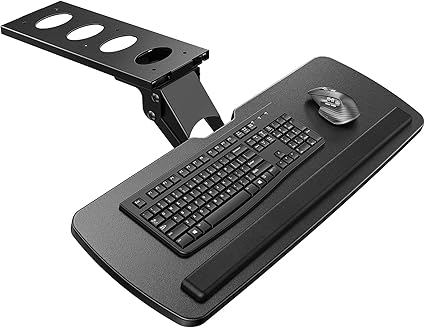
The Humanscale tray earns its 8.0 DEAS score — and the Best Keyboard Tray designation — on the strength of a negative-tilt mechanism that is genuinely spring-counterbalanced rather than friction-locked. Most trays in this category use a simple pivot with a tension knob; Humanscale uses a constant-force spring that holds any angle without the periodic re-tightening those friction systems demand. The result is a tray that stays where you set it through the workday. Layer I performance is strong across all five dimensions, with the highest marks in I.1 Neutral Posture Support (9.0) and I.3 Injury Risk Reduction (8.5). The gel wrist rest is integrated rather than added-on, which keeps the platform from creeping in use.
- Spring-counterbalanced negative tilt — holds angle without re-tightening
- Integrated gel wrist rest stays stable in use
- Best-in-class I.1 (9.0) and I.3 (8.5) Layer I scores in the category
- Requires desk thickness compatibility — verify before ordering
- II.4 N/A due to corporate channel distribution
- Higher price point than the VIVO alternative
VIVO Premium Keyboard Tray — Budget Pick
The VIVO tray scores 6.5 DEAS — the lower end of Meets Minimum Clinical Standard — but it earns that rating honestly. The friction-lock tilt mechanism works reliably when set, and the 26-inch platform covers the majority of keyboard-plus-mouse configurations. Where it gives up ground to the Humanscale is in the precision of that adjustment: you get a fixed set of tilt stops rather than a continuous counterbalanced range, and over time the friction knob requires attention. At roughly one-third the price of the Humanscale, the Layer III value score (8.0) is the strongest number on the DEAS card. If budget is the primary constraint and the posture correction goal is achievable at 6.5, this tray delivers it.
- Best Layer III value score in the keyboard tray category
- 26” platform covers most keyboard + mouse layouts
- Solid II.4 user reliability data (7.0) — large retail review base
- Friction-lock tilt requires periodic re-tightening vs. spring counterbalance
- Lower Layer I scores across the board vs. Humanscale
- 6.5 overall — clears the clinical bar, doesn’t exceed it
A footrest levels the playing field for anyone whose seat pan height — set to a proper desk-relative position — leaves a gap between feet and floor. The clinical requirement is simple: the platform must be height-adjustable enough to achieve parallel thighs, and stable enough that you don’t spend energy keeping your feet on it. Active footrests (rockers and wobble platforms) add a secondary benefit of low-level movement that reduces the static load on the lumbar spine through long sitting bouts.
Humanscale FR500 Foot Rocker — Best Footrest
The FR500 scores 7.0 DEAS and earns the Best Footrest designation by the narrowest margin in the review set — it ties the ErgoFoam at the same overall score. The tiebreaker is the rocker mechanism: the FR500’s continuous motion platform creates genuine low-level movement that activates the calf-muscle pump and reduces venous pooling in the lower legs. For users with circulatory concerns on top of back pain, this matters clinically. The foot surface is textured non-slip material across a wide platform, and the rocker radius is tuned to a natural forefoot-to-heel motion rather than the aggressive wobble of cheaper active boards.
- Rocker mechanism activates calf-muscle pump — clinical advantage for long sitting
- Best I.1 (8.0) and I.3 (7.5) scores in the footrest category
- Wide non-slip textured platform; natural rocker radius
- I.2 Adjustability (6.0) — fewer height positions than the ErgoFoam
- Higher price point; Layer III value score trails the ErgoFoam
- Rocker motion requires a brief adaptation period for some users
ErgoFoam Adjustable Foot Rest — Budget Pick
The ErgoFoam matches the FR500’s 7.0 DEAS score while hitting a significantly lower price point. The mechanism here is simple — a memory foam platform with a removable cover that lets you run the top surface flat (passive support) or flip it to expose a massaging nodule surface (gentle active stimulation). The I.2 Adjustability score (7.0) is the highest in the footrest category: the foam compresses to user weight, providing a continuously customized height that most rigid-platform footrests can’t match. The ErgoFoam is the correct pick when budget is a real constraint or when you prefer a static-style support without the rocking motion.
- Best I.2 Adjustability (7.0) in the footrest category — foam adapts to user weight
- Highest Layer III value score of the two footrests reviewed
- Dual surface (flat + nodule) adds passive stimulation option
- No active rocker motion — passive support only
- Foam compression means effective height changes over time with use
- Lower II.2 Certification score (6.0) vs. FR500
This cause requires two interventions working in parallel. The first is an active exercise program targeting glute activation, hip flexor lengthening, and thoracic extension — the three movement deficits most consistently linked to chronic desk back pain. The second is a posture corrector used not as a passive brace but as a tactile cue device: worn for 20–30 minutes at a time, it creates sensory feedback that trains the user toward the corrected position rather than substituting for muscular effort. Both products reviewed below are assessed within this dual-intervention framework.
DonJoy Posture Support — Best Posture Corrector
The DonJoy earns a 6.8 DEAS score — Meets Minimum Clinical Standard — and the Best Posture Corrector designation primarily on the strength of its Layer II scores. DJO Global is a medical device company with an established certification and quality pathway; the II.2 Published Certification score (8.0) and II.3 Warranty (7.5) reflect a manufacturing standard not present in the consumer-facing posture corrector market. The I.1 Neutral Posture Support score (7.0) is solid for the category: the figure-8 strap geometry reliably cues shoulder retraction without the anterior shoulder impingement risk of poorly designed pull-back designs. The clinical limitation is shared by all posture correctors — passive devices in this category do not build strength, and I.3 Injury Risk Reduction (6.0) reflects that ceiling.
- Medical-device manufacturer — best II.2 Certification (8.0) in the posture corrector category
- Figure-8 strap geometry cues retraction without anterior impingement risk
- Solid Layer II overall — construction and warranty above category average
- Passive device — I.3 Injury Risk Reduction (6.0) reflects the category ceiling
- Effective only when used as a cue, not as a brace — requires active engagement
- Layer III value score below the Upright GO 2 at similar price
Upright GO 2 — Budget Pick
The Upright GO 2 scores 6.4 DEAS and takes a fundamentally different approach to posture correction: rather than a strap that physically cues position, it is a sensor worn on the upper thoracic spine that vibrates when you round forward past a calibrated threshold. The feedback loop is active rather than passive, which means it requires compliance in a way a brace does not — but for users who engage with it, the biofeedback mechanism has clinical support for building postural awareness over time. The I.2 Adjustability score (7.5) is the highest in the category, reflecting that the calibration is user-specific via app rather than a fixed geometry. The primary DEAS limitation is II.3 Warranty (5.0) — the electronics warranty is below the category benchmark for a device at this price point.
- Best I.2 Adjustability (7.5) in the posture corrector category — user-calibrated via app
- Active biofeedback mechanism has clinical support for postural awareness training
- Strong II.4 user reliability data (7.0) — large consumer review base
- II.3 Warranty (5.0) — below category benchmark for an electronic device
- Requires app engagement and user compliance to deliver clinical benefit
- Vibration feedback can become habituated over time, reducing effectiveness
How to Choose: Matching the Fix to Your Pain Pattern
The five causes in this article are not mutually exclusive. Most desk workers with chronic back pain have two or three active simultaneously. The buying guide below is organized by symptom pattern rather than product category — use it to identify which causes are most likely driving your pain before deciding where to spend.
If Your Pain Builds Through the Day and Eases When You Stand
This pattern almost always implicates Cause #1 (poor chair contact) and Cause #2 (seated volume). The pain builds under compressive load and releases when you unload the spine. Start with chair assessment: is your lumbar support actually contacting the curve? Is the seat pan leaving a fist-width gap at the back of your knees? These adjustments cost nothing. If the chair is correctly set and pain persists, a sit-stand desk or converter is the next intervention — breaking up seated time is more effective than any single seated-posture correction for this pattern.
If Your Pain Is Mid-Back and Accompanies Shoulder Tension
Mid-back pain paired with upper trapezius tightness is the signature of Cause #3: forward-shoulder reach to a keyboard at desk height. The pain is thoracic rather than lumbar, and it often co-presents with headaches from upper cervical tension. A keyboard tray is the primary intervention. Monitor height may also need to drop — if you’re reaching forward and looking up simultaneously, you have two posture compromises layered on each other.
If Your Pain Is Worst in the Lower Back and Radiates Into One Hip or Thigh
Unilateral radiating pain from the lower back into a hip or thigh during sitting is a sciatic compression pattern. The most common desk-work driver is Cause #4: the seat edge cutting into the underside of the thigh when feet aren’t adequately supported. A footrest that achieves parallel thighs removes this compression. If symptoms persist after footrest addition, chair height and seat pan depth need reassessment — the seat pan may be too long for your leg length.
If Your Pain Appears After Changing Positions and Includes Morning Stiffness
Morning stiffness that improves with movement, combined with pain that is worst when transitioning from seated to standing, points strongly to Cause #5: deconditioning. No hardware intervention addresses this cause in isolation. A posture corrector used as a biofeedback cue can accelerate awareness, but the primary intervention is movement: glute activation, hip flexor lengthening, and thoracic extension exercises performed daily. The research on this is clear — passive hardware for an active-deconditioning problem produces limited results.
Buying in Sequence, Not All at Once
The most common mistake in ergonomic purchasing is buying everything at once and then being unable to determine what worked. If you have a multi-cause presentation, prioritize by DEAS category score and address causes in order. Chair correction is always first — you sit in it for every cause. Desk or converter second if seated volume is high. Keyboard tray third if mid-back symptoms are present. Footrest fourth if thigh compression is contributing. Posture corrector last, as an adjunct to exercise rather than a primary intervention.
Back Pain at Your Desk: What the Location Tells You
Lower back pain during desk work is most commonly driven by loss of lumbar lordosis — the natural inward curve of the lower spine flattens under posterior pelvic tilt from poor seat contact or unsupported feet. The L4–L5 and L5–S1 disc levels carry disproportionate load in this position. Primary causes: #1 (chair), #4 (footrest). Secondary cause: #2 (seated volume).
First check: Sit against the seatback and verify lumbar support is contacting the small of your back. Feet flat on the floor or a footrest, thighs parallel. If lumbar contact is correct and pain persists, add sit-stand variation.
Thoracic pain in desk workers is almost exclusively postural — it does not arise from disc pathology at the same rate as lumbar pain because thoracic discs are stabilized by the rib cage. The driver is sustained forward-flexion load from reaching to a keyboard or leaning toward a monitor. Primary cause: #3 (keyboard tray). Co-contributor: #5 (postural muscle deactivation).
First check: Can you sit upright without your shoulders rounding forward? If forward reach to your keyboard forces shoulder rounding, a keyboard tray is the intervention before any exercise program.
Pain that is absent in the morning and builds through the work session is a load-accumulation pattern. Spinal discs are hydrated in the morning and progressively lose fluid volume under compressive load through the day — this is why many desk workers feel fine at 9am and symptomatic by 2pm. Primary cause: #2 (seated volume). Any intervention that reduces cumulative seated time will reduce this pattern, independent of posture quality.
First check: Are you sitting for more than 60 consecutive minutes without a postural change? Standing desks and converters are the most effective hardware intervention for this pattern.
The 7-Step Desk Setup Protocol for Back Pain
This protocol is adapted from the workstation assessment sequence used at LLUH Environmental Health and Safety. Complete the steps in order — each step assumes the previous one is correct.
- Chair Height. Sit with feet flat on the floor (or footrest). Thighs should be parallel to the floor or angled slightly downward. The seat edge should not compress the underside of the thighs — a fist-width gap at the back of the knees is the target.
- Lumbar Support Contact. Sit back fully against the seatback. The lumbar support should contact the natural inward curve of your lower back without pushing the pelvis forward or causing you to arch. Adjust height and depth if the chair supports it.
- Monitor Height. The top of the monitor should be at or slightly below eye level, approximately arm’s length away. If you wear bifocals, lower the monitor slightly — bifocal wearers tend to tilt the head back to use the reading portion, which increases cervical load.
- Keyboard and Mouse Position. Elbows at approximately 90°, wrists straight (not extended), keyboard at or slightly below elbow height. If your desk height forces your elbows above 90° to reach the keyboard, a keyboard tray is indicated.
- Footrest (if needed). If your feet don’t reach the floor at the correct chair height, add a footrest. Adjust height until thighs are parallel. Do not compromise chair height to get feet on the floor — this will raise the elbow angle and shift the problem upstream.
- Sit-Stand Ratio. If you have a height-adjustable desk or converter, target a 2:1 seated-to-standing ratio as a starting point — roughly 50 minutes seated, 25 minutes standing per cycle. Adjust based on how your body responds. Standing all day is not the goal; movement variety is.
- Movement Breaks. Set a timer for 45–60 minutes. At each break, stand, walk briefly, and perform three exercises: a standing hip flexor stretch (30 seconds per side), a thoracic extension over the seatback (10 reps), and a glute squeeze standing (10 reps). These three movements directly address the deactivation pattern of Cause #5.
If you complete this protocol and still have back pain after two weeks, the issue may be beyond workstation ergonomics. Structural pathology (disc herniation, facet degeneration, SI joint dysfunction) requires clinical evaluation. A workstation assessment cannot substitute for a physical examination.
Frequently Asked Questions
Related Guides
Clinical Disclaimer: The information in this article is provided for educational purposes by a Certified HEAS (Healthcare Ergonomic Assessment Specialist) and does not constitute medical advice. If you are experiencing back pain, numbness, tingling, weakness, or other symptoms, consult a qualified healthcare provider before making workstation changes. Ergonomic equipment cannot diagnose, treat, or cure any medical condition.
0 comments