Desk painWhy Do My Hands Go Numb While Typing?
Which fingers go numb tells you which nerve is under pressure, and that tells you what to change.

By AJ Prince, HEAS
Healthcare Ergonomic Assessment Specialist. Updated 27 Apr 2026. A 13-minute read.
Desk Doctor earns a commission on some links, at no cost to you. It never changes a score. How we make money
Your hand fell asleep halfway through an email. You didn't. That buzz in your fingertips, or the 3 a.m. wake-up where you shake your hand out like you're trying to get ketchup out of the bottle, isn't fatigue and it isn't stress. It's a nerve that's running short on room, and it's worth sorting out before it settles in.
It's one of the most common complaints I hear in assessments: tingling that starts in the fingers, numbness that wakes people at night, a hand that feels half asleep by noon. Most people have been told to stretch more. A few have been told to take ibuprofen. Almost nobody has been told which nerve is involved, and that's the useful part, because which fingers go numb points to where the pressure is.
Below are the five patterns I see most, what the research says about each, and the fix for each one. I've scored 232 products across keyboards, mice, braces, hand-strength tools, and ice and heat; the picks here are the ones that earned it.
Cause 1 of 5
Your wrist bends back while you type
This is far and away the most common pattern I see. The keyboard sits flat on the desk, or tipped up on its little feet, and your wrists rest on the front edge while you type, so your hands bend up at the wrist to reach the keys. Hold that for four or five hours and the median nerve, which runs through a narrow channel in the wrist called the carpal tunnel, gets squeezed. You feel it in the thumb, index finger, middle finger and part of the ring finger. Waking at night needing to shake your hand out is a classic sign.1
What the research says
Pressure inside the carpal tunnel climbs as the wrist bends. In healthy volunteers, about 33 degrees of extension was enough to push it over 30 mmHg, a common risk threshold, in a quarter of them.2 Computer work is on the 2016 AAOS guideline's list of factors with moderate evidence of raising the risk of carpal tunnel syndrome.3 OSHA's advice is wrists straight and in line with your forearms, no keyboard feet if they bend the wrists up, and an alternative keyboard if it helps you hold that position.4
33°of wrist extension pushed carpal tunnel pressure over a common risk threshold in a quarter of healthy people.2 One honest caveat: trials haven't shown that an ergonomic keyboard treats carpal tunnel syndrome on its own.5 It changes the position your wrist works in, so it works alongside the other fixes here, not instead of them.
The fix
Straighten the wrist before you buy anything: fold the keyboard's feet away, keep your wrists off the desk edge while you type, and set your chair so your elbows are level with the keys. If the numbness keeps coming back, change the keyboard. A split, tented design straightens the wrist and takes the twist out of your forearm without you having to think about it.

The keyboard I reach for first
Kinesis mWave
DEAS 7.7 out of 10
One piece, with the split and a gentle tent built in. Compact, no number pad.
It shows up in more of my follow-up notes than any other keyboard. The split and the tent are built into one piece, so there's nothing to set up, and magnetic legs raise the front for a 5° negative tilt that keeps the wrist from bending back. It's the easiest step up from a flat keyboard.
Good: the built-in split and tent straighten the wrist with no setup; a 5° negative tilt; a padded palm rest for pauses. Less good: the split is fixed, so it can't widen for broad shoulders; no number pad; too new for a long reliability record; no independent ergonomic certification.
Score breakdown
Clinical performance7.8
I.1Neutral posture support8.5
I.2Adjustability range7.5
I.3Injury risk reduction8.0
I.4Population accommodation6.5
I.5Wrist neutral and key actuation8.5
Product quality4.7
II.1Material & construction7.0
II.2Published certification2.0
II.3Warranty vs benchmark5.0
Market value6.0
III.1Price vs category benchmark6.0
III.2Ergonomic value ratio6.0
Composite 7.7 on the DEAS (Desk Ergonomics Assessment Score). How we score

If you want a fully split board
Cloud Nine C989M
DEAS 7.7 out of 10
Two halves that separate up to 6 inches. Full size, with a number pad.
If you're broad through the shoulders, or you want each hand in its own lane, a true split is the next step. The halves pull up to 6 inches apart, a 7° tent is built into the palm supports, and you keep a full number pad and programmable macro keys.
Good: halves that separate for shoulder-width typing; a built-in 7° tent; a full number pad and macro keys. Less good: full size means a wider spread, so your mouse sits further out; a big desk footprint; no independent ergonomic certification.
Score breakdown
Clinical performance7.8
I.1Neutral posture support8.5
I.2Adjustability range7.5
I.3Injury risk reduction8.0
I.4Population accommodation6.5
I.5Wrist neutral and key actuation8.5
Product quality4.7
II.1Material & construction7.0
II.2Published certification2.0
II.3Warranty vs benchmark5.0
Market value6.0
III.1Price vs category benchmark6.0
III.2Ergonomic value ratio6.0
Composite 7.7 on the DEAS (Desk Ergonomics Assessment Score). How we score
Cause 2 of 5
Ring finger and pinky? That's a different nerve
If the numbness is in your ring finger and pinky rather than your thumb and index finger, you're dealing with the ulnar nerve.6 It runs down the inside of your arm, behind the bony bump at your elbow (the funny bone), and into the pinky side of your hand. Desk workers squeeze it in two places.
The common one is the elbow, called cubital tunnel syndrome. Leaning on your elbow presses on the nerve, and keeping the elbow bent for long periods brings symptoms on, so they show up with the arm folded: holding a phone to your ear, driving with your arm on the window, sleeping with your elbows bent.6 OrthoInfo's advice for computer users is not to rest your elbow on the armrest.6 If you use armrests, let them carry your forearms, not your elbows.
The less common spot is the wrist. The nerve crosses into the hand through a small channel at the heel of the palm on the pinky side, called Guyon's canal, and constant pressure there, like the heel of your hand pressing the desk while you mouse, can irritate it.
The fix
At the elbow: keep it open, at about 90 degrees or a little more, and stop leaning on it, on the desk or the armrest. Use a headset instead of cradling the phone. At the wrist: a vertical mouse turns your palm to face sideways, which takes most of the pressure off the heel of your hand, and it takes the twist out of your forearm as a bonus.

The most adjustable vertical mouse
Contour Unimouse
DEAS 8.0 out of 10
Right- and left-handed versions.
Its hinge sets the angle anywhere from 35° to 70°, so you can start gentle and raise it as your forearm adapts, instead of committing to one position on day one. With your palm turned to the side, you're no longer steering with the heel of your hand pressed into the desk.
Good: the adjustable angle lets your forearm adapt over time; the movable thumb support fits an unusually wide range of hands; one of the highest clinical scores of any mouse we've rated. Less good: a premium price for the adjustability; more setup than a plug-and-go mouse; no independent ergonomic certification.
Score breakdown
Clinical performance8.4
I.1Neutral posture support9.0
I.2Adjustability range8.5
I.3Injury risk reduction9.0
I.4Population accommodation6.5
I.5Wrist neutral and grip position9.0
Product quality5.1
II.1Material & construction7.0
II.2Published certification2.5
II.3Warranty vs benchmark5.0
II.4Verified user reliability6.0
Market value6.8
III.1Price vs category benchmark6.5
III.2Ergonomic value ratio7.0
Composite 8.0 on the DEAS (Desk Ergonomics Assessment Score). How we score
The one you can set up today
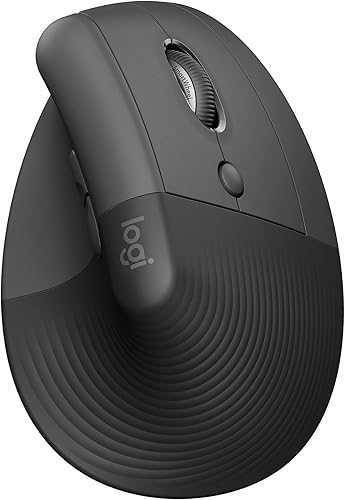
Logitech Lift
DEAS 7.7 out of 10
Right- and left-handed versions. Best for small to medium hands.
When someone needs a vertical mouse the same day, this is the one I point to. It's easy to find, takes almost no adjustment, and comes in a true left-handed version. It also has the strongest long-term reliability record of any vertical mouse I've scored.
Good: easy to find and quick to set up; a true left-handed version; the best verified reliability of any vertical mouse here; a strong price for its clinical scores. Less good: a fixed angle you can't adjust; too small for large hands; no independent ergonomic certification.
Score breakdown
Clinical performance7.4
I.1Neutral posture support8.5
I.2Adjustability range6.5
I.3Injury risk reduction8.0
I.4Population accommodation5.5
I.5Wrist neutral and grip position8.5
Product quality5.8
II.1Material & construction6.5
II.2Published certification3.0
II.3Warranty vs benchmark5.0
II.4Verified user reliability8.5
Market value8.0
III.1Price vs category benchmark8.0
III.2Ergonomic value ratio8.0
Composite 7.7 on the DEAS (Desk Ergonomics Assessment Score). How we score
Cause 3 of 5
You sleep with your wrists curled
This one surprises people. They've changed the keyboard and fixed the chair, and the numbness still wakes them at 3 a.m. The reason is usually the sleep position: wrists curled under the pillow, arms folded, hands tucked in against the body. Those positions put pressure back on the same nerves you spent the day protecting, for hours at a stretch.
What the research says
Night splinting is one of the best-supported fixes there is. The AAOS guideline rates the evidence as strong that a brace or splint improves carpal tunnel symptoms,3 and the angle matters: in a trial comparing splints, a wrist held straight gave better relief than one tipped back 20 degrees.7
Strongis how the AAOS guideline rates the evidence that a splint improves carpal tunnel symptoms.3 2 weeksof night splinting gave most of the relief in one trial; it rarely improved further by two months.7 The fix
Wear a splint that holds your wrist straight, at night, not while you type. Check the angle before you trust it: your hand should line up with your forearm, not tip back. If the numbness is in your ring finger and pinky, it's the elbow that needs to stay straight at night; OrthoInfo suggests wrapping a towel around your straightened elbow.6

The night splint I recommend most
FEATOL Wrist Brace
DEAS 6.8 out of 10
Removable aluminum palm stay. Separate right- and left-hand versions.
It holds the wrist close to straight instead of letting it drift back, which is the whole job of a night splint. A removable aluminum stay runs along the palm, two plastic splints brace the sides, and three straps let you snug it to fit.
Good: a firm palm stay that stops the wrist curling overnight; three adjustable straps; a low price backed by a large, reliable review base. Less good: for night use, not for typing; warmer to sleep in than a soft sleeve; no ergonomic certification beyond basic safety.
Score breakdown
Clinical performance6.2
I.1Neutral posture support6.5
I.2Adjustability range5.5
I.3Injury risk reduction6.5
I.4Population accommodation6.0
I.5Joint support without overcorrection6.5
Product quality6.2
II.1Material & construction6.0
II.2Published certification5.0
II.3Warranty vs benchmark5.5
II.4Verified user reliability8.5
Market value8.8
III.1Price vs category benchmark9.0
III.2Ergonomic value ratio8.5
Composite 6.8 on the DEAS (Desk Ergonomics Assessment Score). How we score
If you need something tonight, the  Futuro Night Wrist Support (DEAS 6.6) is the one you can usually find on a pharmacy shelf: one size, fits either hand, with cushioning in the palm to help hold the hand in a neutral position.
Cause 4 of 5
Something is crowding the tunnel
The carpal tunnel doesn't stretch. It's bone on three sides with a tough ligament across the top, so anything that takes up room inside presses on the nerve. Irritated tendons can thicken or swell and narrow the space.1 So can fluid retention in pregnancy or menopause, and conditions like rheumatoid arthritis, diabetes and thyroid problems.1 You feel it as burning, numbness, or a hand that feels thick and clumsy even though it looks fine.
The fixes from the first three causes, a straight wrist, regular breaks and a night splint, are still the foundation here. Heat can take the edge off on top of them: in a short trial, a continuous low-level heat wrap eased pain and stiffness in people with carpal tunnel syndrome more than a placebo pill did over a few days.8 That's symptom relief, not a fix for what's crowding the tunnel.
The fix
Keep the pressure down with the basics and use heat for the end-of-day ache. If you're pregnant, or you have diabetes, a thyroid condition or rheumatoid arthritis, mention the numbness to your doctor, because those conditions are part of the picture.1
For the end-of-day ache
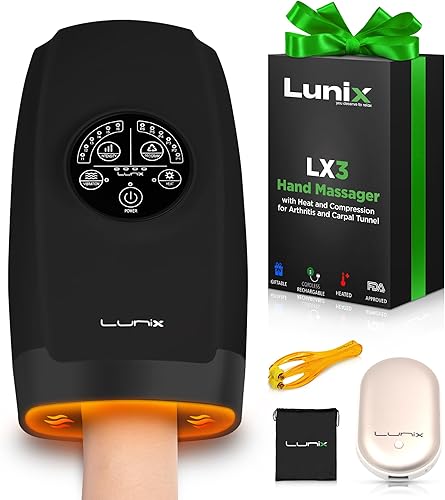
Lunix LX3
DEAS 7.3 out of 10
Heat up to 107°F with air compression. Cordless and rechargeable.
It wraps your hand and wrist in gentle heat while air chambers squeeze and release, which is the closest thing to a hand massage you can run at your desk. Use it for comfort at the end of a long day: it eases the ache, but it doesn't take pressure off the nerve.
Good: heat and rhythmic compression together; several modes and intensity levels; cordless, so it works at the desk or on the couch; strong build quality and safety certification. Less good: priced above the category benchmark; comfort, not treatment; no cold setting.
Score breakdown
Clinical performance7.3
I.1Neutral posture support7.5
I.2Adjustability range7.5
I.3Injury risk reduction7.5
I.4Population accommodation7.0
I.5Therapeutic temperature delivery7.0
Product quality7.5
II.1Material & construction8.5
II.2Published certification8.0
II.3Warranty vs benchmark7.0
II.4Verified user reliability6.5
Market value5.8
III.1Price vs category benchmark5.5
III.2Ergonomic value ratio6.0
Composite 7.3 on the DEAS (Desk Ergonomics Assessment Score). How we score
If cold feels better on your wrist, the  TheraICE Wrist Ice Pack (DEAS 7.1) is a slip-on gel sleeve you can freeze or warm. There's less research behind cold for carpal tunnel symptoms, so let your hand decide.
Cause 5 of 5
Your hands and forearms are out of condition
This is the slowest cause to show up and the slowest to fix, but the change lasts. Typing and mousing are endurance work for small muscles: thousands of light repetitions a day, carried by the muscles of your hands and forearms. Most desk workers never train them, then ask them to work eight hours straight.
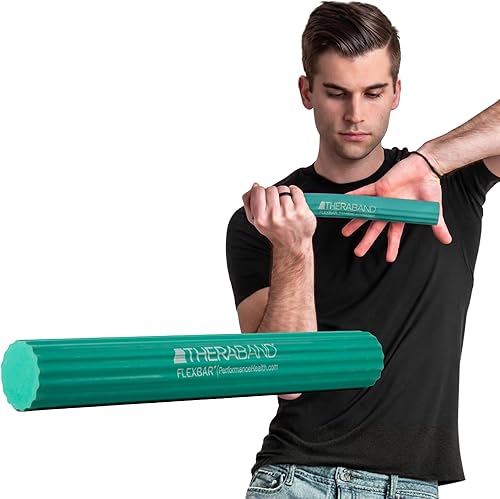
Strength work won't free a pinched nerve on its own, but it builds tolerance for the load. The AAOS guideline rates the evidence as moderate that physical activity and exercise go with a lower risk of developing carpal tunnel syndrome.3 For the forearm, the  FlexBar is the tool behind a known eccentric exercise for tennis elbow: in a small trial, adding it to standard care improved pain scores by 81%, against 22% with standard care alone.9
81% vs 22%improvement in pain scores for tennis elbow when the bar exercise was added to standard care, against standard care alone.9 The fix
Start light and build slowly: a few minutes, a few days a week, at a resistance that feels like work but not strain. Train the muscles that open your hand as well as the ones that close it. And if squeezing or wrist work brings the tingling on, stop. That's the nerve talking, and it's a reason to get checked, not to push through.
The forearm tool I recommend most
THERABAND FlexBar
DEAS 7.0 out of 10
A flexible rubber bar in four color-coded resistance levels.
It's inexpensive, durable, and built for eccentric work, the slow lowering phase that loads the forearm tendons in a controlled way. Technique matters more than effort, so if you can, learn the movement from a physical or hand therapist before you twist hard.
Good: four resistance levels let you progress gradually; trial-backed for tennis elbow; an exceptional reliability record from a very large review base; inexpensive. Less good: technique matters, and done wrong it does little; no product certification; not a substitute for therapy when symptoms are moderate or severe.
Score breakdown
Clinical performance6.5
I.1Neutral posture support6.5
I.2Adjustability range5.0
I.3Injury risk reduction7.0
I.4Population accommodation6.5
I.5Progressive resistance for rehab7.5
Product quality6.1
II.1Material & construction6.5
II.2Published certification2.0
II.3Warranty vs benchmark6.5
II.4Verified user reliability9.5
Market value8.8
III.1Price vs category benchmark9.0
III.2Ergonomic value ratio8.5
Composite 7.0 on the DEAS (Desk Ergonomics Assessment Score). How we score
For the small muscles of the hand that a plain gripper misses, the  FitBeast Grip Strengthener Kit (DEAS 6.9) adds a finger stretcher and finger exercisers to an adjustable gripper.
How to set up your desk to take pressure off the nerves
- 1
Chair height first. Set the seat so your elbows are level with the keyboard, with your back against the backrest and your feet flat. If your elbows sit below the desk, your wrists bend up to reach the keys.
- 2
Elbows open, at your sides. Bring the keyboard close enough that your elbows hang by your sides, bent to about 90 degrees or a little more.4 Too far and you reach; too close and the elbow folds tighter, which is what the ulnar nerve doesn't like.6
- 3
Straight wrists. A straight line from forearm to knuckles, with no bend up, down or sideways. If the keyboard's feet tip it up and bend your wrists back, fold them away.4
- 4
Mouse at keyboard height, right beside it. A mouse on a higher surface, or out to the side, lifts your shoulder and bends your wrist.
- 5
Lift the heel of your hand. If the pinky side of your palm presses into the desk while you mouse, that's pressure on the ulnar nerve at the wrist. A vertical mouse takes most of that weight off.
- 6
Take a short break every 20 minutes or so. In a study of computer workers, microbreaks every 20 minutes eased discomfort the most, with no loss of productivity.10 Stand up, shake your hands out, and open and close them a few times.
- 7
Splint at night, not at the keyboard. A wrist splint worn during repetitive hand work didn't lower carpal tunnel pressure in one study.11 Wear it to bed, where it stops the wrist curling.
When to get it checked
See a clinician if the numbness is constant, you're dropping things or your grip is getting weaker, or symptoms haven't improved after about six weeks of changes. A nerve that stays squeezed long enough can cost you hand muscle that doesn't come back,6 and a nerve conduction study can show which nerve is involved and how much.
What your numbness is telling you
Thumb, index, middle and part of the ring finger
Feels like
Tingling or numbness in those fingers, often at night and often eased by shaking the hand out: the median nerve pattern of carpal tunnel syndrome.1
What helps
A straight wrist at the keyboard (Cause 1), a night splint (Cause 3), and less crowding in the tunnel (Cause 4).
Ring finger and pinky
Feels like
Pins and needles in the pinky and the half of the ring finger next to it, often worse with the elbow bent: the ulnar nerve pattern.6
What helps
An open elbow you don't lean on, and less pressure on the heel of your hand (Cause 2).
The whole hand, or up the arm
Feels like
Numbness that doesn't stay in a few fingers, travels up the forearm, or comes with neck or shoulder pain.
What helps
Get it checked. This pattern can start at the neck or shoulder, and it needs an exam, not new gear.
Common questions
Will an ergonomic keyboard or mouse fix it, or do I need surgery?
For mild or early symptoms, most people start with the basics: a straight wrist, breaks, and a night splint, which has strong evidence behind it.3 An ergonomic keyboard or mouse changes the position your hand works in, but trials haven't shown it treats carpal tunnel syndrome on its own,5 so treat it as one part of the plan. Surgery is for symptoms that are severe, don't improve with these steps, or come with weakness or nerve damage on testing. That's a conversation with a hand specialist, and it's worth having early if your grip is getting weaker.
My whole hand goes numb, not just certain fingers. What does that mean?
It's less specific. Numbness that covers the whole hand, runs up the forearm, or comes with neck or shoulder pain can start higher up, at the neck or around the shoulder, and that needs a clinician's exam rather than new gear. Carpal tunnel syndrome can feel like the whole hand too, which is one more reason to get it checked. A nerve conduction study can show where the pressure is.
Is it safe to wear a wrist brace while typing?
It's usually not the best plan. In one study, a flexible wrist splint worn during repetitive hand work didn't lower the pressure inside the carpal tunnel, and it raised the pressure at rest.11 A splint does its best work at night, holding the wrist straight while you sleep.7 If daytime symptoms are bad enough that you want a brace at work, talk to a clinician about it.
Do wrist rests help or hurt?
They help if you use them for pauses, and hurt if you type on them. Resting your wrists on a pad while your fingers work presses on the carpal tunnel. OSHA's guidance is that your hands should move freely above the rest while you type, and that when you rest, the pad should meet the heel of your palm, not your wrist.12
How many products did you test, and which others are worth a look?
232 products went through the DEAS assessment across the categories in this article: 53 keyboards, 49 mice, 50 braces, 20 hand and forearm tools, and 60 ice and heat products. Beyond the picks above, strong keyboards include the  Kinesis Advantage2 (DEAS 7.7) while it's still sold (Kinesis is winding it down), the
  Kinesis Advantage360 (7.6) and the
 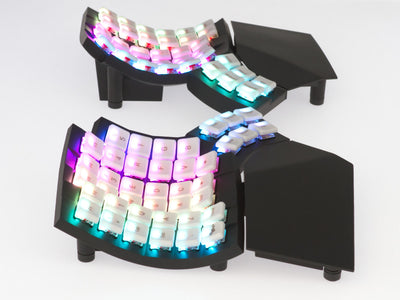 Glove80 (7.6). For mice, look at the
  Logitech MX Vertical (7.4), the
  Evoluent VerticalMouse 4 (7.1) and the
  Logitech Trackman Marble trackball (7.0).
References
- National Institute of Arthritis and Musculoskeletal and Skin Diseases. Carpal tunnel syndrome. niams.nih.gov
- Keir PJ, Bach JM, Hudes M, Rempel DM. Guidelines for wrist posture based on carpal tunnel pressure thresholds. Hum Factors. 2007;49(1):88–99. PMID: 17315846. PubMed
- American Academy of Orthopaedic Surgeons. Management of Carpal Tunnel Syndrome: Evidence-Based Clinical Practice Guideline. 2016. aaos.org
- OSHA. Computer Workstations eTool: keyboards. osha.gov
- O'Connor D, Page MJ, Marshall SC, Massy-Westropp N. Ergonomic positioning or equipment for treating carpal tunnel syndrome. Cochrane Database Syst Rev. 2012;(1):CD009600. PMID: 22259003. doi:10.1002/14651858.CD009600
- American Academy of Orthopaedic Surgeons. OrthoInfo: Ulnar nerve entrapment at the elbow (cubital tunnel syndrome). orthoinfo.org
- Burke DT, Burke MM, Stewart GW, Cambre A. Splinting for carpal tunnel syndrome: in search of the optimal angle. Arch Phys Med Rehabil. 1994;75(11):1241–1244. PMID: 7979936. doi:10.1016/0003-9993(94)90012-4
- Michlovitz S, Hun L, Erasala GN, Hengehold DA, Weingand KW. Continuous low-level heat wrap therapy is effective for treating wrist pain. Arch Phys Med Rehabil. 2004;85(9):1409–1416. PMID: 15375809. doi:10.1016/j.apmr.2003.10.016
- Tyler TF, Thomas GC, Nicholas SJ, McHugh MP. Addition of isolated wrist extensor eccentric exercise to standard treatment for chronic lateral epicondylosis: a prospective randomized trial. J Shoulder Elbow Surg. 2010;19(6):917–922. PMID: 20579907. doi:10.1016/j.jse.2010.04.041
- McLean L, Tingley M, Scott RN, Rickards J. Computer terminal work and the benefit of microbreaks. Appl Ergon. 2001;32(3):225–237. PMID: 11394463. doi:10.1016/S0003-6870(00)00071-5
- Rempel D, Manojlovic R, Levinsohn DG, Bloom T, Gordon L. The effect of wearing a flexible wrist splint on carpal tunnel pressure during repetitive hand activity. J Hand Surg Am. 1994;19(1):106–110. CDC Stacks
- OSHA. Computer Workstations eTool: wrist/palm supports. osha.gov
This article is general education, not medical advice, diagnosis or treatment. Ergonomic equipment can reduce the mechanical risk factors behind hand numbness but is not a substitute for care from a qualified healthcare provider. If you have persistent numbness, tingling, weakness or pain, see a licensed clinician.
AJ Prince, HEAS
Healthcare Ergonomic Assessment Specialist. Conducts over a thousand workstation assessments a year across a multi-campus health system, and authored the DEAS standard used to rank every product on this site.
