
The Best Ergonomic Keyboard Trays of 2026
Most people who book an ergonomic assessment with me for wrist, forearm, or shoulder pain don't need a new chair. They need their hands lower. When a desk is 29 inches off the floor and the user is 5'4", every keystroke runs through a wrist that's slightly extended and shoulders that are slightly shrugged — eight hours a day, five days a week. That's the setup that produces carpal tunnel symptoms, tennis elbow, and the rope-tight upper traps I palpate over and over.
A keyboard tray fixes that geometry in about an hour of installation. It pulls the typing surface 3 to 7 inches below the desk and tilts it slightly downward, putting your wrists in neutral and your elbows at the open angle the textbooks call for. It's the single cheapest fix for a too-high desk — cheaper than replacing the desk, cheaper than a height-adjustable base.
The honest catch: if your job involves constant switching between typing and writing, sketching, sorting paperwork, or reaching for a stack of references, a tray creates a leaning problem. Every time you reach over the tray to the desk surface, you're loading your lumbar spine and rotator cuffs. For pure typing-and-mouse work, a tray is a near-universal upgrade. For mixed-use desks, a height-adjustable desk or a desktop converter is usually the better answer.
I reviewed twelve trays for this guide. The ten featured below are the ones I'd actually install in a patient's home office. The other two are mentioned in the FAQ.
The 10 Picks at a Glance
| # | Product | DEAS | Best For |
|---|---|---|---|
| 1 | Humanscale Keyboard Tray System | 8.0 | Clinical-grade |
| 2 | VIVO Premium MOUNT-KB27P-B | 6.5 | Best value |
| 3 | EUREKA ERGONOMIC Height Adjustable | 6.4 | Tall users |
| 4 | VIVO Large MOUNT-KB05E | 6.0 | Wide work surface |
| 5 | HUANUO 360 Sliding Keyboard Tray | 6.0 | Swivel/rotation |
| 6 | Klearlook Upgraded Sit-Stand Tray | 5.9 | Standing desk pairing |
| 7 | VIVO MOUNT-KB03B Platform | 5.7 | Deep drop |
| 8 | Mount It Under Desk Keyboard Tray | 5.5 | Compact desks |
| 9 | HUANUO Adjustable Under Desk Tray | 5.4 | Wide drop range |
| 10 | BONTEC KMT01 Under Desk Tray | 5.4 | Budget fixed-drop |
Humanscale Keyboard Tray System

This is the only keyboard tray I install in clinical workstations — the negative tilt mechanism, gel palm rest, and Smart Mouse tilting platform are all engineered together rather than stacked as accessories. If your wrist pain is genuine and your budget allows, the cost difference disappears the first time you go a full week without symptoms.
Strengths
- • True negative-tilt mechanism that adjusts under-load — no tool, no relocking
- • 15-year warranty signals real long-term confidence
- • BIFMA + GREENGUARD certifications back the clinical claims
- • Mouse platform tilts independently for left- or right-handed users
Trade-offs
- • Price is roughly 4× the category benchmark
- • Requires 22″ of clearance under the desk lip
- • Professional installation strongly recommended
VIVO Premium Adjustable Keyboard & Mouse Platform (MOUNT-KB27P-B)

This is the tray I recommend for a patient who needs the wrist neutral fix but can't justify a Humanscale. It gets the geometry right — real negative tilt, full 5-inch drop range, separate mouse platform — even though the mechanism feels notchier and the warranty is short.
Strengths
- • Negative tilt adjusts without tools
- • Wide vertical range covers most desk-height mismatches
- • Steel arms feel sturdy under sustained typing
- • Dedicated mouse platform keeps wrist aligned with keyboard plane
Trade-offs
- • No third-party ergonomic certification
- • 1-year warranty is half the category benchmark
- • Slide track can develop a wobble after 12–18 months
EUREKA ERGONOMIC Height Adjustable Keyboard & Mouse Tray

If your desk runs taller than 30 inches and you're 5'10″ or under, this is the tray that brings the keyboard down far enough to put your elbow at 100 degrees instead of 80. The 3-year warranty also signals more confidence in the gas-strut mechanism than most of the field offers.
Strengths
- • Generous vertical range for tall desks and shorter users
- • 3-year warranty — longest in this price tier
- • Wide tilt range supports negative-tilt or flat
- • Tray surface is wide enough for full-size keyboard plus mouse
Trade-offs
- • No published ergonomic certification
- • Mounting hardware doesn't fit desks thicker than 1.5″
- • Price runs above category benchmark without proportional polish
VIVO Large Keyboard Tray (MOUNT-KB05E)

If you keep a notebook, phone, and full-size keyboard within reach, this is the tray that doesn't force you to choose. The drop range is narrow, so it only works for users whose desk is just slightly too tall — but if you fit, the 32-inch surface keeps everything in arm's-length reach without leaning.
Strengths
- • Wide platform keeps phone, notebook, and keyboard reachable
- • Solid load capacity for additional desk items
- • Tool-free tilt adjustment
- • Strong III.1 score — priced well under category benchmark
Trade-offs
- • Drop range under 3″ limits which desk heights it fixes
- • MDF surface shows wear faster than laminate or steel
- • 1-year warranty
HUANUO 360 Adjustable Ergonomic Sliding Keyboard Tray
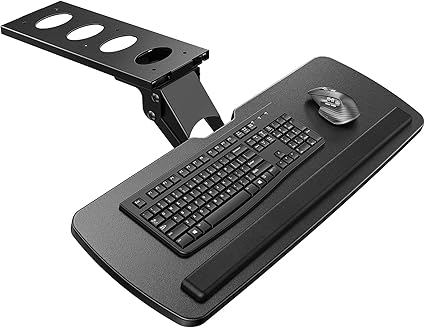
The swivel is a real clinical feature, not a gimmick — it lets you angle the keyboard away from the desk when you stand up or shift seats, which prevents the leaning reach that drives shoulder pain. Drop range is one of the deepest in the field, but the swivel mechanism does loosen over time.
Strengths
- • Deep drop range works for unusually tall desks
- • 360° swivel reduces shoulder reach during posture changes
- • Negative tilt range covers most clinical recommendations
- • Mouse platform included
Trade-offs
- • Swivel joint develops play after heavy use
- • 1-year warranty
- • No published ergonomic certification
Klearlook Upgraded Adjustable Keyboard Tray (Sit-Stand)

If you're already on a standing desk and your wrists still get tight in the afternoon, the height-adjustable base isn't enough — you need negative tilt at the tray. This Klearlook pairs cleanly with most sit-stand surfaces and keeps your wrists in neutral whether you're seated or standing.
Strengths
- • Designed to clamp to standing-desk frames without interfering with lift
- • Tilt range covers neutral and negative positions
- • Solid steel arms hold position under typing load
- • Reasonable price for the build
Trade-offs
- • Fixed 5″ drop — no height adjustability within the tray itself
- • 1-year warranty
- • Mouse surface integrated into main tray, not separately adjustable
VIVO Adjustable Keyboard & Mouse Platform (MOUNT-KB03B)

When a patient comes in with a 31-inch desk and a 5'2″ frame, most trays don't drop far enough to get the elbow open. This VIVO does — nearly 7 inches at full extension. The clinical scores are middling, but for the specific tall-desk-short-user mismatch, drop range is the variable that matters most.
Strengths
- • Deepest drop in this price range
- • Tool-free height and tilt adjustment
- • Steel arms hold the position firmly
- • Priced at or below category benchmark
Trade-offs
- • Mouse platform is small — full-size mousing requires desk overflow
- • 1-year warranty
- • Lower clinical scores reflect a build optimized for range, not refinement
Mount It Under Desk Keyboard Tray

For a desk under 48 inches wide where a full-platform tray hangs off the edges, this Mount It fits the footprint without compromising tilt. It won't fix a major desk-height mismatch, but for users only an inch or two too high, it's the cleanest install.
Strengths
- • Compact footprint fits narrow desks
- • Tool-free height and tilt
- • Below category benchmark on price
- • Lightweight install — one person, 20 minutes
Trade-offs
- • I.5 score reflects a flatter tilt range than ideal
- • Slide track is plastic, not steel
- • 1-year warranty
HUANUO Adjustable Under Desk Keyboard Tray
The 7.5-inch maximum drop is the deepest in this guide, which makes it the right pick for the rare case where a desk is significantly too tall and replacing the desk isn't an option. The clinical scores sit at the lower edge of recommended because the build is functional rather than refined.
Strengths
- • Deepest drop range in the guide
- • Slide-out mouse extension keeps wrist plane aligned
- • Priced well below category benchmark
- • Negative tilt works without tools
Trade-offs
- • Build quality is functional — mechanism feels notchy
- • 1-year warranty
- • I.5 score reflects an inconsistent tilt lock at extreme positions
BONTEC KMT01 Under Desk Keyboard Tray
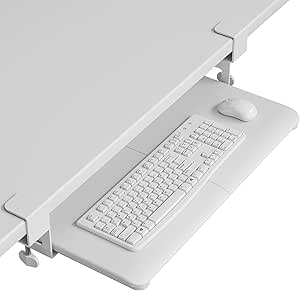
This is the tray I recommend when a patient tells me they can't spend much but their wrists hurt every night. It does one thing — drops the keyboard 5 inches below the desk — and it does it reliably. No tilt, no glide, but for the right user, that's the only variable that matters.
Strengths
- • Best III.1 score in the guide — priced well below benchmark
- • Fixed-position install is essentially set-and-forget
- • Steel mounting bracket handles real typing load
- • Wide tray fits full-size keyboard plus mouse
Trade-offs
- • No negative tilt — flat platform only
- • No glide-in/glide-out track
- • 1-year warranty
- • Won't help users who need a moderately adjustable drop
A tray installed at the wrong height is worse than no tray at all — it creates a new posture problem on top of the old one. Work through these steps in order.
- Sit fully back in your chair with your feet flat on the floor (or a footrest). Don't perch forward — the chair has to be doing its job before the tray can do its job.
- Drop your shoulders, then rest your forearms parallel to the floor. Your elbows should land at roughly 100–110 degrees of open angle, not 90.
- Mark the height where your hands hang. That's the keyboard surface height — not the desk height, the hand height.
- Install the tray so the keyboard sits at or just below that marked point. Most people are wrong by an inch on the first install — expect to adjust once.
- Set the tilt to negative 5 to 10 degrees — meaning the back edge of the tray sits slightly higher than the front. Flat or positive tilt forces wrist extension and defeats the entire reason you bought the tray.
- Position the mouse on the same plane as the keyboard, not on the desk above. If your mouse stays on the desk, your shoulder will hike all day and you'll trade wrist pain for upper-trap pain.
- Test for two weeks before reassessing. Soft-tissue adaptation takes 10–14 days — if your hands still hurt after that window, the height is wrong, not the tray.
Wrist & carpal tunnel symptoms
Tennis elbow / forearm tightness
Upper trap and neck tightness
Do I actually need a keyboard tray, or can I just lower my chair?
Raising the chair instead of lowering the keyboard creates a different problem: your knees end up higher than your hips, your feet leave the floor, and you start sliding forward to compensate. The keyboard surface should match your hands, not your eyes. If lowering your desk isn't an option, a tray is the right answer. If your desk is height-adjustable, lower the desk and skip the tray entirely.
What should I look for when buying a keyboard tray?
Four things matter. First, a real negative tilt mechanism — not just a flat platform. Second, a drop range that covers the actual gap between your desk height and your correct hand height (most people need 3–5 inches). Third, a mouse surface that sits on the same plane as the keyboard — not on the desk above. Fourth, a mounting bracket that fits your desk thickness; trays designed for 1″ surfaces won't clamp securely to a 1.5″ solid-wood desk. Build quality matters most on the slide track and tilt mechanism — those are the parts that wear out first.
I switch between typing and writing constantly. Should I still use a tray?
Probably not. The honest tradeoff with a tray is that anything off the tray — a notebook, a stack of paperwork, a phone — requires reaching over it. That reach loads your lumbar spine and rotator cuffs hundreds of times a day. If your work is 80%+ typing and mousing, a tray is the right call. If you're constantly switching between digital and analog work, a height-adjustable desk or a desk converter is the better fix because it brings the entire work surface down with you.
How do I know if my desk is too high in the first place?
Sit in your chair with your feet flat and your shoulders relaxed. Rest your forearms parallel to the floor. If the desk surface is above the level of your forearms — meaning your wrists bend up to reach the keyboard — the desk is too high. The simplest test: place your hands on your keyboard in normal typing position. If you can see daylight between the underside of your wrist and the desk, your wrist is extended and a tray will likely help.
Why don't any of these trays score above 8.5?
Keyboard trays are an under-certified product category. Even Humanscale — the clinical reference design — loses Layer III points because the price runs roughly 4× the category benchmark. Other manufacturers score well on individual layers but lose on Layer II.2 because no consumer keyboard tray brand outside Humanscale carries third-party ergonomic certification. That's a category-wide limitation, not a flaw in any single product.
Why is II.4 (Verified User Reliability) marked N/A for every product?
Keyboard trays are a niche category by Amazon standards — most models reviewed here sit under 50 verified reviews, which is the minimum DEAS threshold for a meaningful reliability signal. N/A means the data isn't there to score honestly, not that the products are unreliable. Layer II averages here are computed across only II.1 through II.3 per DEAS protocol.
What other keyboard trays were reviewed but didn't make the top 10?
Two additional trays were evaluated but fell below the threshold for inclusion. The Klearlook Keyboard Tray with Wrist Rest (DEAS 5.1) sits at the bottom edge of clinical acceptability — the integrated wrist rest is positioned in a way that encourages wrist contact while typing, which restricts circulation and partially defeats the tilt benefit. The Clamp On Keyboard Tray Generic Top Seller (DEAS 4.5) falls into the Below Category Standard tier — its build quality, drop range, and tilt range all underperform the rest of the field, and the clamp mechanism damages the underside of softer desks. Both are commonly recommended on shopping sites for their low price, but neither passes the clinical bar.
Take the DeskDoctor Virtual Assessment
A keyboard tray is the right fix for some wrist and forearm problems — and the wrong fix for others. If you're not sure whether your desk height is actually the cause of your symptoms, the free virtual assessment delivers a personalized setup plan, recovery guide, and equipment matches in about 12 minutes.
Take the Free Assessment →Affiliate disclosure: DeskDoctor is reader-supported. Some links in this article are affiliate links, which means we may earn a commission if you make a purchase through them — at no additional cost to you. Affiliate relationships do not influence DEAS scoring or rankings. Products are evaluated on the published DEAS framework regardless of commercial relationship.
Clinical disclaimer: The information in this article is for general educational purposes only and does not constitute medical advice. AJ Prince is a Healthcare Ergonomic Assessment Specialist (HEAS), not a physician. If you are experiencing persistent or severe musculoskeletal pain, consult a qualified healthcare provider. Equipment recommendations are based on clinical ergonomic principles and may not address the underlying cause of your individual symptoms. Do not delay medical care based on information in this article.
0 Comments