
Top 10 Ergonomic Desk Product Deals on Prime Day 2026
Every year I see the same thing in my assessments: equipment people bought on sale because the listing said "ergonomic" — and the pain they bought it for is still there. A gaming keyboard with a palm rest. A desk that won't go low enough. A chair with a lumbar pillow sitting four inches above where their back actually curves.
A discount doesn't change what a product does to your body. A chair either supports your lower back where it bends or it doesn't. A mouse either takes the twist out of your forearm or it doesn't. So before you buy, match the product to where you hurt — not to the size of the red tag.
I went through ten of the biggest ergonomic deals on Amazon this Prime Day and checked every one against the DeskDoctor scoring database. Six have scores — from a mouse I'd put most of my forearm-pain patients in, to a gaming keyboard that's better left to gamers. Four haven't been scored yet, so they're marked N/A instead of guessed at.
It's the highest-scoring product on the whole deal list. The adjustable tilt lets your forearm find its own neutral angle instead of forcing it into one.
Jump to review ↓The cheapest way to find out whether a vertical mouse helps your forearm. It gets the basic handshake grip right for a fraction of the premium price.
Jump to review ↓The only chair on the list with a score behind it, and it's a solid one. Lumbar and seat depth both adjust — the two settings that matter most for low back pain.
Jump to review ↓All 10 Prime Day Deals, Ranked
| # | Product | DEAS | Best For |
|---|---|---|---|
| 1 | Contour Unimouse Wireless | 8.0 | Forearm & wrist pain |
| 2 | HON Ignition 2.0 Ergonomic Office Chair | 7.3 | Lower back pain |
| 3 | Anker 2.4G Wireless Vertical Ergonomic Mouse | 6.8 | Budget vertical mouse |
| 4 | Logitech Wave Keys MK670 Keyboard & Mouse Combo | 6.7 | First ergonomic keyboard |
| 5 | HP 480 Comfort Wired Keyboard | 5.9 | Basic wired upgrade |
| 6 | ASUS ROG Strix Scope II 96 Wireless Mechanical Keyboard | 5.8 | Gaming, not pain relief |
| 7 | Vari ComfortEdge Electric Standing Desk (60 × 30) | N/A | Large sit-stand setup |
| 8 | FLEXISPOT E3 Dual Motor Electric Standing Desk (48 × 24) | N/A | Heavier monitor setups |
| 9 | FEZIBO Electric Standing Desk (48 × 24) | N/A | Small spaces |
| 10 | Branch Ergonomic Chair | N/A | Clean-design chair |
N/A = that exact model isn't in the DeskDoctor database yet. It's not a negative score — it means you'll need to check fit yourself.
Take the DeskDoctor Virtual Assessment
Before anything goes in your cart: if you can't tell whether your chair, your mouse, or your desk height is the piece driving your pain, the free virtual assessment delivers a personalized setup plan, recovery guide, and equipment matches in about 12 minutes.
Take the Free Assessment →Contour Unimouse Wireless

If your forearm aches by mid-afternoon or your wrist tightens every time you reach for the mouse, this is the one I'd want you using — the tilt adjusts, so you settle into the handshake angle your forearm actually tolerates instead of forcing it into someone else's fixed angle. It's the highest-scoring product on this year's deal list, and it isn't close.
- Adjustable tilt fits more hands and more pain levels than a fixed vertical mouse
- Strongest posture and injury-risk scores on this entire list
- Left-hand version available
- No independent ergonomic certification
- Sized for small-to-medium hands
- Expect a few days of awkward clicking while you adjust
HON Ignition 2.0 Ergonomic Office Chair

If your lower back starts aching a couple of hours into the workday, this is the chair on the list I'd trust to fix it — the lumbar moves to where your back actually curves, and the seat slides so your thighs are supported without the front edge digging in behind your knees. It's a commercial-grade office chair, not a gaming chair with a pillow strapped to it.
- Lumbar and seat depth both adjust — the two settings that matter most for low back pain
- 300 lb capacity fits a wider range of bodies than most chairs on sale
- Strong long-term reliability record from verified buyers
- 17-inch minimum seat height — shorter users may need a footrest
- No headrest on this listing (a headrest version is sold separately)
- Still a mid-to-upper-tier chair, even on sale
Anker 2.4G Wireless Vertical Ergonomic Mouse

If you've got that dull ache along the top of your forearm and you want to find out whether a vertical mouse helps before spending real money, start here — it puts your hand in the handshake position that takes the twist out of your forearm. It's the cheapest way on this list to test the idea.
- Handshake grip takes the rotation load off the forearm
- Best value score of any product on this list
- Years of steady reliability from verified buyers
- Fixed angle and one size — large hands often feel cramped
- Basic build quality and plastic feel
- No independent certification
Logitech Wave Keys MK670 Keyboard & Mouse Combo
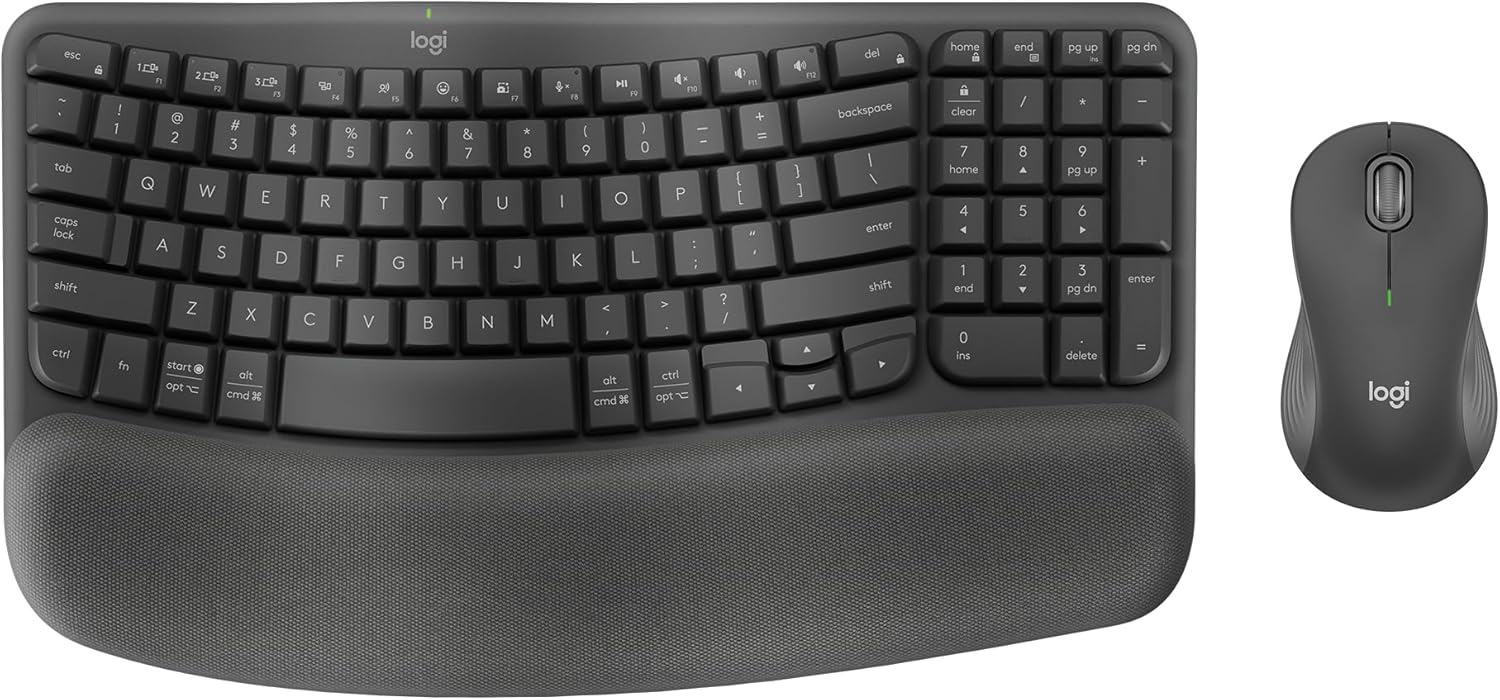
If your wrists ache on a flat keyboard but a split keyboard feels like too big a jump, this is the bridge — the gentle wave in the key rows and the cushioned palm rest let your wrists sit straighter without relearning how to type.
- No learning curve — the layout is still a standard layout
- Cushioned palm rest built in
- Compact width keeps the mouse closer to your body
- Not a true split — limited help if your wrists bend outward to reach the keys
- The bundled mouse wasn’t scored separately
- No independent certification
HP 480 Comfort Wired Keyboard

If you're typing on a thin, flat keyboard and your wrists feel it by the end of the day, this is a modest step up — but the Wave Keys above does the same job better. Buy this one if you specifically want wired and full-size with a number pad.
- Wired — no batteries, no pairing
- Full-size layout with number pad
- Palm rest built in
- Leave the tilt feet folded — the raised angles bend your wrists back
- Too new for a reliability score from verified buyers
- Smaller ergonomic gain than the Wave Keys
ASUS ROG Strix Scope II 96 Wireless Mechanical Keyboard

This is a well-built mechanical gaming keyboard, and it scored like one — the best build quality of any keyboard on this list, but nothing about the layout keeps your wrists straighter than the keyboard you already have. Buy it if you game; skip it if wrist pain is the reason you're shopping.
- Best build quality of the keyboards on this list
- Compact 96% layout still keeps a number pad
- Wireless, with a palm rest included
- Standard layout — no wrist-angle correction
- Weakest value score on this list
- Ergonomic in the listing title, not in function
Vari ComfortEdge Electric Standing Desk (60 × 30)
If your lower back stiffens through long sitting days, being able to stand for part of the afternoon is one of the simplest changes I recommend — and a 60-inch top gives a two-monitor setup room to sit at a proper viewing distance. I haven't scored this exact model yet, so confirm its height range matches your seated and standing elbow height before you buy.
This exact model isn't in the DeskDoctor database yet, so there's no score to show — and I won't guess at one. It's on this list because it's part of this year's Prime Day ergonomic deal lineup, not because it's been clinically evaluated. Check the height range, size, and adjustability against your own body before the return window closes.
- Large 60 × 30 surface fits dual monitors at a comfortable distance
- Electric height adjustment makes switching positions easy
- Not yet DEAS-scored — verify height range and stability yourself
- Larger desks need more room and a sturdier floor setup
FLEXISPOT E3 Dual Motor Electric Standing Desk (48 × 24)
If you're putting a heavier monitor or a monitor arm on your desk, a dual-motor frame is the spec to look for — it lifts heavier loads more evenly than single-motor budget desks. This model hasn't been scored yet, so check how much it wobbles at full standing height before the return window closes.
This exact model isn't in the DeskDoctor database yet, so there's no score to show — and I won't guess at one. It's on this list because it's part of this year's Prime Day ergonomic deal lineup, not because it's been clinically evaluated. Check the height range, size, and adjustability against your own body before the return window closes.
- Dual motors handle heavier loads more smoothly
- 48 × 24 fits most single-monitor setups
- Not yet DEAS-scored — verify height range and stability yourself
- 48 inches gets tight for two monitors plus a keyboard
FEZIBO Electric Standing Desk (48 × 24)
If you're working out of a spare bedroom or a corner and just need a way to get off your chair for part of the day, this compact desk gets you there. It hasn't been scored yet — make sure the lowest setting lets your elbows sit at about 90° when you're seated, because that's where budget desks most often come up short for shorter users.
This exact model isn't in the DeskDoctor database yet, so there's no score to show — and I won't guess at one. It's on this list because it's part of this year's Prime Day ergonomic deal lineup, not because it's been clinically evaluated. Check the height range, size, and adjustability against your own body before the return window closes.
- Compact footprint for small rooms
- Electric adjustment
- Not yet DEAS-scored — verify height range and stability yourself
- Budget frames tend to wobble more at standing height
Branch Ergonomic Chair
If your lower back aches and you want adjustable lumbar in a cleaner-looking chair, Branch is worth a look — but this is the standard model, not the Pro version I've scored, so I can't give it a number. If the Pro fits your budget, that's the one with a score behind it.
This exact model isn't in the DeskDoctor database yet, so there's no score to show — and I won't guess at one. It's on this list because it's part of this year's Prime Day ergonomic deal lineup, not because it's been clinically evaluated. Check the height range, size, and adjustability against your own body before the return window closes.
- Adjustable lumbar support
- Breathable mesh back for long, warm days
- Not yet DEAS-scored — this exact model isn’t in the database
- The scored Branch Pro is a separate product
- Set chair height first. Feet flat on the floor, knees roughly level with your hips. Everything else on your desk gets set relative to this, so do it before anything else.
- Set seat depth. Slide the seat until you can fit two to three fingers between the front edge and the back of your knees. Too deep and you slump; too shallow and your thighs aren't supported.
- Put the lumbar where your back curves. The support belongs in the small of your back, roughly at belt height — not between your shoulder blades. If it feels like it's pushing you forward, it's too high or too firm.
- Bring the desk to your elbows. Seated or standing, the keyboard should sit at or just below elbow height with your shoulders relaxed. If your shoulders creep toward your ears, the desk is too high.
- Keep the keyboard flat. Fold the little feet on the back. Tilting the back edge up bends your wrists backward. A palm rest is for pauses — float your wrists while you type.
- Keep the mouse close. Put it right next to the keyboard, not out at arm's length. With a vertical mouse, let your hand rest on it in a handshake position rather than gripping it.
- Change positions, don't just stand. With a standing desk, switch between sitting and standing every 30 to 60 minutes. Standing all day just trades back pain for leg and foot pain.
Lower back pain from slumping at your desk
A dull ache across your lower back that builds through the afternoon, plus stiffness when you first stand up.
What fixes it: A chair with adjustable lumbar and seat depth — like the HON Ignition 2.0 — and breaking up long sitting stretches with a standing desk.
Wrist and forearm pain (carpal tunnel–type symptoms)
A burning or aching line along the top of your forearm, or tight wrists after a long mouse-heavy day.
What fixes it: A vertical mouse that takes the twist out of your forearm — the Contour Unimouse or Anker vertical mouse — and a flat keyboard. Numbness or tingling in your fingers needs a provider, not just new gear.
Tech neck and rounded shoulders
Tight upper traps, knots between your shoulder blades, and an ache at the base of your skull by end of day.
What fixes it: A desk at true elbow height so your shoulders can drop, plus a monitor at eye level. A sit-stand desk makes that height easy to hit in both positions.
Are Prime Day ergonomic deals actually worth buying?
Some are. A discount on a product that fits your body and your specific pain is a good deal. A discount on something labeled "ergonomic" that doesn't change your posture is just a cheaper mistake. On this list, the Contour Unimouse and the HON Ignition 2.0 are the two I'd buy without hesitation. The ASUS ROG Strix keyboard is the one I'd skip if pain is why you're shopping.
What should I look for when buying ergonomic desk products on Prime Day?
Start with what hurts, not what's discounted. Lower back pain points to a chair with adjustable lumbar and seat depth. Forearm or wrist pain from mousing points to a vertical mouse sized to your hand. Wrist pain while typing points to a keyboard that keeps your wrists straight and sits flat. Neck and shoulder tension usually means your desk is too high. Then check the adjustment range against your own height, the warranty, and the return window — sale items often have the same return policy, so use it if something doesn't fit.
Why do some products on this list show N/A instead of a DEAS score?
N/A means that exact model isn't in the DeskDoctor database yet. Rather than guess, I mark it N/A. It isn't a negative signal — it means you'll need to check the fit yourself, especially height range and stability on standing desks, before the return window closes.
Is a gaming keyboard good for wrist pain?
Usually not on its own. Gaming keyboards are built for switch feel and durability, not wrist position. A standard straight layout keeps your hands close together, which bends your wrists outward to reach the keys. The ASUS ROG Strix on this list scored well for build quality and low for wrist-specific function — a great gaming keyboard, but not a pain fix.
If I can only buy one thing this Prime Day, what should it be?
Whatever addresses where you hurt most. For most of the desk workers I assess, that's the chair, because chair height sets the height for everything else on your desk. If your chair already adjusts properly and the pain is in your forearm or wrist, a vertical mouse is usually the biggest improvement for the money.
Which ergonomic products scored higher but aren't on this deal list?
If none of these deals fit, these scored higher in the DeskDoctor database: Desky Dual Laminate Desk (7.7), Vari Electric Standing Desk (7.3), Branch Ergonomic Chair Pro (7.1), Logitech Lift Right (7.7), Kinesis mWave Mechanical Keyboard (7.7). They may not be discounted this Prime Day, but they have the clinical scores behind them.
Take the DeskDoctor Virtual Assessment
A Prime Day deal only helps if it's the right piece for your body. If you're not sure whether your chair, your mouse, or your desk height is the real problem, the free virtual assessment delivers a personalized setup plan, recovery guide, and equipment matches in about 12 minutes.
Take the Free Assessment →Affiliate disclosure: DeskDoctor is a participant in the Amazon Services LLC Associates Program, an affiliate advertising program designed to provide a means for sites to earn advertising fees by advertising and linking to Amazon.com. We may earn a commission on qualifying purchases made through links on this page at no additional cost to you. Deal pricing and availability change quickly and are set by Amazon. Affiliate relationships never influence DEAS scores or rankings.
Clinical disclaimer: This article is for general educational purposes and does not constitute medical advice, diagnosis, or treatment. AJ Prince, HEAS, is a certified Healthcare Ergonomic Assessment Specialist, not a physician. Persistent pain, numbness, tingling, or weakness should be evaluated by a qualified healthcare provider before you make changes to your workstation.
0 Comments