Desk painHow to Sit Without Lower Back Pain: The Real Ergonomic Fix
It's rarely your chair alone, and it's never fixed by sitting up straight harder.

By AJ Prince, HEAS
Healthcare Ergonomic Assessment Specialist. Updated 14 Jun 2026. A 9-minute read.
Desk Doctor earns a commission on some links, at no cost to you. It never changes a score. How we make money
The ache shows up around hour two. A dull pressure low in your back; you shift, it backs off for a minute, then it creeps right back. By five o'clock you stand up in stages, one hand on the desk, waiting for your spine to finish loading.
I see this in assessments more than any other complaint, and almost everyone has the same theory: their chair is broken, or their back is just bad. Usually it's neither. Most of the time, lower back pain from sitting comes down to four fixable things: the shape of your spine in the seat, where your feet land, how the pressure sits under you, and how long you hold all of it without moving.
None of it requires sitting up straight by force, and most of it doesn't cost much. Here's what's going wrong, what the research says about each cause, and what fixes it.
Cause 1 of 4
Your lower back loses its curve
Stand up and your lower back has a gentle inward curve, called lumbar lordosis. Sink into a chair without support and that curve flattens, then reverses: your pelvis rolls backward, the bottom of your spine rounds, and the load shifts toward the back of the discs. That slumped position is the most common thing I find behind desk-related back pain.
What the research says
In a computer model of the lumbar spine, upright sitting loaded the discs about the same as standing, while slumped sitting raised the pressure on them significantly; the authors' advice was to keep the lumbar curve while seated.1 In a lab study of people with and without a history of back pain, a lumbar support pillow kept the lower back slightly closer to neutral and cut fidgeting on the seat, an objective sign of comfort, although the changes were small and people didn't report feeling more comfortable.2
That's why “just sit up straight” fails. Holding yourself upright with your own muscles for eight hours is exhausting, and the moment you get absorbed in work, you sink right back. The fix isn't willpower. It's a backrest that holds your curve for you, so neutral becomes the position you fall into.
The fix
Get lumbar contact that holds your curve without effort: a chair with good adjustable lumbar support, or a firm lumbar cushion on the chair you have.

The chair I recommend most for back pain
Steelcase Leap v2
DEAS 8.1 out of 10
Adjustable lumbar. Seat height 15.5 to 20.5 inches. Holds up to 400 lb.
Its backrest flexes to follow your spine as you move and keeps contact with your lower back as you recline, so you stay supported whether you're leaning in to type or sitting back to read. If your back aches after two hours of sitting, this is the change that helps the most people I assess.
Good: a backrest that keeps lumbar contact through the recline; a wide adjustment range; commercial-grade build and a long warranty. Less good: a premium price, the weakest part of its score; no headrest on the base model; a few minutes of setup to dial in.
Score breakdown
Clinical performance8.3
I.1Neutral posture support8.5
I.2Adjustability range8.2
I.3Injury risk reduction8.3
I.4Population accommodation8.4
I.5Lumbar support quality8.3
Product quality8.9
II.1Material & construction8.8
II.2Published certification8.5
II.3Warranty vs benchmark9.5
II.4Verified user reliability8.8
Market value2.4
III.1Price vs category benchmark2.0
III.2Ergonomic value ratio2.8
Composite 8.1 on the DEAS (Desk Ergonomics Assessment Score). How we score
Clinical note
If a new chair isn't in the budget, a firm lumbar cushion on your current chair gets you most of the benefit; the pillow study above used exactly that. It's the lumbar contact that matters, not the price tag.
Cause 2 of 4
Your feet don't reach the floor
This one is invisible until you look for it. If your chair is set high enough for your desk, or you're shorter than the chair was designed for, your feet dangle or rest on tiptoe. Most people then slide forward to reach the floor, and sliding forward rolls the pelvis back: the same backward tilt that flattens your curve in Cause 1. You can have a great chair and still slump, from the bottom up.
The giveaways: the front of the seat pressing into the backs of your thighs, or feet hooked around the chair base looking for somewhere to land.
The fix
Plant your feet. Set the chair for your desk first, with your elbows level with the keyboard; then, if your feet don't rest flat with your thighs level or sloping slightly down, add a footrest. Don't lower the seat to reach the floor. That just moves the problem to your shoulders and wrists.

The footrest I recommend most
ErgoFoam Adjustable Foot Rest
DEAS 7.0 out of 10
4 inches tall, or about 6 with the included lifter.
It's the cheapest fix on this page, and often the one that makes the rest work. The foam is supportive enough to bear weight, a removable lifter gives you two heights, and flipped over, the rounded side lets your feet rock, which keeps your legs moving.
Good: two heights with the removable lifter; a rounded side for rocking your feet; a strong price. Less good: foam, not a mechanism, so you get two heights and no tilt; the velvet cover collects dust and hair; no independent ergonomic certification.
Score breakdown
Clinical performance6.4
I.1Neutral posture support7.0
I.2Adjustability range6.0
I.3Injury risk reduction6.0
I.4Population accommodation7.0
I.5Popliteal angle correction6.0
Product quality6.8
II.1Material & construction7.0
II.2Published certification3.0
II.3Warranty vs benchmark9.0
II.4Verified user reliability8.0
Market value8.0
III.1Price vs category benchmark8.0
III.2Ergonomic value ratio8.0
Composite 7.0 on the DEAS (Desk Ergonomics Assessment Score). How we score
Cause 3 of 4
You're parked on a flat seat for hours
Even with a good curve and planted feet, a flat or worn seat concentrates your weight on two small points, your sit bones, and on your tailbone if you slide forward. Hold that for a few hours and the tissue under you complains, so you shift and squirm to escape it. That squirming is often what tips you into the slump from Cause 1.
What the research says
In a six-month trial with office workers at high risk of back pain, an air-filled cushion that kept people making small shifts in position cut new low back pain sharply: 10% developed it, against 59% of those sitting on a plain foam pad. The authors put the benefit down to the movement, not the padding.3
10% vs 59%developed low back pain over six months on a cushion that kept them shifting, against a plain foam pad.3 None of the cushions we've ranked is an air-filled one like the trial's. What a contoured cushion does do is spread the pressure off your sit bones and tailbone, so discomfort doesn't drive you into a slump. Pair it with the movement habits in Cause 4.
The fix
Spread the load and keep moving: a firm, contoured cushion takes pressure off the sit bones and tailbone, and regular shifts do the rest.
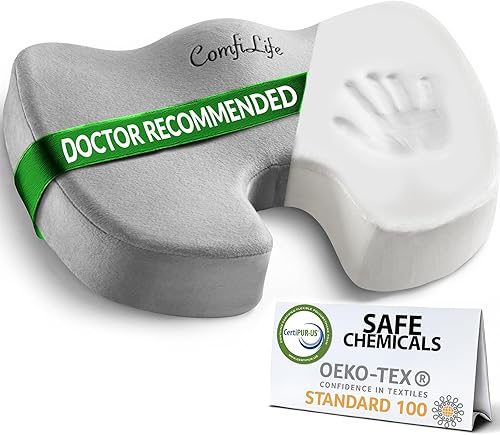
The cushion I point most people to
ComfiLife Gel Seat Cushion
DEAS 7.0 out of 10
Gel-infused memory foam. Non-slip base, removable cover.
The contoured shape spreads the load off your sit bones and tailbone, and it's firm enough that you don't sink, which soft foam lets you do until you collapse again. It's the right call if your seat is the weak link and a new chair isn't on the table.
Good: a contoured shape that takes pressure off the sit bones and tailbone; firm enough to support the pelvis; a strong reliability record and price. Less good: it can't fix a backrest with no lumbar support; one fixed shape; it raises your seat, so re-check your feet after adding it.
Score breakdown
Clinical performance6.4
I.1Neutral posture support6.5
I.2Adjustability range5.5
I.3Injury risk reduction6.5
I.4Population accommodation6.5
I.5Pressure distribution and pelvic support7.0
Product quality7.1
II.1Material & construction6.5
II.2Published certification7.0
II.3Warranty vs benchmark6.0
II.4Verified user reliability9.0
Market value7.2
III.1Price vs category benchmark7.5
III.2Ergonomic value ratio7.0
Composite 7.0 on the DEAS (Desk Ergonomics Assessment Score). How we score
Cause 4 of 4
You stop moving
This is the one nobody wants to hear, and it has the most consistent evidence. You can fix the curve, plant your feet and spread the pressure, and if you then hold that perfect posture, frozen, for three hours, your back will still ache. The problem isn't only the position. It's how long you stay in any one of them.
What the research says
A 2025 review of office-worker studies found the most consistent link to low back pain wasn't total sitting time but sitting behavior: fewer breaks and more static sitting. Most of those studies were cross-sectional, so it's an association, not proof of cause.4 In a lab study, two-minute walking breaks every 40 minutes gave real relief to people whose backs began to ache, but it faded within about 10 minutes of sitting back down,5 which is an argument for moving often, not occasionally.
The fix
Interrupt the static load before it builds. The rule I give people: every time you finish a task, or every 30 to 45 minutes, stand up. Refill your water, roll your shoulders, change how you're sitting. A sit-stand desk makes it nearly automatic, but a phone timer and a glass of water you have to keep refilling work too.
Clinical note
If you take one thing from this guide: the best posture is your next posture. The healthiest way to sit is never to stay in one position long enough for it to become the problem.
Six steps to a neutral spine, from the floor up
- 1
Set seat height for your desk. With your back against the backrest, raise or lower the seat until your elbows are level with the keyboard. Ideally your hips end up slightly higher than your knees.
- 2
Plant your feet. If they don't rest flat at that height, add a footrest. Don't lower the seat and wreck your desk height to compensate.
- 3
Set seat depth. Leave two or three fingers between the front edge of the seat and the backs of your knees. Too deep, and you slide forward and slump.
- 4
Place the lumbar support. It should press gently into the small of your back, the inward curve, not your tailbone and not your mid-back.
- 5
Drop the armrests. Shoulders relaxed, elbows around 90 degrees. High armrests hike your shoulders, and that tension travels down your back.
- 6
Set the monitor. Top edge level with your eyes, about an arm's length away. Reaching forward to read pulls you out of the support you just set.
Build it in this order
Most people start with the backrest and never fix the feet, which is why the slump keeps coming back.
Match your symptom to the cause
Deep ache, low and central
Feels like
A dull, building pressure across the lower back that eases when you stand and stretch.
What helps
Often a lost lumbar curve (Cause 1): fix the backrest or add lumbar support.
Tailbone or sit-bone soreness
Feels like
A sharp or tender spot right where you sit, worse on hard seats and long stretches.
What helps
Often static pressure (Cause 3): a contoured cushion spreads the load. See also tailbone pain from sitting.
Stiff and slow to straighten up
Feels like
You feel fine seated but lock up when you stand, and take a moment to unkink.
What helps
Often too long without moving (Cause 4): break the static load every 30 to 45 minutes.
Common questions
Is sitting actually bad for your back?
Sitting itself isn't the enemy; sitting rounded and sitting still are. In a computer model of the spine, upright, supported sitting loaded the discs about the same as standing,1 and the review evidence points hardest at long, unbroken sitting.4 Both are fixable.
What's the single best sitting position for lower back pain?
The one that keeps your lower back's inward curve while letting you shift often: hips slightly above knees, feet flat, lower back supported, shoulders relaxed. But no position works if you hold it all day. The best one is the one you change out of every half hour.
Do I need an expensive chair to fix this?
No. A premium chair like the  Steelcase Leap v2 gets you there with the least effort, but a firm lumbar cushion and a footrest on your current chair get you most of the benefit for a fraction of the cost, and the lumbar support study used exactly that kind of add-on.2 What matters is lumbar contact and planted feet, not the brand.
How often should I get up when I'm working?
Every 30 to 45 minutes, even for two minutes of standing or walking. In a lab study, two-minute walking breaks every 40 minutes eased sitting-induced back pain, but the relief faded within about 10 minutes of sitting back down,5 so how often matters more than how long. Tie it to a habit, like refilling your water, so you don't rely on memory.
Will a lumbar cushion work if my chair has no support?
Yes, that's exactly where it helps most. A lumbar cushion restores the inward curve a flat backrest can't. Just don't expect a seat cushion to do a backrest's job; they solve different problems. Match the fix to where your support is failing.
How many products did you review for this guide?
The three picks here came from 82 products scored on DEAS across the relevant categories: 41 office chair models, 21 seat cushions and 20 footrests. They're the strongest options for these four causes, not just the highest raw scores.
References
- Cho M, Han JS, Kang S, et al. Biomechanical effects of different sitting postures and physiologic movements on the lumbar spine: a finite element study. Bioengineering. 2023;10(9):1051. doi:10.3390/bioengineering10091051
- Grondin DE, Triano JJ, Tran S, Soave D. The effect of a lumbar support pillow on lumbar posture and comfort during a prolonged seated task. Chiropr Man Therap. 2013;21:21. doi:10.1186/2045-709X-21-21
- Channak S, Speklé EM, van der Beek AJ, Janwantanakul P. The effectiveness of a dynamic seat cushion in preventing neck and low-back pain among high-risk office workers: a 6-month cluster-randomized controlled trial. Scand J Work Environ Health. 2024;50(7):555–566. doi:10.5271/sjweh.4184
- Alaca N, Acar AÖ, Öztürk S. Low back pain and sitting time, posture and behavior in office workers: a scoping review. J Back Musculoskelet Rehabil. 2025;38(5):919–943. doi:10.1177/10538127251320320
- De Carvalho D, Callaghan JP. Does a break from sitting change biomechanical outcome measures or transient pain? A laboratory-based experimental study. Work. 2023;75(2):553–566. doi:10.3233/WOR-211266
This article is general education, not medical advice, diagnosis or treatment. Ergonomic equipment can reduce the mechanical risk factors behind back pain but is not a substitute for care from a qualified healthcare provider. Persistent, severe or radiating lower back pain, especially with numbness, weakness or pain down the leg, should be checked by a licensed clinician.
AJ Prince, HEAS
Healthcare Ergonomic Assessment Specialist. Conducts over a thousand workstation assessments a year across a multi-campus health system, and authored the DEAS standard used to rank every product on this site.
