Desk painWhy Does My Neck Hurt After Sitting at a Computer All Day?
The five places neck pain usually starts at a desk, in the order I check them, and the fix for each. Most of the fixes cost nothing.

By AJ Prince, HEAS
Healthcare Ergonomic Assessment Specialist. Updated 28 Apr 2026. A 11-minute read.
Desk Doctor earns a commission on some links, at no cost to you. It never changes a score. How we make money
Most people I assess think their neck pain comes from stress, a bad night's sleep, or getting older. In almost every case, I'm back at their desk setup within five minutes. The neck is where your body reports the problem. It's almost never where the problem starts.
The pattern I see most: the monitor sits too low, the chair never touches the upper back, and the head has been held slightly forward for six to eight hours a day, five days a week, for years. None of it feels dramatic in the moment. Together, it's what's wrecking your neck.
The good news is that the common causes are fixable, and most of the fixes cost nothing. Here are the five I see most, in the order I address them.
Cause 1 of 5
Your monitor is too low
This is the first thing I check in every assessment, and most of the time it's the problem. When the screen sits below your natural eye line, your head tips forward to meet it, often by 15 to 20 degrees, sometimes more.
Your head weighs about 10 to 12 pounds held upright. A 2014 analysis estimated that tipping it forward 15 degrees raises the load on your neck to about 27 pounds, and 30 degrees, a common angle in front of a low monitor, to about 40.1 Hold that for eight hours and it's no surprise your neck is complaining by 4 p.m.
10–12 lbwhat your head weighs, held upright.1 27 lbthe load on your neck with your head 15° forward.1 40 lbat 30° forward, a common angle at a low monitor.1 Clinical note
A forward head posture of 30 degrees or more is the most common finding in my neck pain assessments. Most people don't notice it happening: the drift is gradual, and the body compensates until it can't.
The fix
Sit with your back fully against the chair and set the top third of the screen at or just below eye level. Most monitors sit two to four inches below that. A monitor arm lets you set height and depth in seconds, instead of stacking books and hoping. Of the 24 arms I've scored, these two do it best.

Best first monitor arm
Ergotron LX Desk Monitor Arm
DEAS 8.0 out of 10
The first arm I recommend to anyone who has never used one. It's the most dialed-in mid-range arm I've tested, and its reach and cable management are clean enough that people keep adjusting it instead of locking it in place and forgetting it.
Good: long warranty and strong real-world reliability; full-extension reach; keeps cables off the desk. Less good: less precise fine-tuning than the  M8.1; the tension has to be set to your monitor's weight when you install it.
Score breakdown
Clinical performance7.8
I.1Neutral posture support8.5
I.2Adjustability range7.5
I.3Injury risk reduction7.5
I.4Population accommodation7.0
I.5Eye-level range and tilt precision8.5
Product quality8.8
II.1Material & construction8.5
II.2Published certification8.0
II.3Warranty vs benchmark9.5
II.4Verified user reliability9.0
Market value6.0
III.1Price vs category benchmark6.0
III.2Ergonomic value ratio6.0
Composite 8.0 on the DEAS (Desk Ergonomics Assessment Score). How we score
Most precise
Humanscale M8.1 Monitor Arm
DEAS 8.2 out of 10
For the cleanest, most precise mechanism you can put on a desk. Its counterbalance lets you move the screen with two fingers, and it stays exactly where you leave it: no drift, no re-tightening. It's the arm on my own assessment workstation.
Good: holds position with no sag or drift; the range fits shorter and taller users; commercial-grade build and warranty. Less good: a premium price, its weakest score.
Score breakdown
Clinical performance8.6
I.1Neutral posture support9.0
I.2Adjustability range8.5
I.3Injury risk reduction8.5
I.4Population accommodation8.0
I.5Eye-level range and tilt precision9.0
Product quality8.8
II.1Material & construction9.0
II.2Published certification9.0
II.3Warranty vs benchmark9.5
II.4Verified user reliability7.5
Market value3.2
III.1Price vs category benchmark3.0
III.2Ergonomic value ratio3.5
Composite 8.2 on the DEAS (Desk Ergonomics Assessment Score). How we score
Cause 2 of 5
Your chair never touches your head
Most headrests sit too high, too far back, or fixed where they only touch your head when you're fully reclined, which is not how anyone reads a screen. So you sit for eight hours with nothing behind your head and neck at all.
Meanwhile, the muscles down the back of your neck work nonstop to hold your head up. A sustained contraction like that restricts blood flow to the muscle, and as the hours pass, it fatigues. That's the dull ache most people feel building through the afternoon.
The fix
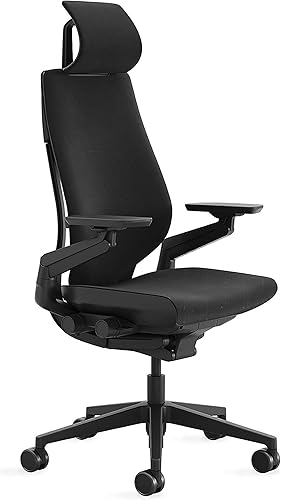
Use a headrest that adjusts to where your head sits when you're upright and working, not when you lean back to watch a video. Height and angle should adjust separately. That sounds minor until you've tried to set a fixed headrest and failed. This is the chair I've seen solve it most consistently, across the widest range of body types.
Best for head and upper-back support
Steelcase Gesture with Headrest
DEAS 8.6 out of 10
Seat height 16.3–21.5 in. Holds up to 400 lb.
The chair I recommend to people with ongoing neck and upper-back pain who spend more than six hours a day at a screen. The backrest moves with your upper back, so it stays in contact when you lean in to focus, and the headrest is the only one I've found that reliably sets up for an active working posture.
Good: a backrest that stays in contact as you shift; a headrest that adjusts in height and angle separately; top-tier build and warranty. Less good: one of the most expensive chairs we scored, so its value scores are low. If budget comes first, a certified used Gesture beats a cheaper new chair.
Score breakdown
Clinical performance9.0
I.1Neutral posture support9.2
I.2Adjustability range9.0
I.3Injury risk reduction9.0
I.4Population accommodation8.8
I.5Lumbar support quality9.2
Product quality9.2
II.1Material & construction9.3
II.2Published certification9.0
II.3Warranty vs benchmark9.5
II.4Verified user reliability9.0
Market value1.8
III.1Price vs category benchmark1.5
III.2Ergonomic value ratio2.0
Composite 8.6 on the DEAS (Desk Ergonomics Assessment Score). How we score
Cause 3 of 5
You hold still for hours: static loading
This one surprises people most: you can sit in a technically decent posture and still wreck your neck over a workday. The problem isn't always the angle. It's the duration.
Neck muscles are built to move. Hold any position, even a good one, for long enough and the fibers doing the holding tire out. The upper trapezius and the muscles at the back of the neck are the most exposed, because they work in nearly every head position, and a screen-focused posture keeps them working for hours.
A NIOSH review of more than 40 studies found strong evidence that prolonged static loading of the neck and shoulder muscles, not only extreme postures, raises the risk of neck and shoulder disorders.2 So the fix is moving more often, not sitting more perfectly.
The fix
Set a timer for every 20 to 30 minutes. Stand up, do three gentle chin tucks, walk to get water, or look out a window for 30 seconds. That's it. In the people I assess, this one change eases end-of-day neck pain, often faster than any equipment change.
The 20-20-20 rule
Every 20 minutes, look at something 20 feet away for 20 seconds. It was designed for eye strain, but moving your head to do it also breaks the static load on your neck. It's the simplest reminder that actually sticks.
When stiffness has already set in by the afternoon, cold or heat on the back of the neck can interrupt the tension-pain cycle without medication. The best option I've reviewed wraps the back of the neck and the tops of the shoulders, so it stays in contact without you holding it.

Best for afternoon stiffness
Magic Gel Neck Ice Pack
DEAS 7.3 out of 10
The neck ice pack I tell people to keep at their desk. It covers the back of the neck and the top of the shoulders at once, which matters because desk neck tension rarely stops at the base of the skull. It stays pliable straight from the freezer, which most gel packs don't.
Good: a wrap-around fit that stays put without your hands; covers neck and shoulders together; well made and reliable. Less good: relief, not a fix: it eases stiffness but doesn't change what caused it.
Score breakdown
Clinical performance6.3
I.1Neutral posture support6.5
I.2Adjustability range6.5
I.3Injury risk reduction6.5
I.4Population accommodation6.0
I.5Therapeutic temperature delivery6.0
Product quality8.6
II.1Material & construction8.5
II.2Published certification8.0
II.3Warranty vs benchmark9.0
II.4Verified user reliability9.0
Market value5.2
III.1Price vs category benchmark5.0
III.2Ergonomic value ratio5.5
Composite 7.3 on the DEAS (Desk Ergonomics Assessment Score). How we score
Cause 4 of 5
You work on a laptop without a stand
Work on a laptop as it comes, screen and keyboard as one unit, and your neck is in an impossible spot. The keyboard height that suits your hands puts the screen near chest height, which takes 30 to 40 degrees of neck flexion to see. Raise the screen to suit your neck, and the keyboard forces your shoulders up and your wrists back.
There's no posture fix for this. It's structural: the screen and the keyboard have to be separated.
The fix
A laptop stand plus an external keyboard and mouse. Screen up to eye level, keyboard down to elbow height, and the neck problem goes away. I see this constantly: someone has spent a lot on a premium chair and still has neck pain because they're working off a flat laptop.
Quick test
Sit at your laptop the way you normally work. Look straight ahead at your natural eye level, then notice where the screen actually is. If you have to drop your chin to see it, you need a stand.
Best for laptops
Roost V3 Portable Laptop Stand
DEAS 6.9 out of 10
Of the 21 laptop stands I've scored, this is the most practical. It folds to almost nothing, so people actually carry it and use it, and it lifts the screen higher than most folding stands.
Good: small enough to travel every day; several height settings. Less good: no third-party certification; does nothing for your neck without an external keyboard and mouse.
Score breakdown
Clinical performance7.6
I.1Neutral posture support8.0
I.2Adjustability range8.0
I.3Injury risk reduction7.0
I.4Population accommodation7.0
I.5Screen height and viewing angle8.0
Product quality5.5
II.1Material & construction7.0
II.2Published certification3.0
II.3Warranty vs benchmark5.0
II.4Verified user reliability7.0
Market value5.5
III.1Price vs category benchmark5.0
III.2Ergonomic value ratio6.0
Composite 6.9 on the DEAS (Desk Ergonomics Assessment Score). How we score
Cause 5 of 5
Your pillow undoes the day
You can fix the monitor, get a new chair and take breaks all day, and still wake up stiff if your pillow doesn't hold your neck's curve overnight. Eight hours with your head rolling forward or sideways means you start every workday with muscles that spent the night under low-grade load.
Your neck has a natural curve, a gentle forward arch when seen from the side. A pillow that's too flat collapses it; one that's too thick exaggerates it. Either way, the muscles and ligaments work all night to compensate, and they don't recover from the day.
For people with long-running computer neck pain, the pillow is often what finally breaks the cycle. Not because it matters more than the desk, but because it's the one part of the day nobody was managing.
The fix
Choose a pillow that keeps your head level with your spine in the position you actually sleep in, sized to the distance from your neck to your shoulder rather than to the bed. Of the 25 pillows I've scored, this one ranks highest overall, and it's the one I point people to most often.
Best for back and side sleepers
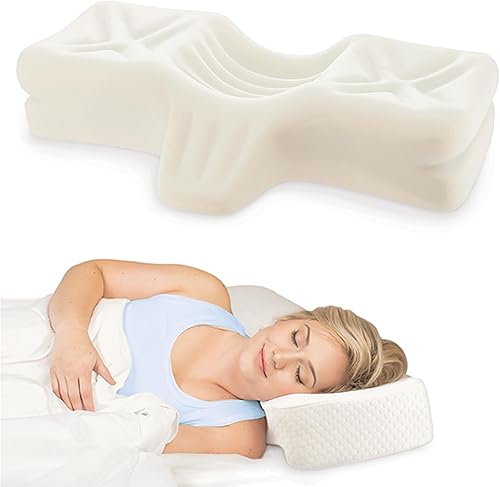
Therapeutica Orthopedic Sleeping Pillow
DEAS 7.2 out of 10
Three sizes by the distance from the base of the neck to the shoulder: petite 4.25 to 5.25 inches, average 5.25 to 6.25, large 6.25 to 7.25. Polyurethane foam; 5-year warranty.
A center hollow for back sleeping and raised sides for side sleeping, so it works in both positions instead of compromising on each. It comes in three sizes measured from the base of your neck to the edge of your shoulder, so you fit it to your frame, not to "standard" or "king."
Good: works for back and side sleepers; three sizes fitted to your frame; strong user reliability; a 5-year warranty. Less good: no third-party certification; once you pick a size, there is little to adjust.
Score breakdown
Clinical performance6.8
I.1Neutral posture support7.5
I.2Adjustability range5.5
I.3Injury risk reduction7.0
I.4Population accommodation6.0
I.5Neck and back support during rest8.0
Product quality7.0
II.1Material & construction7.5
II.2Published certification4.0
II.3Warranty vs benchmark8.0
II.4Verified user reliability8.5
Market value6.0
III.1Price vs category benchmark6.0
III.2Ergonomic value ratio6.0
Composite 7.2 on the DEAS (Desk Ergonomics Assessment Score). How we score
Set up your desk for your neck, in this order
Each step builds on the last. Set the monitor before the chair and you'll get it wrong.
- 1
Set the seat height first. Sit all the way back, feet flat, knees at roughly 90 to 100 degrees. Everything above depends on this.
- 2
Set the lumbar support at your waistline. It should meet the curve of your lower back when you sit all the way back. If it presses your mid-back, it's too high.
- 3
Set the monitor to eye level. Back against the chair, top third of the screen at or just below your natural eye line. A monitor arm makes this precise and repeatable.
- 4
Check the distance. About an arm's length, roughly 50 to 70 cm for a 24 to 27 inch screen. If you lean in to read, the text is too small or the screen is too far away.
- 5
Bring the keyboard and mouse to elbow height. Elbows near 90 degrees, shoulders relaxed, not shrugged. If you're reaching forward, bring the keyboard closer.
- 6
Set the headrest, if you have one. Light contact with the back of your head in your normal working position, not only when you recline. If it only touches when you lean back, move it up.
- 7
Set a 20 to 30 minute movement reminder. No setup removes the need for breaks. Holding still is a risk on its own, whatever the posture.
Progressive or bifocal lenses?
Lower the monitor 2 to 3 inches below the usual eye-level mark. You read through the bottom of the lens by looking down, so the standard height makes you tilt your head back to see, which causes its own neck problem.
Which pattern sounds like yours?
A base-of-skull ache that builds through the day
Feels like
Dull pressure at the base of the skull, often spreading into the temples by afternoon. Like a headache that starts lower.
What helps
Raising the screen to eye level (Cause 1). This pattern usually eases faster than any other once the load comes off.
A tight band across the top of the shoulder
Feels like
Rope-like tension from the neck into the top of the shoulder, on one or both sides, still there in the evening and tender to the touch.
What helps
Movement breaks every 20 to 30 minutes (Cause 3), with the mouse and keyboard close enough that your shoulders can drop. Breaks ease it faster than stretching alone.
Stiffness that's worst in the morning
Feels like
Hard to turn your head fully first thing, easing after an hour or two of moving. It tends to come back for weeks.
What helps
The pillow (Cause 5). Daytime changes alone rarely fix stiffness that's worst when you wake up.
Common questions
How long until my neck feels better after fixing my monitor height?
Most people I assess notice less end-of-day neck fatigue within one to two weeks of fixing the monitor, as long as they also take regular movement breaks. The longer-term changes behind a chronic forward head posture take longer to reverse: typically six to twelve weeks of a corrected setup and neck strengthening.
Should I use ice or heat for computer-related neck pain?
For fresh tightness or soreness from the same day, cold works better: it calms local inflammation and interrupts the pain-spasm cycle. For stiffness that has built up over weeks, heat before activity helps restore circulation and let the muscles lengthen again. Heat as the first response to fresh soreness tends to add swelling rather than ease it.
Can neck stretches replace an ergonomic fix?
No, and it's one of the most common mistakes I see. Stretching relieves symptoms for a while, but if you go back to the same forward-loaded posture every day, the muscles tighten again within hours. Stretches and movement complement a corrected setup; they don't replace it. Fix the load first, then stretch to manage what's left.
What if my pain includes numbness or tingling in my arms?
That changes the picture. Numbness or tingling in the arm or hand alongside neck pain can mean a nerve root in the neck is involved, and that needs a healthcare provider's assessment before you rely on ergonomics. Don't try to self-manage symptoms that travel down the arm. Get evaluated first.
Is a headset safer for my neck than holding a phone?
Yes, by a lot. Cradling a phone between your ear and shoulder bends the neck hard to the side and holds the muscles there under tension. It's one of the worst positions you can hold. Any headset or earbuds beat it, and a headset also frees both hands, which takes extra load off the arms and shoulders.
How many products did Desk Doctor score for this article?
121, across the five categories here: 24 monitor arms, 41 office chair models, 10 neck ice and heat packs, 25 ergonomic pillows and 21 laptop stands. Each is rated on the 11 measures of the DEAS (Desk Ergonomics Assessment Score), and only the top scorers for each cause appear above. Full rankings are in the quick guides for monitor arms, ergonomic chairs, ice and heat therapy, ergonomic pillows and laptop stands.
References
- Hansraj KK. Assessment of stresses in the cervical spine caused by posture and position of the head. Surg Technol Int. 2014;25:277–279. PMID: 25393825. PubMed
- Bernard BP, editor. Musculoskeletal Disorders and Workplace Factors: A Critical Review of Epidemiologic Evidence for Work-Related Musculoskeletal Disorders of the Neck, Upper Extremity, and Low Back. Cincinnati: NIOSH; 1997. DHHS (NIOSH) Publication No. 97-141. CDC Stacks record
This article is general education, not a substitute for individual medical advice, diagnosis or treatment. If neck pain comes with numbness, tingling, weakness or pain that travels into the arm or hand, see a qualified healthcare provider before changing your workstation or treatment.
AJ Prince, HEAS
Healthcare Ergonomic Assessment Specialist. Conducts over a thousand workstation assessments a year across a multi-campus health system, and authored the DEAS standard used to rank every product on this site.


