Desk painThe Top 5 Reasons Desk Workers Get Headaches
Plenty of desk headaches aren't stress at all. They're mechanical: a posture or a visual load your desk holds you in for hours. The five I see most, and the fix for each.
By AJ Prince, HEAS
Healthcare Ergonomic Assessment Specialist. Updated 22 Apr 2026. A 10-minute read.
Desk Doctor earns a commission on some links, at no cost to you. It never changes a score. How we make money
Most people I see for desk headaches blame stress: the boss, the workload, too much coffee, not enough sleep. Then they sit down at a mock-up of their desk, and within a couple of minutes I can usually guess what time of day their headache starts.
A headache that builds through the afternoon, sits at the base of the skull or behind the eyes, and eases on weekends often has a mechanical side: a posture or a visual load your workstation holds you in for hours. Take the load away and that kind of headache usually backs off.
These are the five causes I see most in assessments, with the fix for each. Start with the first: it's the one I find most often.
Cause 1 of 5
Your monitor is too low
This is the headache that starts at the base of the skull, climbs the back of the head and sometimes settles behind one eye. Most people call it a tension headache. When it comes from the joints, discs or soft tissues of the neck, the international headache classification calls it cervicogenic; when tight neck muscles are the driver, it counts as tension-type.1 Either way, the neck is where it starts.
The mechanics are simple. Your head weighs 10 to 12 pounds balanced over your shoulders. Tip it forward to read a low screen and the muscles at the back of your neck pull harder to keep it from dropping: a widely cited 2014 model put the effective load at about 27 pounds with the head tipped 15 degrees forward and about 60 pounds at 60 degrees.2 In a 2025 study of 531 office workers, a deep learning model could pick out people with neck-related headache from photos of how they habitually sat, relying mostly on the neck.3 The link isn't settled, though: people with chronic tension-type headache carry their heads further forward than people without it,4 but a later study by the same team found head posture didn't track how often the headaches came.5
The fix
Raise the screen so its top edge sits level with your eyes and you look slightly down at the middle.6 For most desks that's a few inches. On a laptop, the screen has to go up and the keyboard has to come off it.

The monitor arm I recommend most
Humanscale M8.1 Monitor Arm
DEAS 8.2 out of 10
A spring counterbalance, no gas spring; holds 6 to 28 lb with up to 12 inches of height travel. SCS Indoor Advantage Gold; 15-year warranty.
If you've been stacking books under your monitor, this is the upgrade. A counterbalance, not a gas spring, holds the screen exactly where you set it, so it stays at eye level instead of drifting, and the range fits shorter and taller people. It's expensive, and the price score shows it.
Good: holds eye level precisely, with no sag or drift; the range fits shorter and taller users; a 15-year warranty. Less good: a premium price, its weakest score; one monitor per arm.
Score breakdown
Clinical performance8.6
I.1Neutral posture support9.0
I.2Adjustability range8.5
I.3Injury risk reduction8.5
I.4Population accommodation8.0
I.5Eye-level range and tilt precision9.0
Product quality8.8
II.1Material & construction9.0
II.2Published certification9.0
II.3Warranty vs benchmark9.5
II.4Verified user reliability7.5
Market value3.2
III.1Price vs category benchmark3.0
III.2Ergonomic value ratio3.5
Composite 8.2 on the DEAS (Desk Ergonomics Assessment Score). How we score

If you work on a laptop
Roost V3 Portable Laptop Stand
DEAS 6.9 out of 10
Weighs 6 ounces; lifts the screen 6.5 to 12.5 inches, with 7 height settings; folds flat.
No monitor arm helps a laptop: the screen is fused to the keyboard. Lift the laptop and add an external keyboard and mouse. This is the stand I recommend most for people who move around: it lifts the screen high enough to change your neck angle, then folds into a laptop bag.
Good: raises the screen higher than most folding stands; small enough to carry every day; 7 height settings. Less good: no third-party certification; does nothing for your neck unless you add an external keyboard and mouse.
Score breakdown
Clinical performance7.6
I.1Neutral posture support8.0
I.2Adjustability range8.0
I.3Injury risk reduction7.0
I.4Population accommodation7.0
I.5Screen height and viewing angle8.0
Product quality5.5
II.1Material & construction7.0
II.2Published certification3.0
II.3Warranty vs benchmark5.0
II.4Verified user reliability7.0
Market value5.5
III.1Price vs category benchmark5.0
III.2Ergonomic value ratio6.0
Composite 6.9 on the DEAS (Desk Ergonomics Assessment Score). How we score
Quick test
If firm pressure on the muscles just under the base of your skull brings your headache on, it's coming from your neck. Start here.
Cause 2 of 5
Glare and dim light strain your eyes
This one feels like pressure behind the eyes or across the forehead, often with blur and dry, gritty eyes. It's digital eye strain, or computer vision syndrome: a 2024 review of 103 studies put it at about 69% of computer users, and headache is one of its most common symptoms.7
Your eyes hold their focus at one near distance for hours, and the lighting around the screen often makes it worse. A window or the ceiling lights reflecting off the screen make you squint; a dark room behind a bright screen makes your eyes readjust every time you look away.
The fix
Light the desk, not the screen. Set the monitor at a right angle to the window,6 aim a lamp at your keyboard and papers rather than the monitor,8 and aim for roughly 300 to 500 lux at the desk; a free light meter app will tell you where you are. Then give your eyes a break: every 20 minutes, look at something 20 feet away for 20 seconds. In a small study without a control group, two weeks of reminders eased eye strain.9

The lamp I recommend most
BenQ e-Reading LED Desk Lamp
DEAS 7.4 out of 10
The asymmetric reflector spreads light across the desk in front of the monitor without throwing glare into your eyes or onto the screen. For people with headaches who can't stand bright lamps, this is the one that actually gets used long-term.
Good: lights the desk without screen glare; color temperature from warm to cool; wide spread; auto-dimming. Less good: above the category price benchmark; the clamp needs a desk edge; a 1-year warranty in the US.
Score breakdown
Clinical performance7.3
I.1Neutral posture support7.5
I.2Adjustability range7.0
I.3Injury risk reduction7.0
I.4Population accommodation6.5
I.5Illumination and glare control8.5
Product quality7.4
II.1Material & construction8.0
II.2Published certification7.0
II.3Warranty vs benchmark6.5
II.4Verified user reliability8.0
Market value4.8
III.1Price vs category benchmark4.5
III.2Ergonomic value ratio5.0
Composite 7.4 on the DEAS (Desk Ergonomics Assessment Score). How we score
What about blue light glasses?
Blue light glasses aren't the fix: the 2023 Cochrane review found they may make no short-term difference to eye strain from computer work.10 More on blue light glasses.
Cause 3 of 5
You cradle the phone on your shoulder
This one is often easy to spot: the headache sits on one side, at the temple or above the ear, on the side where you pin the phone. Ask about calls and you get a tired yes.
Pinning a phone between your ear and shoulder bends your neck sideways, hikes the shoulder up and holds both there for the length of the call. OSHA says long calls with the phone pinched between shoulder and head may cause stress and neck pain,11 and in a prospective study of computer users, using a telephone shoulder rest went with more neck and shoulder problems.12
The fix
A headset, before the second call of the day. The assessment recommends one once calls add up to two hours a day. Two ear cups share the weight, and a boom microphone means you never hold anything.

For call-heavy days
Jabra Evolve2 85
DEAS 7.1 out of 10
Wireless, over both ears, with a retractable boom microphone and noise cancelling; 286 g; up to 32 hours of music with noise cancelling on. A version certified for Teams; 2-year warranty.
If you're on calls for hours, this is the one I'd put on you: two ear cups to share the weight, a boom microphone that sits by your mouth, and noise cancelling for a busy room. It has the best weight and ear-pressure score of any headset we've rated.
Good: the best weight and ear-pressure score among headsets; a boom microphone; noise cancelling; handles calls and music. Less good: priced well above the category benchmark, so its value scores are its weakest; more headset than you need for an hour of calls a day.
Score breakdown
Clinical performance6.9
I.1Neutral posture support7.5
I.2Adjustability range6.5
I.3Injury risk reduction6.5
I.4Population accommodation6.5
I.5Weight distribution and ear pressure7.5
Product quality7.1
II.1Material & construction8.0
II.2Published certification6.0
II.3Warranty vs benchmark7.0
II.4Verified user reliability7.5
Market value3.8
III.1Price vs category benchmark3.5
III.2Ergonomic value ratio4.0
Composite 7.1 on the DEAS (Desk Ergonomics Assessment Score). How we score
Cause 4 of 5
Your pillow sets up a morning headache
If you wake up with the headache already there, your desk isn't the first suspect. The clue is the timing: a headache that builds between lunch and the end of the day points at your desk; one that's there when you open your eyes points at the night.
Pillow height is the usual culprit. Too high, and a side sleeper's neck bends sideways all night; too flat, and a back sleeper's head drops back. The trials favor the right height and a supportive material over any particular shape: in a 2021 meta-analysis, latex and spring pillows reduced neck pain and waking symptoms in people with chronic neck pain,13 and in a blinded trial of side sleepers, a contoured foam pillow did no better than a regular foam one, while latex pillows did best for waking headache.14
The fix
A pillow that keeps your head level with your spine in the position you sleep in: higher at the sides for side sleeping, lower in the middle for back sleeping. Get the height right for your frame first.
For morning headaches
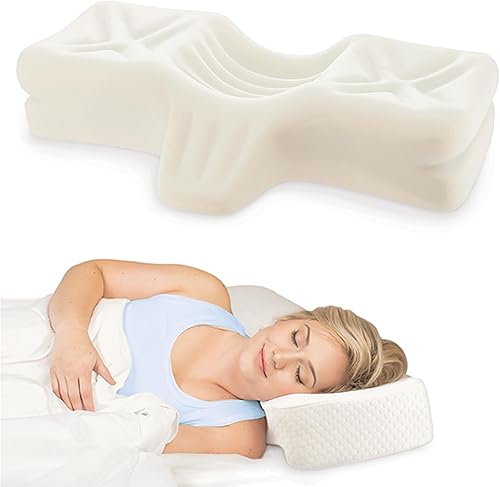
Therapeutica Orthopedic Sleeping Pillow
DEAS 7.2 out of 10
Three sizes by the distance from the base of the neck to the shoulder: petite 4.25 to 5.25 inches, average 5.25 to 6.25, large 6.25 to 7.25. Polyurethane foam; 5-year warranty.
A center hollow for back sleeping and raised sides for side sleeping, in three sizes measured from the base of your neck to the edge of your shoulder, so the height fits your frame. In the trials, height and material matter more than shape, and this one gets the height right.
Good: works for back and side sleepers; three sizes fitted to your frame; strong user reliability; a 5-year warranty. Less good: contoured foam, which one trial found no better than a regular foam pillow; no third-party certification; a week or two to get used to.
Score breakdown
Clinical performance6.8
I.1Neutral posture support7.5
I.2Adjustability range5.5
I.3Injury risk reduction7.0
I.4Population accommodation6.0
I.5Neck and back support during rest8.0
Product quality7.0
II.1Material & construction7.5
II.2Published certification4.0
II.3Warranty vs benchmark8.0
II.4Verified user reliability8.5
Market value6.0
III.1Price vs category benchmark6.0
III.2Ergonomic value ratio6.0
Composite 7.2 on the DEAS (Desk Ergonomics Assessment Score). How we score
Give it time
In my experience, a new pillow takes about a week to get used to. Give it two to three weeks before you judge it.
Cause 5 of 5
Your shoulders hold up your arms all day
This is the slow burn: a dull, band-like ache that wraps from the back of the neck to the temples and forehead, builds across the day and is worst on long days. Tension-type headache is the most common headache there is, affecting about 26% of people worldwide against 14% for migraine.15 What I usually see in the assessment is shoulders hitched up and forward, with armrests too low or too wide to catch the forearms.
When nothing supports your forearms, the muscles across the top of your shoulders hold up your arms, each about 5% of your body weight,16 for as long as you type. Arm supports lower shoulder muscle activity in lab studies,17,18 and in a prospective study of computer users, armrests on the chair went with a lower risk of neck and shoulder problems.12 Those muscles respond to training too: in one trial, two minutes of daily strength work cut headache frequency by 43%.19
The fix
Set the armrests so they support your forearms with your shoulders relaxed and your upper arms close to your body,20 elbows bent about 90 degrees or a little more.21 If yours won't go there, it's the chair, not you.

Armrests that catch your forearms
Steelcase Gesture
DEAS 8.6 out of 10
Armrests that pivot through 360 degrees; seat 16.3 to 21.5 inches high, depth 15.75 to 18.75; rated to 400 lb. BIFMA level 3; 12-year multi-shift warranty.
If you've ruled out the other four and still get an end-of-day tension headache, look at your armrests. The Gesture's arms move in every direction, so they meet your forearms where you actually type and let your shoulders drop.
Good: arms that move in every direction; the widest adjustment range of any chair we've scored; rated to 400 lb; a 12-year multi-shift warranty. Less good: priced far above the category benchmark; adjustable lumbar costs extra.
Score breakdown
Clinical performance9.0
I.1Neutral posture support9.2
I.2Adjustability range9.0
I.3Injury risk reduction9.0
I.4Population accommodation8.8
I.5Lumbar support quality9.2
Product quality9.2
II.1Material & construction9.3
II.2Published certification9.0
II.3Warranty vs benchmark9.5
II.4Verified user reliability9.0
Market value1.8
III.1Price vs category benchmark1.5
III.2Ergonomic value ratio2.0
Composite 8.6 on the DEAS (Desk Ergonomics Assessment Score). How we score
The headache-proof desk, in order
Start at the chair and work up: each step sets up the next.
- 1
Set the chair. Feet flat on the floor or a footrest, thighs roughly level.21
- 2
Drop the armrests until your shoulders relax. Forearms supported, upper arms close to your body.20
- 3
Bring the keyboard to elbow height. Flat or tilted slightly away from you, close enough that you don't reach.
- 4
Raise the screen. Top edge level with your eyes, so you look slightly down at the middle.6
- 5
Set it an arm's length away. At least 20 inches from your eyes.6
- 6
Light the desk, not the screen. A lamp aimed at the keyboard and papers,8 the screen at a right angle to the window.6
- 7
Headset before the second call. No cradling.
The free one
Every 30 minutes, look away, stand up and roll your shoulders back. It's the cheapest fix on this page.
Which headache do you have?
From your neck
Feels like
Starts at the base of the skull and climbs the back of the head, sometimes settling behind one eye. Worse in the afternoon, better on weekends.
What helps
Raise the monitor (Cause 1).
Eye strain
Feels like
Pressure behind the eyes or across the forehead, with dry, gritty eyes and blur after screen time.
What helps
Light the desk, take 20-20-20 breaks, and keep the screen at arm's length (Cause 2).
Tension-type
Feels like
A dull band from the neck around to the forehead that builds through the day.
What helps
Armrests that take your forearms, and movement breaks (Cause 5).
When to see a doctor
A sudden, severe headache, one that wakes you at night, or one that comes with vision changes, weakness, confusion, or fever and a stiff neck needs a doctor, not a desk change.
Common questions
How do I know if my headache is from my desk?
Three signs point that way: it builds through the afternoon, it eases on weekends and days off, and it sits at the base of the skull or behind the eyes. A headache that wakes you at night, comes on suddenly and severely, or comes with vision changes or weakness is a different matter: see a doctor.
Do blue light glasses help with screen headaches?
Probably not: the 2023 Cochrane review found blue light filtering lenses may make no short-term difference to eye strain from computer work.10 Screen distance, lighting and breaks do more. If a pair seems to help you, the tint cutting overall glare is the likelier reason.
How long until my headaches improve once I fix my setup?
In my experience, headaches from the neck and from tense shoulders often start easing within a week or two of fixing the screen and the armrests. Morning headaches take two to three weeks, because a new pillow takes getting used to. If nothing has changed after about six weeks, the cause probably isn't your desk: see a doctor.
I have a standing desk. Will that stop the headaches?
Not on its own. Standing changes how your back is loaded, not where your screen is. If the monitor is still below eye level when you stand, you'll get the same neck headache. Reset the screen height every time you change position.
Will an ergonomic mouse or keyboard help with headaches?
Indirectly. A keyboard at elbow height and a mouse close beside it stop you hiking your shoulders, which feeds tension headaches. But they come second: fix the screen height, the armrests and the lighting first.
How many products did you score for this guide?
These six come from categories we score in full: 24 monitor arms, 21 laptop stands, 25 desk lamps, 37 headsets, 25 ergonomic pillows and 39 chairs. They're the ones that best match the cause behind each headache, not always the top scorer in each category.
References
- Headache Classification Committee of the International Headache Society. The International Classification of Headache Disorders, 3rd edition. Cephalalgia. 2018;38(1):1–211. doi:10.1177/0333102417738202
- Hansraj KK. Assessment of stresses in the cervical spine caused by posture and position of the head. Surg Technol Int. 2014;25:277–279. PMID: 25393825. PubMed
- Hwang U, Han J, Kwon O, Chu YS, Yang S. Classifying office workers with and without cervicogenic headache or neck and shoulder pain using posture-based deep learning models: a multicenter retrospective study. Front Pain Res. 2025;6. doi:10.3389/fpain.2025.1614143
- Fernández-de-las-Peñas C, Alonso-Blanco C, Cuadrado ML, Pareja JA. Forward head posture and neck mobility in chronic tension-type headache: a blinded, controlled study. Cephalalgia. 2006;26(3):314–319. PMID: 16472338. doi:10.1111/j.1468-2982.2005.01042.x
- Fernández-de-las-Peñas C, et al. Neck mobility and forward head posture are not related to headache parameters in chronic tension-type headache. Cephalalgia. 2007;27(2):158–164. PMID: 17257237. doi:10.1111/j.1468-2982.2006.01247.x
- OSHA. Computer Workstations eTool: monitors. osha.gov
- Ccami-Bernal F, Soriano-Moreno DR, Romero-Robles MA, et al. Prevalence of computer vision syndrome: a systematic review and meta-analysis. J Optom. 2024;17(1):100482. doi:10.1016/j.optom.2023.100482
- OSHA. Computer Workstations eTool: workstation environment (lighting and glare). osha.gov
- Talens-Estarelles C, Cerviño A, García-Lázaro S, Fogelton A, Sheppard A, Wolffsohn JS. The effects of breaks on digital eye strain, dry eye and binocular vision: testing the 20-20-20 rule. Cont Lens Anterior Eye. 2023;46(2):101744. PMID: 35963776. doi:10.1016/j.clae.2022.101744
- Singh S, Keller PR, Busija L, McMillan P, Makrai E, Lawrenson JG, Hull CC, Downie LE. Blue-light filtering spectacle lenses for visual performance, sleep, and macular health in adults. Cochrane Database Syst Rev. 2023. doi:10.1002/14651858.CD013244.pub2
- OSHA. Computer Workstations eTool: telephones. osha.gov
- Marcus M, Gerr F, Monteilh C, Ortiz DJ, Gentry E, Cohen S, Edwards A, Ensor C, Kleinbaum D. A prospective study of computer users: II. Postural risk factors for musculoskeletal symptoms and disorders. Am J Ind Med. 2002;41(4):236–249. PMID: 11920967. doi:10.1002/ajim.10067
- Pang JCY, Tsang SMH, Fu ACL. The effects of pillow designs on neck pain, waking symptoms, neck disability, sleep quality and spinal alignment in adults: a systematic review and meta-analysis. Clin Biomech (Bristol). 2021;85:105353. PMID: 33895703. doi:10.1016/j.clinbiomech.2021.105353
- Gordon SJ, Grimmer-Somers KA, Trott PH. Pillow use: the behavior of cervical stiffness, headache and scapular/arm pain. J Pain Res. 2010;3:137–145. doi:10.2147/JPR.S10880
- Stovner LJ, Hagen K, Linde M, Steiner TJ. The global prevalence of headache: an update, with analysis of the influences of methodological factors on prevalence estimates. J Headache Pain. 2022;23(1):34. doi:10.1186/s10194-022-01402-2
- de Leva P. Adjustments to Zatsiorsky-Seluyanov's segment inertia parameters. J Biomech. 1996;29(9):1223–1230. doi:10.1016/0021-9290(95)00178-6
- Feng Y, Grooten W, Wretenberg P, Arborelius UP. Effects of arm support on shoulder and arm muscle activity during sedentary work. Ergonomics. 1997;40(8):834–848. PMID: 9336107. doi:10.1080/001401397187829
- Gonçalves JS, et al. The effects of forearm support and shoulder posture on upper trapezius and anterior deltoid activity. J Phys Ther Sci. 2017. PMID: 28603347. PubMed
- Andersen LL, Mortensen OS, Zebis MK, Jensen RH, Poulsen OM. Effect of brief daily exercise on headache among adults: secondary analysis of a randomized controlled trial. Scand J Work Environ Health. 2011;37(6):547–550. doi:10.5271/sjweh.3170
- OSHA. Computer Workstations eTool: chairs. osha.gov
- OSHA. Computer Workstations eTool: neutral working postures. osha.gov
This article is general education, not medical advice. A sudden or severe headache, or one with vision changes, weakness, confusion, fever or a stiff neck, needs prompt medical care; for headaches that persist, see a licensed clinician.
AJ Prince, HEAS
Healthcare Ergonomic Assessment Specialist. Conducts over a thousand workstation assessments a year across a multi-campus health system, and authored the DEAS standard used to rank every product on this site.
