Ergonomic productsThe Best Ergonomic Mice of 2026
A flat mouse holds your forearm twisted palm-down and your wrist angled toward your little finger, hour after hour. A vertical mouse or a trackball takes most of that away. I scored 49 on the DEAS standard; these are the ten I'd put on your desk, then the full ranking.

By AJ Prince, HEAS
Healthcare Ergonomic Assessment Specialist. Updated 23 Apr 2026. A 9-minute read.
Desk Doctor earns a commission on some links, at no cost to you. It never changes a score. How we make money
When the side of someone's hand goes numb by mid-afternoon, or their forearm feels tight after a couple of hours at the desk, the mouse is one of the first things I look at. A standard flat mouse turns your forearm fully palm-down and angles your wrist toward your little finger, and you hold that position for as long as your hand is on it.
The fix is shape. A vertical mouse turns your hand up toward a handshake, so the forearm doesn't have to twist; a trackball stays put while your fingers or thumb roll the ball, so your arm stops travelling. What I check is whether a mouse actually delivers that position for the hand it's made for, and whether it holds up to eight hours a day.
Of the 49 mice I scored, the  Contour Unimouse comes out on top, and the
 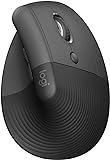 Logitech Lift is the one I hand people with smaller hands. Size matters as much as style here, so measure your hand first: the fit finder on our mouse ranking does it with a credit card.
All 49, ranked
Best to worst by DEAS score, left- and right-handed versions listed separately. Tap a row for its full score breakdown; the quick guide filters the same list to your hand size and mousing hand.
#ProductDEAS
1  Contour Unimouse Right Best overall Lift (vertical) 8.0 DEAS
Clinical performance8.4
I.1Neutral posture support9.0
I.2Adjustability range8.5
I.3Injury risk reduction9.0
I.4Population accommodation6.5
I.5Wrist neutral and grip position9.0
Product quality5.1
II.1Material & construction7.0
II.2Published certification2.5
II.3Warranty vs benchmark5.0
II.4Verified user reliability6.0
Market value6.8
III.1Price vs category benchmark6.5
III.2Ergonomic value ratio7.0
2  Contour Unimouse Left Best overall Lift (vertical) 8.0 DEAS
Clinical performance8.4
I.1Neutral posture support9.0
I.2Adjustability range8.5
I.3Injury risk reduction9.0
I.4Population accommodation6.5
I.5Wrist neutral and grip position9.0
Product quality5.1
II.1Material & construction7.0
II.2Published certification2.5
II.3Warranty vs benchmark5.0
II.4Verified user reliability6.0
Market value6.8
III.1Price vs category benchmark6.5
III.2Ergonomic value ratio7.0
3  Logitech Lift Right Best for smaller hands Lift (vertical) 7.7 DEAS
Clinical performance7.4
I.1Neutral posture support8.5
I.2Adjustability range6.5
I.3Injury risk reduction8.0
I.4Population accommodation5.5
I.5Wrist neutral and grip position8.5
Product quality5.8
II.1Material & construction6.5
II.2Published certification3.0
II.3Warranty vs benchmark5.0
II.4Verified user reliability8.5
Market value8.0
III.1Price vs category benchmark8.0
III.2Ergonomic value ratio8.0
4  Logitech Lift Left Best for smaller hands Lift (vertical) 7.7 DEAS
Clinical performance7.4
I.1Neutral posture support8.5
I.2Adjustability range6.5
I.3Injury risk reduction8.0
I.4Population accommodation5.5
I.5Wrist neutral and grip position8.5
Product quality5.8
II.1Material & construction6.5
II.2Published certification3.0
II.3Warranty vs benchmark5.0
II.4Verified user reliability8.5
Market value8.0
III.1Price vs category benchmark8.0
III.2Ergonomic value ratio8.0
5  R-Go HE Break Vertical Mouse, left-handed Best for left-handers Lift (vertical) 7.5 DEAS
Clinical performance8.0
I.1Neutral posture support9.0
I.2Adjustability range6.5
I.3Injury risk reduction8.5
I.4Population accommodation7.5
I.5Wrist neutral and grip position8.5
Product quality5.9
II.1Material & construction7.0
II.2Published certification3.0
II.3Warranty vs benchmark6.5
II.4Verified user reliability7.0
Market value6.0
III.1Price vs category benchmark5.5
III.2Ergonomic value ratio6.5
6  Logitech MX Vertical Best for larger hands Lift (vertical) 7.4 DEAS
Clinical performance7.5
I.1Neutral posture support8.5
I.2Adjustability range6.5
I.3Injury risk reduction8.0
I.4Population accommodation6.0
I.5Wrist neutral and grip position8.5
Product quality5.4
II.1Material & construction6.5
II.2Published certification3.0
II.3Warranty vs benchmark5.0
II.4Verified user reliability7.0
Market value7.5
III.1Price vs category benchmark7.5
III.2Ergonomic value ratio7.5
7  Evoluent VerticalMouse 4 Right Best wired vertical mouse Lift (vertical) 7.1 DEAS
Clinical performance7.3
I.1Neutral posture support8.5
I.2Adjustability range6.0
I.3Injury risk reduction8.0
I.4Population accommodation5.5
I.5Wrist neutral and grip position8.5
Product quality4.9
II.1Material & construction6.0
II.2Published certification2.5
II.3Warranty vs benchmark5.0
II.4Verified user reliability6.0
Market value6.8
III.1Price vs category benchmark6.5
III.2Ergonomic value ratio7.0
8  Evoluent VerticalMouse 4 Left Best wired vertical mouse Lift (vertical) 7.1 DEAS
Clinical performance7.3
I.1Neutral posture support8.5
I.2Adjustability range6.0
I.3Injury risk reduction8.0
I.4Population accommodation5.5
I.5Wrist neutral and grip position8.5
Product quality4.9
II.1Material & construction6.0
II.2Published certification2.5
II.3Warranty vs benchmark5.0
II.4Verified user reliability6.0
Market value6.8
III.1Price vs category benchmark6.5
III.2Ergonomic value ratio7.0
9  Logitech MX Ergo Trackball 7.0 DEAS
Clinical performance7.2
I.1Neutral posture support8.0
I.2Adjustability range6.5
I.3Injury risk reduction7.5
I.4Population accommodation6.0
I.5Wrist neutral and grip position8.0
Product quality5.6
II.1Material & construction7.0
II.2Published certification3.0
II.3Warranty vs benchmark5.0
II.4Verified user reliability7.5
Market value6.2
III.1Price vs category benchmark6.0
III.2Ergonomic value ratio6.5
10  Logitech MX Ergo S Best thumb trackball Trackball 7.0 DEAS
Clinical performance7.2
I.1Neutral posture support8.0
I.2Adjustability range6.5
I.3Injury risk reduction7.5
I.4Population accommodation6.0
I.5Wrist neutral and grip position8.0
Product quality5.6
II.1Material & construction7.0
II.2Published certification3.0
II.3Warranty vs benchmark5.0
II.4Verified user reliability7.5
Market value6.2
III.1Price vs category benchmark6.0
III.2Ergonomic value ratio6.5
Show all 49
11  Logitech Trackman Marble Best value trackball Trackball 7.0 DEAS
Clinical performance6.7
I.1Neutral posture support7.5
I.2Adjustability range5.5
I.3Injury risk reduction7.0
I.4Population accommodation6.0
I.5Wrist neutral and grip position7.5
Product quality5.4
II.1Material & construction6.5
II.2Published certification3.0
II.3Warranty vs benchmark5.0
II.4Verified user reliability7.0
Market value8.0
III.1Price vs category benchmark8.5
III.2Ergonomic value ratio7.5
12  Kensington Expert Mouse Wireless Trackball Trackball 7.0 DEAS
Clinical performance7.1
I.1Neutral posture support8.0
I.2Adjustability range6.0
I.3Injury risk reduction7.5
I.4Population accommodation6.0
I.5Wrist neutral and grip position8.0
Product quality5.5
II.1Material & construction7.0
II.2Published certification3.0
II.3Warranty vs benchmark5.0
II.4Verified user reliability7.0
Market value6.5
III.1Price vs category benchmark6.5
III.2Ergonomic value ratio6.5
13  Kensington SlimBlade Pro Trackball Best big-ball trackball Trackball 7.0 DEAS
Clinical performance7.1
I.1Neutral posture support8.0
I.2Adjustability range6.0
I.3Injury risk reduction7.5
I.4Population accommodation6.0
I.5Wrist neutral and grip position8.0
Product quality5.2
II.1Material & construction6.5
II.2Published certification3.0
II.3Warranty vs benchmark5.0
II.4Verified user reliability6.5
Market value6.2
III.1Price vs category benchmark6.0
III.2Ergonomic value ratio6.5
14  ELECOM EX-G Left Trackball Best left-handed trackball Trackball 7.0 DEAS
Clinical performance6.9
I.1Neutral posture support8.0
I.2Adjustability range5.5
I.3Injury risk reduction7.5
I.4Population accommodation6.0
I.5Wrist neutral and grip position7.5
Product quality5.1
II.1Material & construction6.0
II.2Published certification2.5
II.3Warranty vs benchmark5.0
II.4Verified user reliability7.0
Market value8.0
III.1Price vs category benchmark8.5
III.2Ergonomic value ratio7.5
15  Evoluent VMC Vertical Mouse, wireless Copy and paste built in Lift (vertical) 6.9 DEAS
Clinical performance7.0
I.1Neutral posture support8.0
I.2Adjustability range6.0
I.3Injury risk reduction7.5
I.4Population accommodation5.5
I.5Wrist neutral and grip position8.0
Product quality4.5
II.1Material & construction6.0
II.2Published certification2.5
II.3Warranty vs benchmark5.0
Market value7.0
III.1Price vs category benchmark7.0
III.2Ergonomic value ratio7.0
16  Anker Vertical Ergonomic Mouse Wireless Lift (vertical) 6.8 DEAS
Clinical performance6.6
I.1Neutral posture support7.5
I.2Adjustability range5.5
I.3Injury risk reduction7.0
I.4Population accommodation5.5
I.5Wrist neutral and grip position7.5
Product quality4.5
II.1Material & construction5.5
II.2Published certification2.0
II.3Warranty vs benchmark4.5
II.4Verified user reliability6.0
Market value8.5
III.1Price vs category benchmark9.0
III.2Ergonomic value ratio8.0
17  Anker Vertical Ergonomic Mouse Wired Lift (vertical) 6.8 DEAS
Clinical performance6.6
I.1Neutral posture support7.5
I.2Adjustability range5.5
I.3Injury risk reduction7.0
I.4Population accommodation5.5
I.5Wrist neutral and grip position7.5
Product quality4.5
II.1Material & construction5.5
II.2Published certification2.0
II.3Warranty vs benchmark4.5
II.4Verified user reliability6.0
Market value8.5
III.1Price vs category benchmark9.0
III.2Ergonomic value ratio8.0
18  Microsoft Sculpt Ergonomic Mouse Standard ergonomic 6.8 DEAS
Clinical performance6.3
I.1Neutral posture support7.0
I.2Adjustability range5.5
I.3Injury risk reduction6.5
I.4Population accommodation6.0
I.5Wrist neutral and grip position6.5
Product quality5.4
II.1Material & construction6.5
II.2Published certification3.0
II.3Warranty vs benchmark5.0
II.4Verified user reliability7.0
Market value7.0
III.1Price vs category benchmark7.5
III.2Ergonomic value ratio6.5
19  Razer Pro Click V2 Vertical Lift (vertical) 6.8 DEAS
Clinical performance7.1
I.1Neutral posture support8.0
I.2Adjustability range6.5
I.3Injury risk reduction7.5
I.4Population accommodation5.5
I.5Wrist neutral and grip position8.0
Product quality5.1
II.1Material & construction6.5
II.2Published certification3.0
II.3Warranty vs benchmark5.0
II.4Verified user reliability6.0
Market value5.2
III.1Price vs category benchmark5.0
III.2Ergonomic value ratio5.5
20  Kensington Pro Fit Left Ergo Standard ergonomic 6.8 DEAS
Clinical performance6.4
I.1Neutral posture support7.0
I.2Adjustability range5.5
I.3Injury risk reduction6.5
I.4Population accommodation6.5
I.5Wrist neutral and grip position6.5
Product quality5.4
II.1Material & construction6.5
II.2Published certification3.0
II.3Warranty vs benchmark5.0
II.4Verified user reliability7.0
Market value6.8
III.1Price vs category benchmark7.0
III.2Ergonomic value ratio6.5
21  MEETION Left Vertical Mouse Lift (vertical) 6.8 DEAS
Clinical performance6.8
I.1Neutral posture support8.0
I.2Adjustability range5.5
I.3Injury risk reduction7.5
I.4Population accommodation5.5
I.5Wrist neutral and grip position7.5
Product quality4.5
II.1Material & construction5.5
II.2Published certification2.0
II.3Warranty vs benchmark4.5
II.4Verified user reliability6.0
Market value8.5
III.1Price vs category benchmark9.0
III.2Ergonomic value ratio8.0
22  Evoluent VerticalMouse D Right Lift (vertical) 6.7 DEAS
Clinical performance7.3
I.1Neutral posture support8.5
I.2Adjustability range6.0
I.3Injury risk reduction8.0
I.4Population accommodation5.5
I.5Wrist neutral and grip position8.5
Product quality4.8
II.1Material & construction6.0
II.2Published certification2.5
II.3Warranty vs benchmark5.0
II.4Verified user reliability5.5
Market value5.2
III.1Price vs category benchmark5.0
III.2Ergonomic value ratio5.5
23  Kensington Orbit Trackball Trackball 6.7 DEAS
Clinical performance6.4
I.1Neutral posture support7.0
I.2Adjustability range5.5
I.3Injury risk reduction6.5
I.4Population accommodation6.0
I.5Wrist neutral and grip position7.0
Product quality5.0
II.1Material & construction6.0
II.2Published certification3.0
II.3Warranty vs benchmark5.0
II.4Verified user reliability6.0
Market value7.5
III.1Price vs category benchmark8.0
III.2Ergonomic value ratio7.0
24  Kensington MY630 EQ Wireless Standard ergonomic 6.7 DEAS
Clinical performance6.5
I.1Neutral posture support7.5
I.2Adjustability range5.5
I.3Injury risk reduction6.5
I.4Population accommodation6.0
I.5Wrist neutral and grip position7.0
Product quality5.0
II.1Material & construction6.0
II.2Published certification3.0
II.3Warranty vs benchmark5.0
II.4Verified user reliability6.0
Market value7.2
III.1Price vs category benchmark7.5
III.2Ergonomic value ratio7.0
25  Logitech Signature M750 Standard ergonomic 6.6 DEAS
Clinical performance5.6
I.1Neutral posture support6.0
I.2Adjustability range5.5
I.3Injury risk reduction5.5
I.4Population accommodation6.0
I.5Wrist neutral and grip position5.0
Product quality5.8
II.1Material & construction6.5
II.2Published certification3.0
II.3Warranty vs benchmark5.0
II.4Verified user reliability8.5
Market value8.0
III.1Price vs category benchmark8.5
III.2Ergonomic value ratio7.5
26  Contour Touch Trackpad 6.6 DEAS
Clinical performance6.7
I.1Neutral posture support7.5
I.2Adjustability range5.0
I.3Injury risk reduction7.0
I.4Population accommodation6.5
I.5Wrist neutral and grip position7.5
Product quality5.2
II.1Material & construction7.0
II.2Published certification2.5
II.3Warranty vs benchmark5.0
II.4Verified user reliability6.5
Market value5.0
III.1Price vs category benchmark4.5
III.2Ergonomic value ratio5.5
27  Microsoft Bluetooth Ergonomic Mouse Standard ergonomic 6.6 DEAS
Clinical performance6.0
I.1Neutral posture support6.5
I.2Adjustability range5.5
I.3Injury risk reduction6.0
I.4Population accommodation6.0
I.5Wrist neutral and grip position6.0
Product quality5.1
II.1Material & construction6.0
II.2Published certification3.0
II.3Warranty vs benchmark5.0
II.4Verified user reliability6.5
Market value7.5
III.1Price vs category benchmark8.0
III.2Ergonomic value ratio7.0
28  Logitech Signature M550 L Standard ergonomic 6.6 DEAS
Clinical performance5.8
I.1Neutral posture support6.0
I.2Adjustability range5.5
I.3Injury risk reduction5.5
I.4Population accommodation6.5
I.5Wrist neutral and grip position5.5
Product quality5.6
II.1Material & construction6.5
II.2Published certification3.0
II.3Warranty vs benchmark5.0
II.4Verified user reliability8.0
Market value8.0
III.1Price vs category benchmark8.5
III.2Ergonomic value ratio7.5
29  ProtoArc Trackpad Trackpad 6.5 DEAS
Clinical performance5.9
I.1Neutral posture support6.5
I.2Adjustability range4.5
I.3Injury risk reduction6.0
I.4Population accommodation6.0
I.5Wrist neutral and grip position6.5
Product quality4.9
II.1Material & construction5.5
II.2Published certification2.0
II.3Warranty vs benchmark4.5
II.4Verified user reliability7.5
Market value8.0
III.1Price vs category benchmark8.5
III.2Ergonomic value ratio7.5
30  Contour Design Ultimate Workstation RollerMouse Red Roller bar 6.4 DEAS
Clinical performance8.5
I.1Neutral posture support9.0
I.2Adjustability range8.0
I.3Injury risk reduction9.0
I.4Population accommodation7.5
I.5Wrist neutral and grip position9.0
Product quality5.5
II.1Material & construction8.0
II.2Published certification2.5
II.3Warranty vs benchmark5.0
II.4Verified user reliability6.5
Market value1.5
III.1Price vs category benchmark1.0
III.2Ergonomic value ratio2.0
31  Logitech M720 Triathlon Standard ergonomic 6.3 DEAS
Clinical performance5.6
I.1Neutral posture support6.0
I.2Adjustability range5.5
I.3Injury risk reduction5.5
I.4Population accommodation6.0
I.5Wrist neutral and grip position5.0
Product quality5.6
II.1Material & construction6.5
II.2Published certification3.0
II.3Warranty vs benchmark5.0
II.4Verified user reliability8.0
Market value7.5
III.1Price vs category benchmark8.0
III.2Ergonomic value ratio7.0
32  Contour RollerMouse Red Roller bar 6.3 DEAS
Clinical performance8.1
I.1Neutral posture support9.0
I.2Adjustability range7.0
I.3Injury risk reduction8.5
I.4Population accommodation7.0
I.5Wrist neutral and grip position9.0
Product quality5.4
II.1Material & construction7.5
II.2Published certification2.5
II.3Warranty vs benchmark5.0
II.4Verified user reliability6.5
Market value2.0
III.1Price vs category benchmark1.5
III.2Ergonomic value ratio2.5
33  Microsoft Classic IntelliMouse Standard ergonomic 6.3 DEAS
Clinical performance5.6
I.1Neutral posture support6.0
I.2Adjustability range5.0
I.3Injury risk reduction5.5
I.4Population accommodation6.0
I.5Wrist neutral and grip position5.5
Product quality5.2
II.1Material & construction6.5
II.2Published certification3.0
II.3Warranty vs benchmark5.0
II.4Verified user reliability6.5
Market value7.5
III.1Price vs category benchmark8.0
III.2Ergonomic value ratio7.0
34 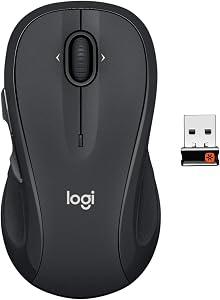 Logitech M510 Standard ergonomic 6.2 DEAS
Clinical performance5.2
I.1Neutral posture support5.5
I.2Adjustability range5.0
I.3Injury risk reduction5.0
I.4Population accommodation6.0
I.5Wrist neutral and grip position4.5
Product quality5.2
II.1Material & construction6.0
II.2Published certification3.0
II.3Warranty vs benchmark5.0
II.4Verified user reliability7.0
Market value8.2
III.1Price vs category benchmark9.0
III.2Ergonomic value ratio7.5
35  Logitech MX Master 3S Standard ergonomic 6.1 DEAS
Clinical performance5.9
I.1Neutral posture support6.5
I.2Adjustability range6.0
I.3Injury risk reduction6.0
I.4Population accommodation6.0
I.5Wrist neutral and grip position5.0
Product quality5.8
II.1Material & construction7.0
II.2Published certification3.0
II.3Warranty vs benchmark5.0
II.4Verified user reliability8.0
Market value6.0
III.1Price vs category benchmark6.0
III.2Ergonomic value ratio6.0
36  Logitech M705 Marathon Standard ergonomic 6.1 DEAS
Clinical performance5.2
I.1Neutral posture support5.5
I.2Adjustability range5.0
I.3Injury risk reduction5.0
I.4Population accommodation6.0
I.5Wrist neutral and grip position4.5
Product quality5.4
II.1Material & construction6.0
II.2Published certification3.0
II.3Warranty vs benchmark5.0
II.4Verified user reliability7.5
Market value7.8
III.1Price vs category benchmark8.5
III.2Ergonomic value ratio7.0
37  Adesso iMouse E10 Lift (vertical) 6.1 DEAS
Clinical performance6.2
I.1Neutral posture support7.0
I.2Adjustability range5.0
I.3Injury risk reduction6.5
I.4Population accommodation5.5
I.5Wrist neutral and grip position7.0
Product quality4.1
II.1Material & construction4.5
II.2Published certification2.0
II.3Warranty vs benchmark4.5
II.4Verified user reliability5.5
Market value8.0
III.1Price vs category benchmark8.5
III.2Ergonomic value ratio7.5
38  Razer Pro Click Standard ergonomic 6.1 DEAS
Clinical performance6.0
I.1Neutral posture support6.5
I.2Adjustability range6.0
I.3Injury risk reduction6.0
I.4Population accommodation6.0
I.5Wrist neutral and grip position5.5
Product quality5.2
II.1Material & construction6.5
II.2Published certification3.0
II.3Warranty vs benchmark5.0
II.4Verified user reliability6.5
Market value6.0
III.1Price vs category benchmark6.0
III.2Ergonomic value ratio6.0
39  Acer Wireless Vertical Ergonomic Mouse Lift (vertical) 6.0 DEAS
Clinical performance6.2
I.1Neutral posture support7.0
I.2Adjustability range5.0
I.3Injury risk reduction6.5
I.4Population accommodation5.5
I.5Wrist neutral and grip position7.0
Product quality3.8
II.1Material & construction5.0
II.2Published certification2.0
II.3Warranty vs benchmark4.5
Market value8.2
III.1Price vs category benchmark9.0
III.2Ergonomic value ratio7.5
40  Incase Bluetooth Ergonomic Mouse Standard ergonomic 6.0 DEAS
Clinical performance5.6
I.1Neutral posture support6.0
I.2Adjustability range5.5
I.3Injury risk reduction5.5
I.4Population accommodation5.5
I.5Wrist neutral and grip position5.5
Product quality4.5
II.1Material & construction6.0
II.2Published certification2.5
II.3Warranty vs benchmark5.0
Market value7.0
III.1Price vs category benchmark7.5
III.2Ergonomic value ratio6.5
41 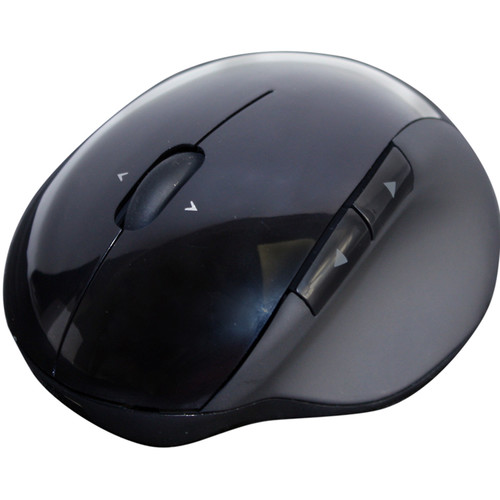 Adesso iMouse E50 Lift (vertical) 5.9 DEAS
Clinical performance6.2
I.1Neutral posture support7.0
I.2Adjustability range5.0
I.3Injury risk reduction6.5
I.4Population accommodation5.5
I.5Wrist neutral and grip position7.0
Product quality3.7
II.1Material & construction4.5
II.2Published certification2.0
II.3Warranty vs benchmark4.5
Market value7.5
III.1Price vs category benchmark8.0
III.2Ergonomic value ratio7.0
42  Adesso iMouse X1 Standard ergonomic 5.9 DEAS
Clinical performance5.5
I.1Neutral posture support6.0
I.2Adjustability range5.0
I.3Injury risk reduction5.5
I.4Population accommodation5.5
I.5Wrist neutral and grip position5.5
Product quality3.8
II.1Material & construction5.0
II.2Published certification2.0
II.3Warranty vs benchmark4.5
Market value8.2
III.1Price vs category benchmark9.0
III.2Ergonomic value ratio7.5
43  Razer Pro Click Mini Standard ergonomic 5.9 DEAS
Clinical performance5.4
I.1Neutral posture support6.0
I.2Adjustability range5.5
I.3Injury risk reduction5.5
I.4Population accommodation5.0
I.5Wrist neutral and grip position5.0
Product quality5.0
II.1Material & construction6.0
II.2Published certification3.0
II.3Warranty vs benchmark5.0
II.4Verified user reliability6.0
Market value6.8
III.1Price vs category benchmark7.0
III.2Ergonomic value ratio6.5
44  Logitech G Pro Wireless Standard ergonomic 5.9 DEAS
Clinical performance5.2
I.1Neutral posture support5.5
I.2Adjustability range5.5
I.3Injury risk reduction5.0
I.4Population accommodation5.5
I.5Wrist neutral and grip position4.5
Product quality5.9
II.1Material & construction7.0
II.2Published certification3.0
II.3Warranty vs benchmark5.0
II.4Verified user reliability8.5
Market value6.0
III.1Price vs category benchmark6.0
III.2Ergonomic value ratio6.0
45  Logitech MX Anywhere 2S Standard ergonomic 5.7 DEAS
Clinical performance4.7
I.1Neutral posture support5.0
I.2Adjustability range5.0
I.3Injury risk reduction4.5
I.4Population accommodation5.0
I.5Wrist neutral and grip position4.0
Product quality5.5
II.1Material & construction6.5
II.2Published certification3.0
II.3Warranty vs benchmark5.0
II.4Verified user reliability7.5
Market value6.5
III.1Price vs category benchmark7.0
III.2Ergonomic value ratio6.0
46  Logitech G502 X Lightspeed Standard ergonomic 5.6 DEAS
Clinical performance5.3
I.1Neutral posture support5.5
I.2Adjustability range6.0
I.3Injury risk reduction5.0
I.4Population accommodation5.5
I.5Wrist neutral and grip position4.5
Product quality5.5
II.1Material & construction7.0
II.2Published certification3.0
II.3Warranty vs benchmark5.0
II.4Verified user reliability7.0
Market value4.8
III.1Price vs category benchmark4.5
III.2Ergonomic value ratio5.0
47  Logitech G Pro X Superlight Standard ergonomic 5.6 DEAS
Clinical performance4.9
I.1Neutral posture support5.0
I.2Adjustability range5.5
I.3Injury risk reduction4.5
I.4Population accommodation5.5
I.5Wrist neutral and grip position4.0
Product quality6.0
II.1Material & construction7.0
II.2Published certification3.0
II.3Warranty vs benchmark5.0
II.4Verified user reliability9.0
Market value5.0
III.1Price vs category benchmark5.0
III.2Ergonomic value ratio5.0
48  SteelSeries Aerox 5 Wireless Standard ergonomic 5.6 DEAS
Clinical performance5.2
I.1Neutral posture support5.5
I.2Adjustability range5.5
I.3Injury risk reduction5.0
I.4Population accommodation5.5
I.5Wrist neutral and grip position4.5
Product quality5.5
II.1Material & construction7.0
II.2Published certification3.0
II.3Warranty vs benchmark5.0
II.4Verified user reliability7.0
Market value4.8
III.1Price vs category benchmark4.5
III.2Ergonomic value ratio5.0
49  Razer Naga V2 HyperSpeed Standard ergonomic 5.4 DEAS
Clinical performance4.9
I.1Neutral posture support5.0
I.2Adjustability range5.5
I.3Injury risk reduction4.5
I.4Population accommodation5.5
I.5Wrist neutral and grip position4.0
Product quality5.2
II.1Material & construction6.5
II.2Published certification3.0
II.3Warranty vs benchmark5.0
II.4Verified user reliability6.5
Market value5.8
III.1Price vs category benchmark6.0
III.2Ergonomic value ratio5.5
Why your mouse is part of your wrist pain
Lay your hand flat on a standard mouse and look at your forearm. It's rotated palm-down, and to get there the two bones of your forearm cross over each other. Most people also angle the wrist out toward the little finger to steer. Both keep the forearm and wrist muscles working, and you hold them for hours.
What the research says
In a controlled comparison, a vertical mouse cut forearm rotation from 42 to 28 degrees and lowered wrist extensor activity, though people were a little slower to hit targets at first.1 When researchers compared mice slanted from 0 to 30 degrees, the more slanted ones lowered activity in the forearm muscles and the upper trapezius.2 Wrist angle matters because of what's inside it: in healthy volunteers, bending the wrist about 15 degrees toward the little finger pushed carpal tunnel pressure over a common risk threshold in a quarter of them.3 Forearm rotation changes the pressure too: in one study, it measured lowest with the forearm turned about halfway between palm-down and thumb-up,4 which is roughly where a vertical mouse puts your hand.
42° → 28°forearm rotation with a vertical mouse instead of a flat one.1 15°of sideways bend toward the little finger pushed carpal tunnel pressure over the risk threshold in a quarter of healthy people.3 What that means when you shop
Pick the style for your symptoms and the size for your hand. A vertical mouse that's too big for you is worse than a flat one that fits.
Full reviews

1 of 49. Best overall
Contour Unimouse
DEAS 8.0 out of 10
Tilt adjusts from 35 to 70 degrees; adjustable thumb support; right- and left-handed versions; wireless.
The widest angle range of any mouse in our top ten: the hinge adjusts from 35 to 70 degrees, so you can find the point where your forearm relaxes instead of accepting the maker's guess. That's why it tops our ranking, and it comes in right- and left-handed versions.
Good: an angle you set yourself; an adjustable thumb support; the top adjustability score of any mouse we've scored; right and left versions. Less good: Contour publishes no hand-size range, so try it if you can; no third-party certification.
Score breakdown
Clinical performance8.4
I.1Neutral posture support9.0
I.2Adjustability range8.5
I.3Injury risk reduction9.0
I.4Population accommodation6.5
I.5Wrist neutral and grip position9.0
Product quality5.1
II.1Material & construction7.0
II.2Published certification2.5
II.3Warranty vs benchmark5.0
II.4Verified user reliability6.0
Market value6.8
III.1Price vs category benchmark6.5
III.2Ergonomic value ratio7.0
Composite 8.0 on the DEAS (Desk Ergonomics Assessment Score). How we score
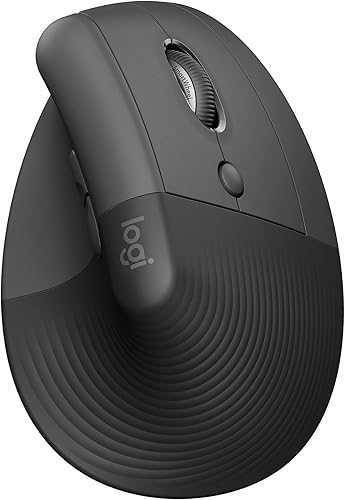
3 of 49. Best for smaller hands
Logitech Lift
DEAS 7.7 out of 10
57-degree angle; for small to medium hands; right- and left-handed versions; one AA battery, rated for about 24 months.
A vertical mouse sized for smaller hands, which most aren't. The 57-degree angle takes much of the twist out of your forearm without feeling extreme, and it has the best reliability score from user reviews in our top ten.
Good: sized for small to medium hands; a gentle 57-degree angle; the best reliability score here; right and left versions. Less good: an AA battery instead of recharging; a 1-year warranty in the US (2 years for the Business version).
Score breakdown
Clinical performance7.4
I.1Neutral posture support8.5
I.2Adjustability range6.5
I.3Injury risk reduction8.0
I.4Population accommodation5.5
I.5Wrist neutral and grip position8.5
Product quality5.8
II.1Material & construction6.5
II.2Published certification3.0
II.3Warranty vs benchmark5.0
II.4Verified user reliability8.5
Market value8.0
III.1Price vs category benchmark8.0
III.2Ergonomic value ratio8.0
Composite 7.7 on the DEAS (Desk Ergonomics Assessment Score). How we score

5 of 49. Best for left-handers
R-Go HE Break Vertical Mouse, left-handed
DEAS 7.5 out of 10
Vertical grip; this version is left-handed and medium (hands about 6.5 to 7.3 inches long); Bluetooth with a USB receiver; rechargeable; 5 buttons. 2-year warranty.
Left-handers usually get the leftovers. R-Go makes its vertical mouse for either hand in three sizes, and this left-handed one ranks fifth of all 49. It comes with R-Go's break-reminder software. Measure your hand first: this listing is the medium.
Good: made for the left hand, in three sizes; rechargeable; the top population-fit score of any mouse here; a 2-year warranty. Less good: R-Go doesn't publish the angle; this listing is the medium size only.
Score breakdown
Clinical performance8.0
I.1Neutral posture support9.0
I.2Adjustability range6.5
I.3Injury risk reduction8.5
I.4Population accommodation7.5
I.5Wrist neutral and grip position8.5
Product quality5.9
II.1Material & construction7.0
II.2Published certification3.0
II.3Warranty vs benchmark6.5
II.4Verified user reliability7.0
Market value6.0
III.1Price vs category benchmark5.5
III.2Ergonomic value ratio6.5
Composite 7.5 on the DEAS (Desk Ergonomics Assessment Score). How we score

6 of 49. Best for larger hands
Logitech MX Vertical
DEAS 7.4 out of 10
57-degree angle; for medium to large hands; right-handed only.
The vertical mouse I hand people who want the fix without much of a learning curve: the same 57-degree angle as the Lift in a bigger body, for medium to large hands. In my experience, most people stop noticing the angle within a week.
Good: a 57-degree angle; sized for bigger hands; a good reliability score from user reviews. Less good: right-handed only; too big for small hands; a 1-year warranty in the US.
Score breakdown
Clinical performance7.5
I.1Neutral posture support8.5
I.2Adjustability range6.5
I.3Injury risk reduction8.0
I.4Population accommodation6.0
I.5Wrist neutral and grip position8.5
Product quality5.4
II.1Material & construction6.5
II.2Published certification3.0
II.3Warranty vs benchmark5.0
II.4Verified user reliability7.0
Market value7.5
III.1Price vs category benchmark7.5
III.2Ergonomic value ratio7.5
Composite 7.4 on the DEAS (Desk Ergonomics Assessment Score). How we score

7 of 49. Best wired vertical mouse
Evoluent VerticalMouse 4
DEAS 7.1 out of 10
Handshake grip; for medium to large hands; right- and left-handed versions, wired as linked; a small right-handed size for hands under about 7 inches. 2-year warranty.
From the company that calls itself the inventor of the vertical mouse: an upright, handshake grip for medium to large hands, in right- and left-handed versions. The links here are the wired ones; Evoluent also makes a small right-handed model for hands under about 7 inches.
Good: a handshake grip; right and left versions; a small size for smaller hands; a 2-year warranty. Less good: Evoluent publishes no angle; the left-handed version is wired only.
Score breakdown
Clinical performance7.3
I.1Neutral posture support8.5
I.2Adjustability range6.0
I.3Injury risk reduction8.0
I.4Population accommodation5.5
I.5Wrist neutral and grip position8.5
Product quality4.9
II.1Material & construction6.0
II.2Published certification2.5
II.3Warranty vs benchmark5.0
II.4Verified user reliability6.0
Market value6.8
III.1Price vs category benchmark6.5
III.2Ergonomic value ratio7.0
Composite 7.1 on the DEAS (Desk Ergonomics Assessment Score). How we score

10 of 49. Best thumb trackball
Logitech MX Ergo S
DEAS 7.0 out of 10
Thumb-operated trackball; the base tilts to 0 or 20 degrees; right-handed; for medium to large hands; quiet clicks; USB-C charging; Logi Bolt receiver.
Your thumb rolls the ball and your arm stays still, so the wrist stops sweeping side to side. The base tilts from flat to 20 degrees, turning your hand partway toward a handshake. The S is the current version of the MX Ergo, with quieter clicks, USB-C charging and Logitech's Logi Bolt receiver; the original scores the same.
Good: your arm stays put; a 20-degree tilt option; quiet clicks; USB-C charging. Less good: right-handed only; no charging cable in the box; a 1-year warranty in the US; not for a sore thumb.
Score breakdown
Clinical performance7.2
I.1Neutral posture support8.0
I.2Adjustability range6.5
I.3Injury risk reduction7.5
I.4Population accommodation6.0
I.5Wrist neutral and grip position8.0
Product quality5.6
II.1Material & construction7.0
II.2Published certification3.0
II.3Warranty vs benchmark5.0
II.4Verified user reliability7.5
Market value6.2
III.1Price vs category benchmark6.0
III.2Ergonomic value ratio6.5
Composite 7.0 on the DEAS (Desk Ergonomics Assessment Score). How we score

11 of 49. Best value trackball
Logitech Trackman Marble
DEAS 7.0 out of 10
Finger-operated ball under your index, middle and ring fingers; works in either hand; corded USB, no battery. 3-year warranty.
The ball sits under your fingers, not your thumb, so your wrist stays still and either hand can use it. It's corded and simple, it's tied for the best price score in our top ten, and Logitech covers it for 3 years. One dealer rates it best for small to average hands.
Good: works in either hand; leaves the thumb out of it; tied for the best price score here; a 3-year warranty. Less good: no tilt; corded only; may suit small to average hands best.
Score breakdown
Clinical performance6.7
I.1Neutral posture support7.5
I.2Adjustability range5.5
I.3Injury risk reduction7.0
I.4Population accommodation6.0
I.5Wrist neutral and grip position7.5
Product quality5.4
II.1Material & construction6.5
II.2Published certification3.0
II.3Warranty vs benchmark5.0
II.4Verified user reliability7.0
Market value8.0
III.1Price vs category benchmark8.5
III.2Ergonomic value ratio7.5
Composite 7.0 on the DEAS (Desk Ergonomics Assessment Score). How we score
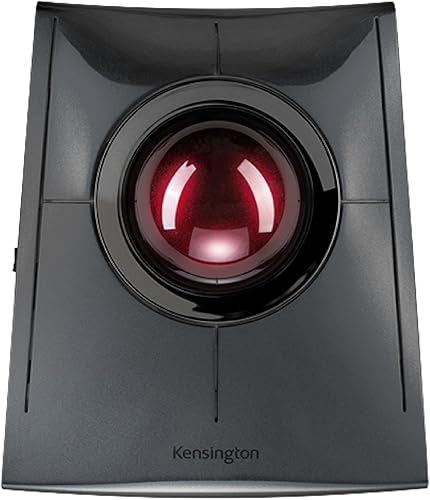
13 of 49. Best big-ball trackball
Kensington SlimBlade Pro Trackball
DEAS 7.0 out of 10
A 55 mm ball you roll with your fingers and twist to scroll; works in either hand; Bluetooth, 2.4 GHz or wired USB; rechargeable. 3-year warranty.
A big ball you roll with your fingertips and twist to scroll, so your wrist stays still and either hand can use it. The Pro version, the one linked here, connects three ways and recharges.
Good: works in either hand; scroll by twisting the ball; three ways to connect; a 3-year warranty. Less good: no tilt; Kensington gives no hand-size guidance.
Score breakdown
Clinical performance7.1
I.1Neutral posture support8.0
I.2Adjustability range6.0
I.3Injury risk reduction7.5
I.4Population accommodation6.0
I.5Wrist neutral and grip position8.0
Product quality5.2
II.1Material & construction6.5
II.2Published certification3.0
II.3Warranty vs benchmark5.0
II.4Verified user reliability6.5
Market value6.2
III.1Price vs category benchmark6.0
III.2Ergonomic value ratio6.5
Composite 7.0 on the DEAS (Desk Ergonomics Assessment Score). How we score

14 of 49. Best left-handed trackball
ELECOM EX-G Left-Handed Trackball
DEAS 7.0 out of 10
Thumb-operated 34 mm ball; left-handed; 2.4 GHz receiver that stores inside it; one AA battery; 6 buttons. 1-year US warranty.
The only left-handed thumb trackball in our ranking. Your thumb rolls the ball, your arm stays still, and the receiver tucks inside the mouse when you travel.
Good: made for the left hand; your arm stays still; tied for the best price score here. Less good: an AA battery instead of recharging; no tilt; ELECOM gives no hand-size guidance; not for a sore thumb.
Score breakdown
Clinical performance6.9
I.1Neutral posture support8.0
I.2Adjustability range5.5
I.3Injury risk reduction7.5
I.4Population accommodation6.0
I.5Wrist neutral and grip position7.5
Product quality5.1
II.1Material & construction6.0
II.2Published certification2.5
II.3Warranty vs benchmark5.0
II.4Verified user reliability7.0
Market value8.0
III.1Price vs category benchmark8.5
III.2Ergonomic value ratio7.5
Composite 7.0 on the DEAS (Desk Ergonomics Assessment Score). How we score

15 of 49. Copy and paste built in
Evoluent VMC Vertical Mouse
DEAS 6.9 out of 10
Handshake grip; right-handed; wireless by USB receiver or Bluetooth; AA battery; six fixed buttons, including copy and paste. 2-year warranty.
Evoluent's wireless right-handed vertical mouse, with copy, paste and back on fixed buttons, so there's no software to set up. Evoluent sells it for medium to large hands.
Good: a handshake grip; wireless two ways; copy and paste on the mouse; a 2-year warranty. Less good: right-handed only; the buttons can't be reprogrammed; too new for a reliability score.
Score breakdown
Clinical performance7.0
I.1Neutral posture support8.0
I.2Adjustability range6.0
I.3Injury risk reduction7.5
I.4Population accommodation5.5
I.5Wrist neutral and grip position8.0
Product quality4.5
II.1Material & construction6.0
II.2Published certification2.5
II.3Warranty vs benchmark5.0
Market value7.0
III.1Price vs category benchmark7.0
III.2Ergonomic value ratio7.0
Composite 6.9 on the DEAS (Desk Ergonomics Assessment Score). How we score
How to set up your mouse
- 1
Bring it in beside the keyboard. OSHA's guidance is to keep the mouse close to the keyboard.5 Your elbow should hang by your side, not reach forward or out.
- 2
Keep the wrist straight. Not bent up, down or to the side. Raise or lower the chair or the keyboard tray until it is.5
- 3
Support the forearm. On the desk or an armrest. Supporting the forearm cut shoulder muscle activity in a lab study.6
- 4
Hold it lightly. Don't clamp it. OSHA's guidance is to avoid gripping the mouse tightly, and to set the sensitivity so a light touch controls the pointer and it reaches the whole screen with your wrist straight.5
- 5
Switch hands now and then. Changing hands gives the other one a rest.5 Even part of the day helps.
- 6
Take short breaks. In a study of computer workers, microbreaks every 20 minutes eased discomfort the most, with no loss of productivity.7
Clinical note
A new mouse can't fix a desk that's too high or a chair that's too low. If your elbow isn't level with the mouse, start there.
Which mouse pain are you solving?
Tingling thumb and fingers
Feels like
Numbness or tingling in the thumb, index and middle fingers, often at night.
What helps
A trackball while it flares, so your wrist stays still; then a vertical mouse and a straight wrist.
A tight forearm
Feels like
Aching from the elbow down the outside of the forearm, worse by mid-afternoon.
What helps
A vertical mouse to cut the twist, a lighter grip, and short breaks.
A sore mousing shoulder
Feels like
A dull ache in the shoulder of your mousing arm, sometimes up the side of the neck.
What helps
Bring the mouse in beside the keyboard and support the forearm.
Common questions
Which type of mouse is right for me?
Match it to where it hurts. A standard ergonomic mouse, sculpted to the hand, suits mild wrist pain. A lift (vertical) mouse, like the Lift, holds your hand at a handshake angle and suits any wrist pain; in a lab comparison, a vertical mouse cut forearm rotation from 42 to 28 degrees.1 A trackball, like the  Trackman Marble, stays put while you roll the ball, taking the arm travel out: the assessment keeps it for moderate to severe wrist and elbow pain most days. A trackpad suits wrist pain that's moderate most days or severe; neither is for a sore thumb. A roller bar, in front of the keyboard and moved with your fingers and palm, is the step for severe wrist pain most days.
I'm left-handed. Which mice come in a left-handed version?
Most vertical mice are right-handed only, so check before you buy. Left-handed versions: the Contour Unimouse, the Logitech Lift, the  R-Go HE, made for either hand in three sizes, and the
  Evoluent VerticalMouse 4, wired only on the left. For a trackball, the
  ELECOM EX-G Left is a thumb trackball made for the left hand, and the Trackman Marble and
  SlimBlade Pro work in either hand. Don't use a right-handed vertical mouse in your left hand: the shape is built for one side.
How do I know my hand size?
Lay a standard credit card, long side, from the crease of your wrist to the tip of your middle finger, end to end. Under two cards is small, about two is medium, more than two and a quarter is large; the finder on our mouse ranking uses the same test. Makers' charts vary: R-Go calls a hand under 6.5 inches small and over 7.3 large, and Evoluent makes its regular VerticalMouse 4 for hands of about 7 inches and up. OSHA's advice is a mouse that fits the hand using it, in the right size and side.5
How long does it take to get used to an ergonomic mouse?
In my experience, a few days to a couple of weeks, and longer for a trackball than a vertical mouse. In the lab, people were a little slower to hit targets on a vertical mouse at first,1 and in another test the alternative devices made little difference to speed or comfort ratings,8 so give a new shape a fair trial before you judge it.
Do I need a wrist rest for my mouse?
Not under your wrist. OSHA's guidance on wrist and palm supports is to rest the heel of your palm, not your wrist, and only during pauses.9 What helps more is support for the forearm, on the desk or an armrest.6
Which mice didn't make the top 10?
The rest of the 49 are in the ranking. Worth a look: the  Anker Vertical Ergonomic Mouse (6.8), tied for the best price score of any vertical mouse we've scored, so it's a cheap way to try one; the
  Contour Touch (6.6), a trackpad; and the
  Contour RollerMouse Red (6.4), a roller bar that sits in front of your keyboard.
What is the DEAS score?
The Desk Ergonomics Assessment Score, Desk Doctor's product rating out of 10. Every product is scored on eleven dimensions in three layers: clinical performance, product quality and value. For mice, the category-specific part is wrist neutral and grip position: whether the shape lets your forearm rest closer to a handshake than palm-down (vertical and contoured designs score higher), and whether you can hold it without your wrist bending toward your little finger. Tap any row in the ranking for the full breakdown. How we score.
References
- Quemelo PRV, Vieira ER. Biomechanics and performance when using a standard and a vertical computer mouse. Ergonomics. 2013;56(8):1336–1344. PMID: 23777482. doi:10.1080/00140139.2013.805251
- Chen HM, Leung CT. The effect on forearm and shoulder muscle activity in using different slanted computer mice. Clin Biomech. 2007;22:518–523. ScienceDirect
- Keir PJ, Bach JM, Hudes M, Rempel DM. Guidelines for wrist posture based on carpal tunnel pressure thresholds. Hum Factors. 2007;49(1):88–99. PMID: 17315846. PubMed
- Rempel D, Bach JM, Gordon L, So Y. Effects of forearm pronation/supination on carpal tunnel pressure. J Hand Surg Am. 1998;23(1):38–42. CDC Stacks
- OSHA. Computer Workstations eTool: pointer/mouse. osha.gov
- Gonçalves JS, et al. The effects of forearm support and shoulder posture on upper trapezius and anterior deltoid activity. J Phys Ther Sci. 2017. PMID: 28603347. PubMed
- McLean L, Tingley M, Scott RN, Rickards J. Computer terminal work and the benefit of microbreaks. Appl Ergon. 2001;32(3):225–237. PMID: 11394463. doi:10.1016/S0003-6870(00)00071-5
- Choi J, Lin Y, Loh PY. The effects of standing working posture on operation force and upper limb muscle activation when using different pointing devices. Int J Environ Res Public Health. 2022;19(16):10217. MDPI
- OSHA. Computer Workstations eTool: wrist/palm supports. osha.gov
This article is general education, not medical advice. If you have wrist or hand pain, numbness or tingling that lasts, see a licensed clinician.
AJ Prince, HEAS
Healthcare Ergonomic Assessment Specialist. Conducts over a thousand workstation assessments a year across a multi-campus health system, and authored the DEAS standard used to rank every product on this site.
