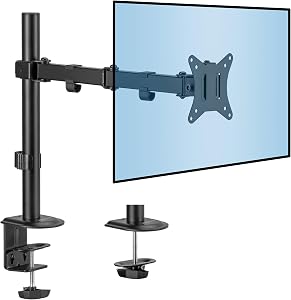
Monitor Arm Finder: The Best Arm for Your Screens and Desk
Short answer: the Humanscale M8.1 is the best monitor arm we’ve scored, with the Ergotron HX and the Herman Miller Flo just behind. An arm only works if your desk has room for it: answer 3 quick questions below and the finder checks, then picks yours.
An arm earns its place when you move your screen: turning it to show someone, or shifting between tasks. It moves and returns without you guessing where it was. That’s when the Desk Doctor assessment recommends one.
Two screens need a dual arm, which holds both side by side on one mount. And an arm needs room behind the desk: it clamps to the back edge and the screen swings out from there, so with the desk pushed against a wall the screen can only come toward you. If there isn’t about four inches behind it, the finder says so and points you to a monitor stand instead.
The pick is the highest DEAS score that holds your screens, in your budget. Fit comes before price: if nothing that fits is in your budget, the finder says so and shows the lowest-priced one that does.
Common questions
What is the best monitor arm?
The Humanscale M8.1 (DEAS 8.2), then the Ergotron HX Heavy Duty and the Herman Miller Flo (8.1 each). The finder above checks first that an arm can mount where you sit.
Monitor arm or monitor stand?
A stand lifts the screen to one height and stays put: stable, simple and cheap. An arm moves it up, down, in, out and around, and puts it back. The assessment suggests an arm when you turn your screen for other people, as long as there are four to six inches behind the desk for it to swing back; otherwise a stand covers the height.
Does a monitor arm help with neck pain?
It can, by making it easy to get the top of the screen level with your eyes and keep it there. OSHA's guidance puts the top of the screen at or slightly below eye level,1 and monitor height research shows that the lower the screen, the further your head and neck tip forward to read it.2 The height is what matters; the arm makes it easy to reach and to keep.
Do I need a dual arm?
Only if you run two screens. A dual arm holds both side by side on one mount, and it's what the assessment looks for when you have two. With one screen, a single arm is all you need. The filter above shows each kind.
What is the DEAS score?
The Desk Ergonomics Assessment Score, Desk Doctor's product rating out of 10. Every product is scored on eleven dimensions in three layers: clinical performance, product quality and value. For monitor arms, the category-specific part is eye-level range and tilt precision: whether it brings the screen to eye level for short and tall people alike when seated, tilts through –5° to +20°, and holds the position you set without drifting. Tap any row in the ranking for the full breakdown. How we score.
How often is this ranking updated?
Scores are refreshed as products are revised and new models are scored. The ranking always reflects the current DEAS data.
Are these affiliate links?
Some are, which means Desk Doctor may earn a commission at no cost to you. Rankings are set by DEAS score alone and are never influenced by commissions.
Burgess-Limerick R, Plooy A, Fraser K, Ankrum DR. The influence of computer monitor height on head and neck posture. Int J Ind Ergon. 1999;23(3):171–179.
This guide is general education, not medical advice. If you have neck pain or headaches that last, see a licensed clinician.
Healthcare Ergonomic Assessment Specialist. Conducts over a thousand workstation assessments a year across a multi-campus health system, and authored the DEAS standard used to rank every product on this site.
Diagnose your desk in 15 minutes.
The free assessment measures your setup against your body and names exactly what to change, what it costs, and what costs nothing.


 Humanscale M8.1 Monitor Arm Single arm 8.2 DEAS