Desk painThe Best Keyboards and Mice for Tennis Elbow: 8 Picks for 2026
When tennis elbow flares at a desk, look at the angle your forearm is held at while you work, not just how much you work. Four keyboards and four mice that change the angle.

By AJ Prince, HEAS
Healthcare Ergonomic Assessment Specialist. Updated 20 Jun 2026. A 8-minute read.
Desk Doctor earns a commission on some links, at no cost to you. It never changes a score. How we make money
If your tennis elbow flares when you type or mouse, look at the angle your forearm sits at while you work, not just how much you work. A flat mouse turns your forearm palm-down and lets the wrist cock back; a flat keyboard pulls your hands together and turns the palms down too. Both hold you where the muscle behind tennis elbow works hardest.1,2
Fair warning on the evidence: reviews haven't found that computer work causes tennis elbow in the first place.3 Changing your keyboard and mouse won't heal the tendon either. What it can do is stop your desk from aggravating a sore one all day, which gives everything else a chance to work.
I narrowed these from the 102 keyboards and mice I've scored to four keyboards and four mice.
Why your keyboard and mouse can aggravate tennis elbow
Tennis elbow, lateral epicondylitis, is wear and tear in the tendon that anchors your wrist extensors at the outside of the elbow, and loaded gripping and repeated wrist extension aggravate it.4 Whether desk work causes it is unproven: a systematic review found insufficient evidence linking computer work to epicondylitis.3 But the muscle involved works harder when your palm faces down and your wrist bends back,1,2 which is how a flat mouse and keyboard hold you.
Of the two, the mouse is more consistently linked to forearm and elbow pain. In a large Danish study of computer users, intensive mouse use, and to a lesser extent keyboard use, were the main risk factors for forearm pain,5 and in its one-year follow-up, heavier mouse use went with more severe elbow pain, a pattern keyboard use didn't show.6 A vertical mouse helps the forearm: in a controlled comparison, it cut forearm rotation from 42 to 28 degrees and lowered wrist extensor effort.7
42° → 28°forearm rotation with a vertical mouse instead of a flat one.7 16% → 13%wrist extensor muscle effort with the vertical mouse.7 What this means for you
Neither device is a proven cause, but both can keep a sore tendon working all day. Start with the one you use most, and keep your wrist level whichever you choose.
The keyboards
A split lets each hand sit at shoulder width, a tent lets your palms tilt inward instead of lying flat, and a board that sits flat or tilts away from you keeps your wrists from bending back.8 Light keys mean less force with every keystroke.

Best keyboard
Cloud Nine C989M
DEAS 7.7 out of 10
Two halves that separate up to 6 inches; a built-in 7-degree tent; full size with a number pad; Kailh Box mechanical switches; molded palm rests.
This is the keyboard I hand someone whose elbow flares when they type. The halves pull apart to shoulder width, the built-in tent takes a little of the palm-down roll out of your forearms, and the palm rests give you somewhere to settle between bursts.
Good: halves that separate up to 6 inches; a gentle built-in tent; a number pad; palm rests. Less good: the tent is fixed at 7 degrees; a large footprint; a learning period for the split.
Score breakdown
Clinical performance7.8
I.1Neutral posture support8.5
I.2Adjustability range7.5
I.3Injury risk reduction8.0
I.4Population accommodation6.5
I.5Wrist neutral and key actuation8.5
Product quality4.7
II.1Material & construction7.0
II.2Published certification2.0
II.3Warranty vs benchmark5.0
Market value6.0
III.1Price vs category benchmark6.0
III.2Ergonomic value ratio6.0
Composite 7.7 on the DEAS (Desk Ergonomics Assessment Score). How we score

Best when the pain won't settle
Kinesis Advantage360
DEAS 7.6 out of 10
Contoured key wells in two separate halves, 15.25 to 21.25 inches apart (wired); three tent settings; a wireless Pro version. 3-year warranty.
When tennis elbow won't settle whatever else you change, this is the keyboard I move people to. The key wells bring the keys to your fingers, the halves separate to shoulder width with three tent settings, and the thumb keys take work off your little fingers. It costs more and asks for an adjustment period. Kinesis is winding down the older  Advantage2, so this is the one to buy.
Good: contoured key wells; fully separate halves; three tent settings; a 3-year warranty. Less good: the lowest price score of these keyboards, from $499 at list; a real learning period.
Score breakdown
Clinical performance8.8
I.1Neutral posture support9.5
I.2Adjustability range9.0
I.3Injury risk reduction9.0
I.4Population accommodation7.0
I.5Wrist neutral and key actuation9.5
Product quality5.0
II.1Material & construction8.0
II.2Published certification2.0
II.3Warranty vs benchmark5.0
Market value1.2
III.1Price vs category benchmark1.0
III.2Ergonomic value ratio1.5
Composite 7.6 on the DEAS (Desk Ergonomics Assessment Score). How we score

Best plug-and-play split
Perixx PERIBOARD-835
DEAS 7.4 out of 10
One-piece split with a built-in palm rest; low-profile Kailh mechanical switches, brown and tactile; wired, 2.4 GHz or Bluetooth; legs tilt it to -4 or -7 degrees. 1-year warranty.
The fixed split puts your wrists close to straight out of the box, the legs tilt it away from you, and the palm rest is built in. You give up the tent, but the core posture fix is here, with nothing to set up.
Good: negative tilt built in; quiet tactile mechanical switches; a built-in palm rest; tied for the best reliability score from user reviews here. Less good: the split is fixed, with no tent; a 1-year warranty.
Score breakdown
Clinical performance7.5
I.1Neutral posture support8.0
I.2Adjustability range7.5
I.3Injury risk reduction7.5
I.4Population accommodation6.5
I.5Wrist neutral and key actuation8.0
Product quality5.4
II.1Material & construction7.0
II.2Published certification2.0
II.3Warranty vs benchmark5.0
II.4Verified user reliability7.5
Market value4.8
III.1Price vs category benchmark4.5
III.2Ergonomic value ratio5.0
Composite 7.4 on the DEAS (Desk Ergonomics Assessment Score). How we score

Easiest keyboard to switch to
Logitech ERGO K860
DEAS 7.3 out of 10
Curved one-piece split; full size with a number pad; front legs tilt it to -4 or -7 degrees; pillowed palm rest; pairs with up to 3 devices. 1-year warranty.
For most people who want the relief without a learning curve, this is the easiest to live with: the curve feels familiar enough that your typing speed barely dips, and the front legs tilt it away from you. It's the one I recommend when someone won't tolerate a fully separate board.
Good: a familiar layout; negative tilt; a pillowed palm rest; tied for the best reliability score from user reviews here. Less good: one piece, so you can't widen the split; membrane keys; a 1-year warranty.
Score breakdown
Clinical performance7.4
I.1Neutral posture support8.0
I.2Adjustability range7.0
I.3Injury risk reduction7.5
I.4Population accommodation6.5
I.5Wrist neutral and key actuation8.0
Product quality5.2
II.1Material & construction6.5
II.2Published certification2.0
II.3Warranty vs benchmark5.0
II.4Verified user reliability7.5
Market value6.0
III.1Price vs category benchmark6.0
III.2Ergonomic value ratio6.0
Composite 7.3 on the DEAS (Desk Ergonomics Assessment Score). How we score
The mice
A vertical mouse turns your hand toward a handshake, which takes your forearm out of full palm-down.7 A trackball goes further and keeps your arm still. Either way, keep your wrist level, not cocked up: in one study, a vertical mouse bent the wrist back more than a standard one.9

Best mouse
Contour Unimouse
DEAS 8.0 out of 10
Tilt adjusts from 35 to 70 degrees; adjustable thumb support; right- and left-handed versions; wireless.
The mouse I reach for first with a stubborn tennis elbow, because you set the angle yourself, from 35 to 70 degrees, instead of living with one fixed shape. If a standard vertical mouse felt close but not quite right, this is the one that dials it in. Go as steep as you can while your wrist stays level.
Good: an angle you set yourself; an adjustable thumb support; right and left versions; tied for the top score of any mouse we've rated. Less good: Contour publishes no hand-size range; it takes a few days to find your angle.
Score breakdown
Clinical performance8.4
I.1Neutral posture support9.0
I.2Adjustability range8.5
I.3Injury risk reduction9.0
I.4Population accommodation6.5
I.5Wrist neutral and grip position9.0
Product quality5.1
II.1Material & construction7.0
II.2Published certification2.5
II.3Warranty vs benchmark5.0
II.4Verified user reliability6.0
Market value6.8
III.1Price vs category benchmark6.5
III.2Ergonomic value ratio7.0
Composite 8.0 on the DEAS (Desk Ergonomics Assessment Score). How we score
Best value mouse
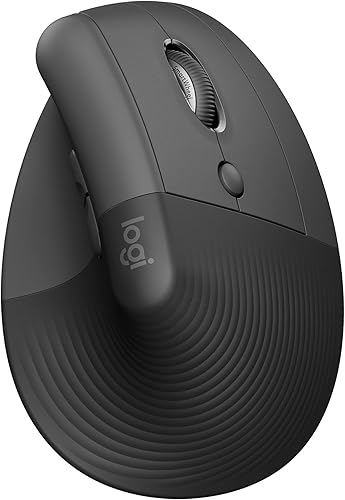
Logitech Lift
DEAS 7.7 out of 10
57-degree angle; for small to medium hands; right- and left-handed versions; one AA battery, rated for about 24 months.
The upgrade I suggest to almost everyone first. The 57-degree angle takes your forearm out of full palm-down, and it's sized for smaller hands, so you aren't stretching for the buttons. If you've never used a vertical mouse, start here.
Good: sized for small to medium hands; the best value and reliability scores of these four mice; right and left versions. Less good: a fixed angle; too small for large hands; a 1-year warranty in the US.
Score breakdown
Clinical performance7.4
I.1Neutral posture support8.5
I.2Adjustability range6.5
I.3Injury risk reduction8.0
I.4Population accommodation5.5
I.5Wrist neutral and grip position8.5
Product quality5.8
II.1Material & construction6.5
II.2Published certification3.0
II.3Warranty vs benchmark5.0
II.4Verified user reliability8.5
Market value8.0
III.1Price vs category benchmark8.0
III.2Ergonomic value ratio8.0
Composite 7.7 on the DEAS (Desk Ergonomics Assessment Score). How we score
Best for larger hands
Logitech MX Vertical
DEAS 7.4 out of 10
57-degree angle; for medium to large hands; right-handed only.
If the  Lift feels cramped, this carries the same 57-degree angle on a bigger body, so a larger hand can rest on it without clawing or pinching to grip.
Good: a 57-degree angle; sized for bigger hands; a good value score. Less good: right-handed only; too big for small hands; a 1-year warranty in the US.
Score breakdown
Clinical performance7.5
I.1Neutral posture support8.5
I.2Adjustability range6.5
I.3Injury risk reduction8.0
I.4Population accommodation6.0
I.5Wrist neutral and grip position8.5
Product quality5.4
II.1Material & construction6.5
II.2Published certification3.0
II.3Warranty vs benchmark5.0
II.4Verified user reliability7.0
Market value7.5
III.1Price vs category benchmark7.5
III.2Ergonomic value ratio7.5
Composite 7.4 on the DEAS (Desk Ergonomics Assessment Score). How we score

Best trackball
Logitech MX Ergo S
DEAS 7.0 out of 10
Thumb-operated trackball; the base tilts to 0 or 20 degrees; right-handed; for medium to large hands; quiet clicks; USB-C charging; Logi Bolt receiver.
When even a vertical mouse aggravates the elbow because dragging it around is the problem, a trackball stays put and your thumb does the work. The base tilts to 20 degrees, which eases some of the palm-down roll.
Good: your arm stays still; a 20-degree tilt option; quiet clicks; USB-C charging. Less good: your thumb does the work, so not for thumb pain; right-handed only; a 1-year warranty in the US.
Score breakdown
Clinical performance7.2
I.1Neutral posture support8.0
I.2Adjustability range6.5
I.3Injury risk reduction7.5
I.4Population accommodation6.0
I.5Wrist neutral and grip position8.0
Product quality5.6
II.1Material & construction7.0
II.2Published certification3.0
II.3Warranty vs benchmark5.0
II.4Verified user reliability7.5
Market value6.2
III.1Price vs category benchmark6.0
III.2Ergonomic value ratio6.5
Composite 7.0 on the DEAS (Desk Ergonomics Assessment Score). How we score
How to set them up to spare your elbow
- 1
Lower the keyboard and mouse. Elbows about level with them and by your sides, shoulders relaxed.10 If the desk is too high, a keyboard tray can get you there.
- 2
Pull both in close. Upper arms relaxed at your sides, not creeping forward.11
- 3
Keep the keyboard flat or tilted slightly away. Fold the back feet away; tilting it toward you bends your wrists back.8
- 4
Set the split, then the tent. Halves at about shoulder width, inner edges raised until your forearms stop lying flat.
- 5
Mouse right beside the keyboard, at the same height. So you aren't stretching sideways or forward for it.11
- 6
Relax your grip. Let your hand rest on a vertical mouse rather than clamping it.11
- 7
Rest your palms, not your wrists, in pauses. Pressing the wrist into a hard edge puts contact stress on the nerve and tendons there.12
Change one thing at a time
Change one device at a time and give each change about two weeks, so you know what helped.
How desk work shows up as elbow and forearm pain
Tennis elbow (lateral epicondylitis)
Feels like
A sharp or burning ache on the bony outside of the elbow that worsens when you grip, lift a mug or shake hands.4
What helps
A vertical mouse to turn the forearm, kept level so the wrist doesn't bend back; light keys; a relaxed, not clenched, hand.
Wrist extensor fatigue
Feels like
A tired, heavy feeling along the top of the forearm by mid-afternoon, sometimes with a dull ache creeping toward the elbow.
What helps
A keyboard flat or tilted away, palm support only in pauses, and lower-force keys.
Forearm pronation strain
Feels like
Tightness and soreness through the forearm from holding your hand palm-down on a flat mouse all day.
What helps
A vertical mouse or trackball and a split keyboard, so the forearm can turn back toward a handshake.
Clinical note
Pain that's severe or getting worse, or that comes with numbness or weakness, needs a clinician. The right equipment supports recovery; it doesn't replace a diagnosis or rehab.
Common questions
Can a keyboard or mouse relieve tennis elbow?
They won't heal the tendon on their own, but they can stop your desk from aggravating it. The evidence doesn't show that computer work causes tennis elbow,3 but the muscle involved works harder with the palm down and the wrist bent back,1,2 and equipment that holds your forearm closer to a handshake changes that. Pair it with the load management and exercises your clinician recommends.
Should I fix my mouse or my keyboard first?
Usually the mouse: heavy mouse use is more consistently linked to forearm and elbow pain than typing.5,6 But if you type far more than you mouse, start with the keyboard: in one lab study, typing produced less neutral wrist postures and more forearm muscle activity than mousing.13 Most people end up fixing both.
What should I look for in a keyboard and mouse for tennis elbow?
On the keyboard: a split or tented design so your forearms stop lying flat, light keys, and a board that sits flat or tilts away from you. On the mouse: a vertical shape that turns your hand toward a handshake, ideally with an adjustable angle so you can find the one that doesn't hurt, or a trackball if moving the mouse at all aggravates it. Flat mice and standard keyboards hold your forearm palm-down, so they're the ones to replace.
Vertical mouse or trackball for tennis elbow?
A vertical mouse first: it turns the forearm7 while keeping a familiar point-and-click motion. A trackball keeps your arm still, which helps if dragging the mouse around hurts more than the grip. If a vertical mouse eases the grip but the movement still aches, try a trackball like the  Logitech MX Ergo S.
What other keyboards and mice are worth a look?
Keyboards: the Kinesis Advantage2 (7.7) while it's still sold, and the  Kinesis Freestyle2 (7.1), whose halves come fully apart and lie flat. Mice: the
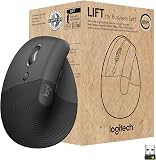
 Evoluent VerticalMouse 4 (7.1) in right- and left-handed versions, and the left-handed
 Logitech Lift (7.7). Every one is in the keyboard and mouse rankings.
What is the DEAS score?
The Desk Ergonomics Assessment Score, Desk Doctor's product rating out of 10. Every product is scored on eleven dimensions in three layers: clinical performance, product quality and value. For keyboards and mice, the category-specific part is how well the shape keeps your wrist neutral: straight for a keyboard, closer to a handshake for a mouse. How we score.
References
- Ikeda K, Kaneoka K, Matsunaga N, Ikumi A, Yamazaki M, Yoshii Y. Effects of forearm rotation on wrist flexor and extensor muscle activities. J Orthop Surg Res. 2025;20:53. doi:10.1186/s13018-024-05363-x
- Mogk JPM, Keir PJ. The effects of posture on forearm muscle loading during gripping. Ergonomics. 2003;46(9):956–975. doi:10.1080/0014013031000107595
- Wærsted M, Hanvold TN, Veiersted KB. Computer work and musculoskeletal disorders of the neck and upper extremity: a systematic review. BMC Musculoskelet Disord. 2010;11:79. doi:10.1186/1471-2474-11-79
- Buchanan BK, Varacallo MA. Lateral epicondylitis (tennis elbow). StatPearls. Treasure Island (FL): StatPearls Publishing; updated 2023. NCBI Bookshelf
- Kryger AI, et al. Does computer use pose an occupational hazard for forearm pain; from the NUDATA study. Occup Environ Med. 2003;60(11):e14. doi:10.1136/oem.60.11.e14
- Lassen CF, et al. Elbow and wrist/hand symptoms among 6,943 computer operators: a 1-year follow-up study (the NUDATA study). Am J Ind Med. 2004;46(5):521–533. doi:10.1002/ajim.20081
- Quemelo PRV, Vieira ER. Biomechanics and performance when using a standard and a vertical computer mouse. Ergonomics. 2013;56(8):1336–1344. PMID: 23777482. doi:10.1080/00140139.2013.805251
- Rempel D, Nathan-Roberts D, Chen BY, Odell D. The effects of split keyboard geometry on upper body postures. Ergonomics. 2009;52(1):104–111. PMID: 19308823. doi:10.1080/00140130802481040
- Schmid AB, Kubler PA, Johnston V, Coppieters MW. A vertical mouse and ergonomic mouse pads alter wrist position but do not reduce carpal tunnel pressure in patients with carpal tunnel syndrome. Appl Ergon. 2015;47:151–156. PMID: 25479984. doi:10.1016/j.apergo.2014.08.020
- OSHA. Computer Workstations eTool: keyboards. osha.gov
- OSHA. Computer Workstations eTool: pointer/mouse. osha.gov
- OSHA. Computer Workstations eTool: wrist/palm supports. osha.gov
- Dennerlein JT, Johnson PW. Different computer tasks affect the exposure of the upper extremity to biomechanical risk factors. Ergonomics. 2006;49(1):45–61. doi:10.1080/00140130500321845
This article is general education, not medical advice. If your elbow pain is severe, getting worse, or not improving, or comes with numbness or weakness, see a licensed clinician.
AJ Prince, HEAS
Healthcare Ergonomic Assessment Specialist. Conducts over a thousand workstation assessments a year across a multi-campus health system, and authored the DEAS standard used to rank every product on this site.


