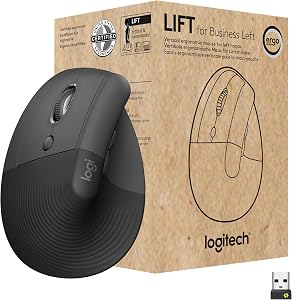
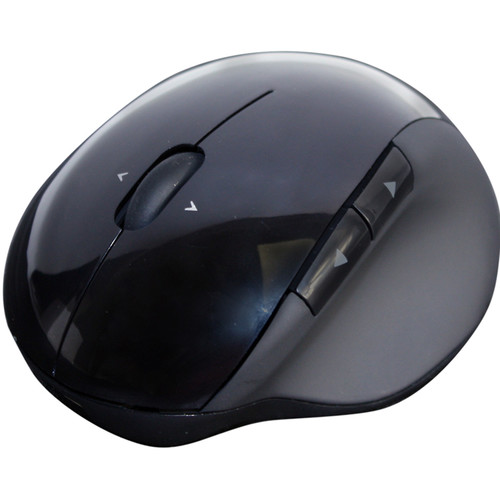
Short answer: a vertical mouse sized to your hand, angled so your wrist stays level. That holds your forearm near the position where carpal tunnel pressure measures lowest. Milder symptoms can start with a sculpted ergonomic mouse; if severe symptoms don’t settle, step up to a trackpad or a roller bar.
Not sure which one fits you? Use the finder above: it checks every mouse we’ve scored against your hand and your symptoms.
Why a vertical mouse, and why it has to fit
Here’s why the finder picks what it does, and then how to set your mouse up so it actually helps.
A flat mouse asks for two things a carpal tunnel hates: a forearm turned fully palm-down, and a wrist that steers from a bend. You hold both for as long as your hand is on it, which in most desk jobs is most of the day.
Carpal tunnel syndrome is a pressure problem: the median nerve, squeezed in a narrow tunnel at the wrist.1 That pressure measures lowest with the wrist close to straight2 and the forearm turned about halfway between palm-down and thumb-up,3 which is roughly where a vertical mouse puts your hand. In a controlled comparison, a vertical mouse cut forearm rotation from 42 to 28 degrees and lowered the effort in the muscles that lift the wrist.4
42° → 28°forearm rotation with a vertical mouse instead of a flat one.4
~12 mmHgmore carpal tunnel pressure while dragging than with the hand resting on the mouse.5
Now the catch, and the reason the adjustable Unimouse tops these picks. In 21 people with carpal tunnel syndrome, a vertical mouse cut the sideways bend toward the little finger but bent the wrist back the most of the devices tested, and none of them lowered the pressure in the tunnel.6 So the angle has to suit your wrist: as steep as you can go while the back of your hand stays in line with your forearm.
Size matters as much as style. A mouse that’s too big has you stretching for the buttons; one that’s too small has you pinching it. OSHA’s advice is a mouse that fits the hand using it, in the right size and for the right hand.7 That’s why the finder asks for your hand length, measured in credit cards.
If your symptoms are moderate most days, or severe, the finder also shows the next steps up, in case a vertical mouse isn’t enough. They take the moving out of mousing: a trackpad stays put while your fingers do the work, and, for severe symptoms most days, a roller bar sits under your palms in front of the keyboard, so there’s no reach at all. Thumb pain on your mousing hand rules out trackballs and trackpads, as it does in the Desk Doctor assessment; the roller bar is moved with the fingers and palm, so it stays in.
What a mouse can’t do
No mouse has been shown to treat carpal tunnel syndrome: a Cochrane review found too little evidence to call any ergonomic equipment a treatment.8 What the right mouse does is take load off your wrist, every hour you work. Left alone, carpal tunnel syndrome can weaken the muscles at the base of the thumb,1 so numbness that wakes you at night or won’t go away, or a weakening grip, needs a clinician, not a new mouse.
Why these five
Contour Unimouse (DEAS 8.0). The hinge adjusts from 35 to 70 degrees, the widest range of any mouse in our top ten, with an adjustable thumb support, in right- and left-handed versions. Start near the flatter end and turn your hand further toward a handshake as it gets comfortable, keeping the wrist level. Less good: it’s made for small to medium hands, and finding your angle takes a few days.
Logitech Lift (7.7). A fixed 57-degree angle in a body made for small to medium hands, right or left, with the best reliability score from user reviews in our top ten. Less good: it runs on an AA battery, and it’s too small for large hands.
Logitech MX Vertical (7.4). The same 57-degree angle in a bigger body, for medium to large hands. It’s right-handed only: left-handers with bigger hands should look at the R-Go HE (7.5) or the left-handed Evoluent VerticalMouse 4 (7.1).
Anker Vertical Ergonomic Mouse (6.8). Tied for the best price score of any vertical mouse we’ve scored, so it’s a cheap way to try the style before you spend more. Medium hands, right-handed, in wireless and wired versions.
Contour RollerMouse Red (6.4). A bar that sits centered in front of your keyboard, under your palms, moved with your fingers: either hand, any hand size. It’s the step for severe symptoms most days. Less good: it costs $250 to $500, and in my experience it takes the longest to get used to. If you’d rather try something smaller first, the Contour Touch trackpad (6.6) is the top-scoring trackpad.
How to set up your mouse for carpal tunnel
1
Put it right beside the keyboard. Same height, close enough that your elbow hangs by your side. OSHA’s guidance is to keep the mouse close to the keyboard.7 A keyboard without a number pad lets it sit closer still.
2
Set the angle to your wrist. On a vertical mouse, go as steep as you can while the back of your hand stays in line with your forearm. If your wrist cocks back, ease the angle off.6
3
Rest your forearm, not your wrist. Let the desk or an armrest at elbow height carry the forearm: across two trials, a forearm support combined with an alternative mouse cut new neck and shoulder disorders roughly in half, though not right-arm disorders.9 Pressing on the palm over the tunnel raises the pressure inside it,10 so if you use a rest, it goes under the heel of your palm, in pauses only.11
4
Hold it lightly and turn the pointer speed up. OSHA’s guidance is to avoid gripping the mouse tightly and to set the sensitivity so you can control the pointer with a light touch.7 Move from the elbow, not by flicking the wrist.
5
Cut the drag. Dragging raises the pressure in the tunnel.5 Turn on ClickLock in Windows’ mouse settings, or a drag lock if your trackpad has one, and use keyboard shortcuts to copy, paste and select, as OSHA suggests.7
6
Break it up every 20 minutes. In a study of computer workers, microbreaks every 20 minutes eased discomfort the most, with no loss of productivity.12
7
Give it two weeks. In my experience a new mouse feels strange for a few days and normal within a couple of weeks; a trackpad or roller bar takes longer. Judge it after that, not on day one.
How to tell it’s working
Change one thing at a time and give each change two weeks, so you know what helped. Note when your symptoms start in the day, and whether they wake you at night. If night numbness, constant tingling or a weak grip shows up at any point, stop shopping and see a clinician.
Vertical, trackpad, trackball or roller: which is best for carpal tunnel?
Each style changes something different. The finder uses the same ladder as the Desk Doctor assessment: it marks the lowest step that suits your symptoms Recommended, and shows the steps above it as Preventative, in case things don’t settle.
Style
What it changes
When the finder shows it
Watch out for
Standard ergonomic
A sculpted shape that rests the hand; the forearm stays mostly palm-down.
Recommended for mild symptoms, or moderate ones now and then.
Changes the forearm angle least.
Vertical (lift)
Turns your hand toward a handshake: less forearm twist and less sideways bend.4,6
Shown for any wrist symptoms. Recommended once they’re moderate most days, or severe.
Bends the wrist back if the angle or the size is wrong.6
Trackpad
The device stays put and your fingers do the moving.
A next step for moderate symptoms most days, or severe ones, with no thumb pain.
A learning curve, and not for a sore thumb.
Trackball
Your arm and wrist stay still while a thumb or fingers roll the ball.
A next step when wrist and elbow are both moderate most days or worse, with no thumb pain.
Thumb-operated models load the thumb.
Roller bar
Sits centered under your palms, in front of the keyboard: no reach.
A next step for severe symptoms most days.
The price, and the longest learning curve.
Every vertical, trackball, trackpad and roller mouse, ranked
All 28 vertical, trackball, trackpad and roller mice we’ve scored, best to worst by DEAS score. After you use the finder, this list keeps only the ones made for your hand size and mousing hand. Tap a row for its score breakdown. Standard ergonomic mice are in the full mouse ranking.
#ProductDEAS
1Contour Unimouse RightSmall to medium hands, right-handedLift (vertical)8.0DEAS
Pain at the base of the thumb when you grip or click, without tingling in the fingers.
What helps
A mouse that lets the thumb rest instead of work, like a vertical mouse with a thumb support. Tell the finder your thumb hurts and it rules out trackballs and trackpads.
Clinical note
These overlap and can happen together. Numbness that persists, night waking or a weakening grip is a reason to see a clinician, not to shop.
When it isn’t just the mouse
Your mouse is one input. Three more matter at the desk:
Desk height. If the desk sits above your elbows, your wrists bend back to reach it. A keyboard tray or a lower desk fixes that.
The rest of you. Body weight and forceful, repetitive hand work have stronger evidence behind them than computer use,13,14 and heavy mouse use is at most a minor risk factor.15
Not sure which of these is yours? The free assessment checks your whole desk in about 15 minutes.
A vertical mouse sized to your hand, set so your wrist stays level. Our top pick is the Contour Unimouse (DEAS 8.0), because you set the angle yourself; the Logitech Lift (7.7) suits smaller hands and the Logitech MX Vertical (7.4) larger ones. Milder symptoms can start with a sculpted ergonomic mouse; if severe symptoms don’t settle on a vertical mouse, a trackpad or a roller bar is the next step. The finder above matches the step to yours.
Does a vertical mouse help carpal tunnel?
It improves the posture behind it. A vertical mouse turns your forearm toward a handshake, which cut forearm rotation from 42 to 28 degrees in one comparison,4 and pressure in the tunnel measured lowest with the forearm about halfway turned.3 But in 21 people with carpal tunnel syndrome, a vertical mouse didn’t lower the pressure, partly because it bent their wrists back,6 and no mouse is a proven treatment.8 Set it so your wrist stays level, and see a clinician if numbness persists.
Is a trackball good for carpal tunnel?
It can be, once a vertical mouse isn’t enough. A trackball keeps your arm and wrist still while your thumb or fingers roll the ball. In the finder, it comes up when moderate or severe wrist symptoms most days come with elbow pain that’s moderate most days or worse; for wrist symptoms alone, the step after a vertical mouse is a trackpad. Thumb pain rules out both. In a year-long trial of 182 call-center workers, a trackball didn’t reduce right-arm disorders, and some people found it hard to use.16
Vertical mouse or trackball: which is better for carpal tunnel?
Start with the vertical mouse. It changes the forearm angle, which is where the pressure evidence points,3,4 and it asks the least of you to learn. Move to a trackpad, trackball or roller bar if your symptoms stay moderate most days, or severe, after you’ve fixed the setup.
What size vertical mouse do I need?
Lay a standard credit card, long side, from the crease of your wrist to the tip of your middle finger. Under two cards is small, about two is medium, more than two and a quarter is large. The Logitech Lift is made for small to medium hands and the Logitech MX Vertical for medium to large; the finder keeps only the mice made for yours.
Can using a mouse cause carpal tunnel?
It’s at most a minor risk factor. In a one-year study of nearly 7,000 computer users, more than 20 hours of mouse use a week was linked to possible carpal tunnel syndrome, which was uncommon overall.17 A meta-analysis of 12 studies concluded that heavy mouse use might be a minor risk factor.15 Body weight and forceful, repetitive hand work have stronger evidence.13,14
Should I use a wrist rest with my mouse?
Not under your wrist. Pressing on the palm over the tunnel raises the pressure inside it.10 OSHA’s guidance is to rest the heel of your palm, not the wrist, and only in pauses.11 Support under the forearm does more.9
How long does it take to get used to a vertical mouse?
In my experience, a few days to a couple of weeks, and longer for a trackpad or a roller bar. In the lab, people were a little slower to hit targets on a vertical mouse at first,4 so give it two weeks before you judge it.
National Institute of Arthritis and Musculoskeletal and Skin Diseases. Carpal tunnel syndrome. niams.nih.gov
Weiss ND, Gordon L, Bloom T, So Y, Rempel DM. Position of the wrist associated with the lowest carpal-tunnel pressure: implications for splint design. J Bone Joint Surg Am. 1995;77(11):1695–1699. PMID: 7593079. doi:10.2106/00004623-199511000-00008
Rempel D, Bach JM, Gordon L, So Y. Effects of forearm pronation/supination on carpal tunnel pressure. J Hand Surg Am. 1998;23(1):38–42. CDC Stacks
Quemelo PRV, Vieira ER. Biomechanics and performance when using a standard and a vertical computer mouse. Ergonomics. 2013;56(8):1336–1344. PMID: 23777482. doi:10.1080/00140139.2013.805251
Keir PJ, Bach JM, Rempel D. Effects of computer mouse design and task on carpal tunnel pressure. Ergonomics. 1999;42(10):1350–1360. PMID: 10582504. doi:10.1080/001401399184992
Schmid AB, Kubler PA, Johnston V, Coppieters MW. A vertical mouse and ergonomic mouse pads alter wrist position but do not reduce carpal tunnel pressure in patients with carpal tunnel syndrome. Appl Ergon. 2015;47:151–156. PMID: 25479984. doi:10.1016/j.apergo.2014.08.020
McLean L, Tingley M, Scott RN, Rickards J. Computer terminal work and the benefit of microbreaks. Appl Ergon. 2001;32(3):225–237. PMID: 11394463. doi:10.1016/S0003-6870(00)00071-5
Shiri R, Pourmemari MH, Falah-Hassani K, Viikari-Juntura E. The effect of excess body mass on the risk of carpal tunnel syndrome: a meta-analysis of 58 studies. Obes Rev. 2015;16(12):1094–1104. PMID: 26395787. doi:10.1111/obr.12324
Kozak A, Schedlbauer G, Wirth T, Euler U, Westermann C, Nienhaus A. Association between work-related biomechanical risk factors and the occurrence of carpal tunnel syndrome: an overview of systematic reviews and a meta-analysis of current research. BMC Musculoskelet Disord. 2015;16:231. PMID: 26323649. doi:10.1186/s12891-015-0685-0
Shiri R, Falah-Hassani K. Computer use and carpal tunnel syndrome: a meta-analysis. J Neurol Sci. 2015;349(1–2):15–19. PMID: 25582979. doi:10.1016/j.jns.2014.12.037
Rempel DM, Krause N, Goldberg R, Benner D, Hudes M, Goldner GU. A randomised controlled trial evaluating the effects of two workstation interventions on upper body pain and incident musculoskeletal disorders among computer operators. Occup Environ Med. 2006;63(5):300–306. oem.bmj.com
Andersen JH, Thomsen JF, Overgaard E, et al. Computer use and carpal tunnel syndrome: a 1-year follow-up study. JAMA. 2003;289(22):2963–2969. PMID: 12799404. doi:10.1001/jama.289.22.2963
This article is general education, not medical advice. Carpal tunnel syndrome can cause lasting nerve damage; if you have numbness that persists, night symptoms, a weak grip or wasting at the base of the thumb, see a licensed clinician.
Healthcare Ergonomic Assessment Specialist. Conducts over a thousand workstation assessments a year across a multi-campus health system, and authored the DEAS standard used to rank every product on this site.
Not sure it’s just the mouse?
The free assessment checks your whole desk against your body in 15 minutes and names exactly what to change, what it costs, and what costs nothing.






 Contour Unimouse Right Small to medium hands, right-handed Lift (vertical) 8.0 DEAS