Desk Doctor Free assessment
Ergonomic products

The Best Ergonomic Keyboard for Carpal Tunnel in 2026

Short answer: a split keyboard, set flat or tilted slightly away from you, at elbow height. The split straightens the sideways bend in your wrists and the tilt stops the backward bend: the two angles that raise pressure in the carpal tunnel. If your symptoms are mild and come and go, you can keep your keyboard, fold its feet in and add a palm support for pauses.

By AJ Prince, HEAS

Healthcare Ergonomic Assessment Specialist. Updated 19 Nov 2026. An 11-minute read.

Desk Doctor earns a commission on some links, at no cost to you. It never changes a score. How we make money

Top picks for carpal tunnel

  1. Best overall

    Cloud Nine C989M

    Halves you pull apart until your wrists stop bending out, with a gentle built-in tent, palm rests and a number pad.

  2. Best without a number pad

    Kinesis mWave

    A built-in split, tent and negative tilt in one piece, with no number pad, so your mouse sits close.

  3. Easiest to switch to

    Logitech ERGO K860

    A gentle curved split whose front legs tilt it away from you, with a pillowed palm rest.

  4. For severe symptoms and all-day typing

    Kinesis Advantage360

    Contoured key wells in fully separate halves, with three tent settings.

  5. Best under $50

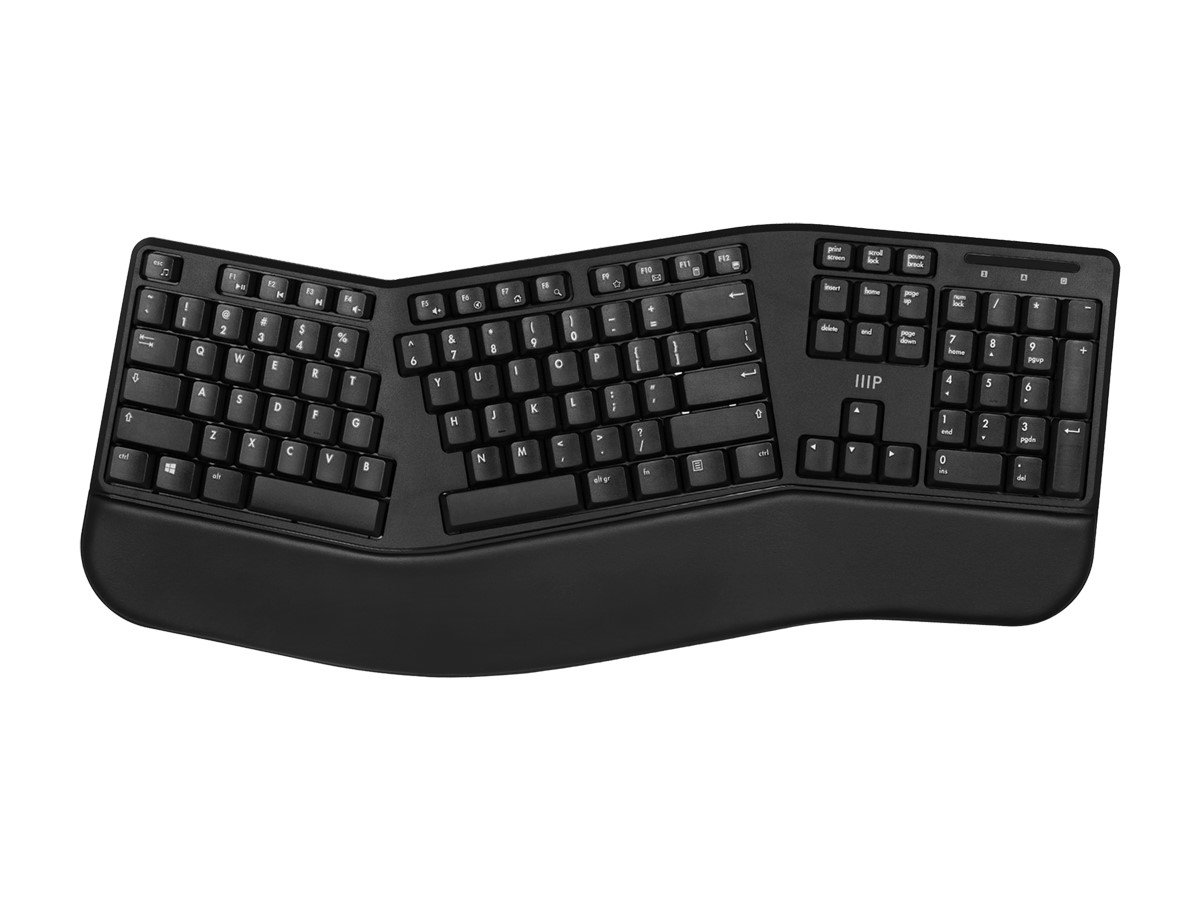
    Monoprice Ergonomic Split

    The top-scoring split keyboard under $50, tied for the best price score of any keyboard we’ve scored.

Not sure which one fits you? Use the finder above: it checks every keyboard we’ve scored against your frame, your number pad and your symptoms.

Why a split keyboard, and why the tilt matters

Here’s why the finder picks what it does, and then how to set your keyboard up so it actually helps.

Carpal tunnel syndrome is pressure on the median nerve where it runs through a narrow channel at the wrist.1 That pressure rises when the wrist bends away from straight: in a classic study, people with carpal tunnel syndrome averaged 32 mmHg with the wrist straight, against 2.5 in people without it, and 110 with the wrist bent back.2 Even in healthy volunteers, about 33 degrees of wrist extension, or about 15 degrees of sideways bend toward the little finger, pushed carpal tunnel pressure over a common risk threshold in a quarter of them.3

A flat keyboard asks for both bends. When researchers measured 90 experienced clerical workers on a conventional keyboard, the left wrist averaged 15 degrees of sideways bend and 21 degrees bent back; the right, 10 and 17.4 Typing adds to it: pressure rose with typing compared with holding the same posture still, and rose further as the wrist bent back.5

12° → 5°average sideways wrist bend on a flat keyboard, then within 5 of straight on a split set up correctly.6

0 to −4°the keyboard slope that gave the least wrist extension.7

Each fix works on a different angle. Splitting the keys straightens the sideways bend.6 The slope controls the bend back: a keyboard flat or tilted slightly away from you gave the least wrist extension.7 Tenting the halves turns your palms in a little. A meta-analysis of six studies found no single design improved all three angles,8 which is why the setup steps below matter as much as the model.

Height matters as much as shape. A keyboard that’s too high bends your wrists back to reach it, and the fold-out feet on the back do the same. The lower of two keyboard heights gave lower elbows and less sideways bend.7

The honest part

A better keyboard reliably fixes your wrist angles. Whether it eases symptoms is less certain: in a six-month trial of 80 computer users with arm and hand disorders, two alternative keyboards showed an improving trend in pain against a placebo keyboard,9 but in a workplace trial of 77 operators with symptoms, five months on each of two keyboards made no difference to discomfort.10 A Cochrane review found too little evidence to call any ergonomic equipment a treatment for carpal tunnel syndrome.11 And the population studies point at the mouse more than the keyboard,12,13 so if you only change one, read the best mouse for carpal tunnel too.

Size is about your mouse as much as your keyboard. A full-width keyboard pushes the mouse further out, and OSHA’s guidance is to keep the mouse close to the keyboard.14 That’s why the finder asks your height and whether you use a number pad every day: a narrower keyboard keeps your mousing hand in close.

If your symptoms are mild and come and go, the finder starts lower on the ladder: your keyboard, set flat and low, with a palm support for pauses, then a basic ergonomic or wave keyboard if that isn’t enough. Once they’re moderate most days, or severe, it recommends a split, with a tented split as the next step. Tick elbow or forearm pain as well and it can pick a wave keyboard for milder wrist symptoms.

Why these five

Cloud Nine C989M (DEAS 7.7). Two halves that separate up to 6 inches, a built-in 7-degree tent, molded palm rests and a number pad, tied for the top score of the 53 keyboards we’ve scored. Pull the halves apart until your wrists stop bending out and keep the back flat. Less good: the tent is fixed at 7 degrees, and it takes a lot of desk.

Kinesis mWave (7.7). One piece with a built-in split, tent and 5-degree negative tilt, a washable palm rest and no number pad, so your mouse sits right beside it; it ties the C989M for our top score. Less good: the split is fixed, and there are too few user reviews yet for a reliability score.

Logitech ERGO K860 (7.3). A curved one-piece split with a number pad and a pillowed palm rest; its front legs tilt it to −4 or −7 degrees. If you’ve never used an ergonomic keyboard, start here. Less good: one piece, so you can’t widen the split, and membrane keys. For the same tilt with mechanical keys and a built-in palm rest, the Perixx PERIBOARD-835 (7.4) is tied with the K860 for the best reliability score from user reviews in our top ten.

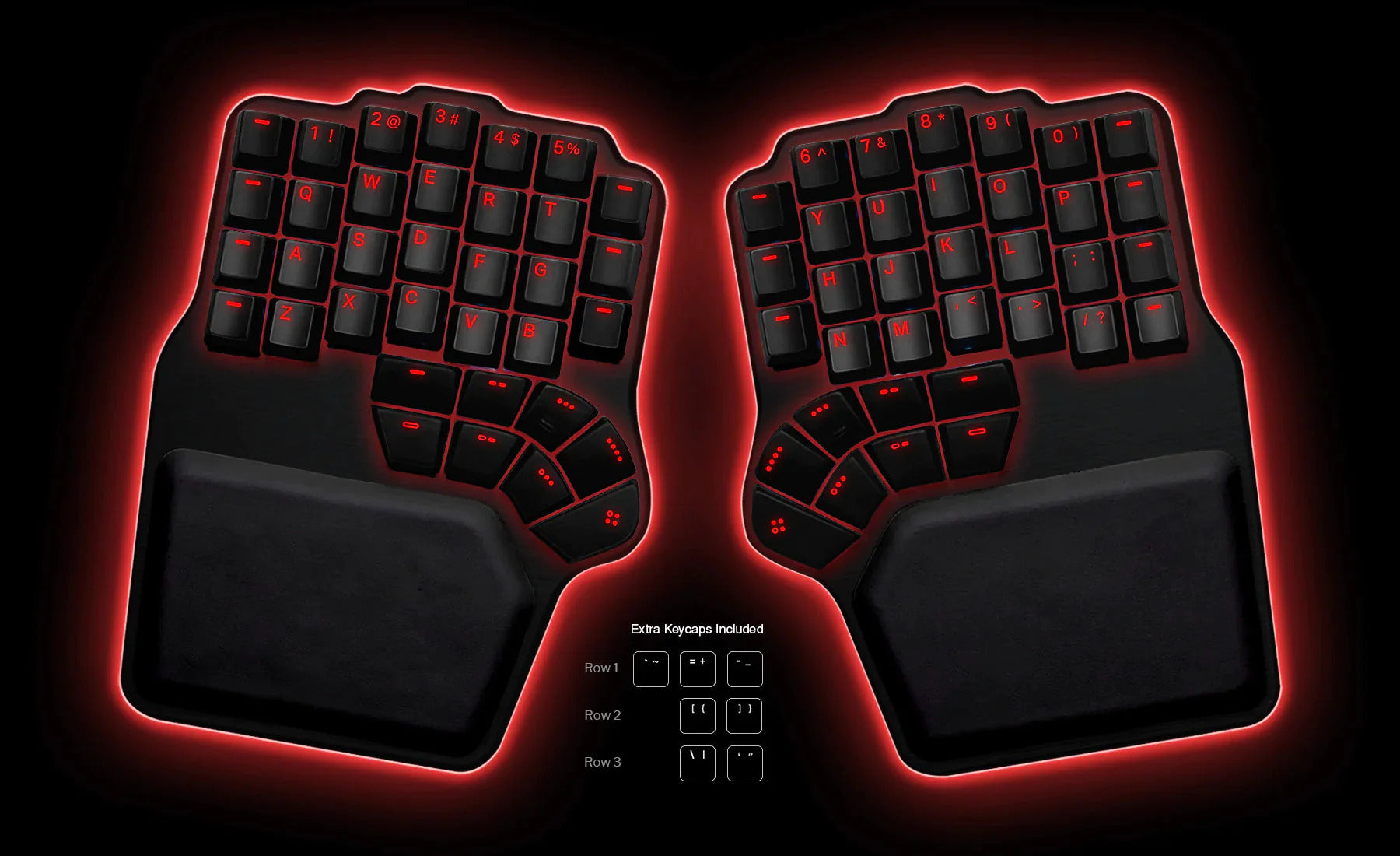
Kinesis Advantage360 (7.6). Contoured key wells in two separate halves with three tent settings and a 3-year warranty. For someone with diagnosed carpal tunnel syndrome who types all day, it’s the design I reach for. Less good: it’s from $499 at list, and the learning period is real. For broad shoulders, or one wrist far worse than the other, the fully separate Kinesis Freestyle2 (7.1) lies flat and costs much less.

Monoprice Ergonomic Split (6.8). The top-scoring split keyboard under $50, and a cheap way to find out whether a split suits you before you spend more.

How to set up your keyboard for carpal tunnel

  1. Set your chair first. Upper arms at your sides, elbows bent 90 to 120 degrees, feet supported.15

  2. Bring the keyboard to elbow height or just below. Elbows about level with it and by your sides, shoulders relaxed.16 If the desk won’t come down, a keyboard tray can.

  3. Fold the back feet in. Flat to slightly negative gave the least wrist extension.7 If your keyboard has front legs, use them.

  4. Open the split gently. Widen the halves until your wrists run straight out from your forearms. In the lab, an opening of about 12 to 15 degrees held wrists and forearms closest to neutral; wider angles trade the sideways bend for more twist.7,17

  5. Tent it moderately. About 14 degrees held wrists and forearms closest to neutral in the lab.17 Your palms should face slightly inward, not sideways.

  6. Rest your palms between bursts, not while you type. A palm rest is for pauses; hover while your fingers move.18 Pressing on the palm over the tunnel raises the pressure inside it.19

  7. Keep the mouse right beside the keyboard, and take a short break every 20 minutes: in a study of computer workers, microbreaks at that interval eased discomfort the most, with no loss of productivity.14,20

The test

If you can draw a straight line from your forearm across the back of your hand, your keyboard is doing its job. Give a new one a full week: in a learning-curve study, typists quickly regained the speed they lost on a split and a contoured keyboard.21 If night numbness, constant tingling or a weak grip shows up at any point, stop adjusting your desk and see a clinician.

Split, wave or tented: which keyboard is best for carpal tunnel?

The finder uses the same ladder as the Desk Doctor assessment: it marks the lowest step that suits your symptoms Recommended, and shows the steps above it as Preventative, in case things don’t settle.

StyleWhat it changesWhen the finder shows itWatch out for
Your keyboard + a palm supportNothing about the keys; support for the palms between bursts.Recommended for mild symptoms, or moderate ones now and then, with no elbow pain.A palm rest used while typing presses on the tunnel.19
Basic ergonomicA gentle slope and curve, with no learning curve.A next step after a palm support, for the same symptoms.The smallest change on the ladder.
WaveCurved key rows in one familiar piece.A next step for mild symptoms; Recommended when milder wrist symptoms come with some elbow pain.A fixed shape: you can’t widen it.
SplitTwo halves set to your shoulders: straightens the sideways bend.6Recommended once wrist symptoms are moderate most days, or severe.Doesn’t stop the bend back on its own; keep it flat.8
Advanced split (tented)Split plus tenting, so the forearms turn toward neutral too.8A next step after a split, for moderate symptoms most days or severe ones.The price, and the longest learning curve.

Every wave, split and tented keyboard, ranked

All 49 wave, split and tented keyboards we’ve scored, best to worst by DEAS score. After you use the finder, this list keeps only the size you chose. Tap a row for its score breakdown. Basic ergonomic keyboards are in the full keyboard ranking.

  1. Cloud Nine C989M Ergonomic Mechanical KeyboardCloud Nine C989M Ergonomic Mechanical Keyboard Full size Advanced split 7.7 DEAS

    Clinical performance7.8

    I.1Neutral posture support8.5
    I.2Adjustability range7.5
    I.3Injury risk reduction8.0
    I.4Population accommodation6.5
    I.5Wrist neutral and key actuation8.5

    Product quality4.7

    II.1Material & construction7.0
    II.2Published certification2.0
    II.3Warranty vs benchmark5.0

    Market value6.0

    III.1Price vs category benchmark6.0
    III.2Ergonomic value ratio6.0
  2. Kinesis mWave Mechanical KeyboardKinesis mWave Mechanical Keyboard Tenkeyless Split 7.7 DEAS

    Clinical performance7.8

    I.1Neutral posture support8.5
    I.2Adjustability range7.5
    I.3Injury risk reduction8.0
    I.4Population accommodation6.5
    I.5Wrist neutral and key actuation8.5

    Product quality4.7

    II.1Material & construction7.0
    II.2Published certification2.0
    II.3Warranty vs benchmark5.0

    Market value6.0

    III.1Price vs category benchmark6.0
    III.2Ergonomic value ratio6.0
  3. Kinesis Advantage2Kinesis Advantage2 Tenkeyless Advanced split 7.7 DEAS

    Clinical performance8.7

    I.1Neutral posture support9.5
    I.2Adjustability range8.5
    I.3Injury risk reduction9.0
    I.4Population accommodation7.0
    I.5Wrist neutral and key actuation9.5

    Product quality5.0

    II.1Material & construction8.0
    II.2Published certification2.0
    II.3Warranty vs benchmark5.0

    Market value1.8

    III.1Price vs category benchmark1.5
    III.2Ergonomic value ratio2.0
  4. Kinesis Advantage360Kinesis Advantage360 Tenkeyless Advanced split 7.6 DEAS

    Clinical performance8.8

    I.1Neutral posture support9.5
    I.2Adjustability range9.0
    I.3Injury risk reduction9.0
    I.4Population accommodation7.0
    I.5Wrist neutral and key actuation9.5

    Product quality5.0

    II.1Material & construction8.0
    II.2Published certification2.0
    II.3Warranty vs benchmark5.0

    Market value1.2

    III.1Price vs category benchmark1.0
    III.2Ergonomic value ratio1.5
  5. Glove80 Ergonomic KeyboardGlove80 Ergonomic Keyboard Tenkeyless Advanced split 7.6 DEAS

    Clinical performance8.8

    I.1Neutral posture support9.5
    I.2Adjustability range9.0
    I.3Injury risk reduction9.0
    I.4Population accommodation7.0
    I.5Wrist neutral and key actuation9.5

    Product quality5.0

    II.1Material & construction8.0
    II.2Published certification2.0
    II.3Warranty vs benchmark5.0

    Market value1.8

    III.1Price vs category benchmark1.5
    III.2Ergonomic value ratio2.0
  6. Dygma DefyDygma Defy Tenkeyless Advanced split 7.5 DEAS

    Clinical performance8.4

    I.1Neutral posture support9.0
    I.2Adjustability range8.5
    I.3Injury risk reduction8.5
    I.4Population accommodation7.0
    I.5Wrist neutral and key actuation9.0

    Product quality5.0

    II.1Material & construction8.0
    II.2Published certification2.0
    II.3Warranty vs benchmark5.0

    Market value1.2

    III.1Price vs category benchmark1.0
    III.2Ergonomic value ratio1.5
  7. Perixx PERIBOARD-835BRPerixx PERIBOARD-835BR Full size Split 7.4 DEAS

    Clinical performance7.5

    I.1Neutral posture support8.0
    I.2Adjustability range7.5
    I.3Injury risk reduction7.5
    I.4Population accommodation6.5
    I.5Wrist neutral and key actuation8.0

    Product quality5.4

    II.1Material & construction7.0
    II.2Published certification2.0
    II.3Warranty vs benchmark5.0
    II.4Verified user reliability7.5

    Market value4.8

    III.1Price vs category benchmark4.5
    III.2Ergonomic value ratio5.0
  8. R-Go Split KeyboardR-Go Split Keyboard Tenkeyless Advanced split 7.4 DEAS

    Clinical performance7.3

    I.1Neutral posture support8.0
    I.2Adjustability range7.0
    I.3Injury risk reduction7.5
    I.4Population accommodation6.5
    I.5Wrist neutral and key actuation7.5

    Product quality6.6

    II.1Material & construction6.5
    II.2Published certification7.0
    II.3Warranty vs benchmark6.5
    II.4Verified user reliability6.5

    Market value6.0

    III.1Price vs category benchmark6.0
    III.2Ergonomic value ratio6.0
  9. Keyboardio Model 100Keyboardio Model 100 Tenkeyless Advanced split 7.4 DEAS

    Clinical performance8.3

    I.1Neutral posture support9.0
    I.2Adjustability range8.5
    I.3Injury risk reduction8.5
    I.4Population accommodation6.5
    I.5Wrist neutral and key actuation9.0

    Product quality4.8

    II.1Material & construction7.5
    II.2Published certification2.0
    II.3Warranty vs benchmark5.0

    Market value2.2

    III.1Price vs category benchmark2.0
    III.2Ergonomic value ratio2.5
  10. Logitech ERGO K860Logitech ERGO K860 Full size Split 7.3 DEAS

    Clinical performance7.4

    I.1Neutral posture support8.0
    I.2Adjustability range7.0
    I.3Injury risk reduction7.5
    I.4Population accommodation6.5
    I.5Wrist neutral and key actuation8.0

    Product quality5.2

    II.1Material & construction6.5
    II.2Published certification2.0
    II.3Warranty vs benchmark5.0
    II.4Verified user reliability7.5

    Market value6.0

    III.1Price vs category benchmark6.0
    III.2Ergonomic value ratio6.0
Show all 49
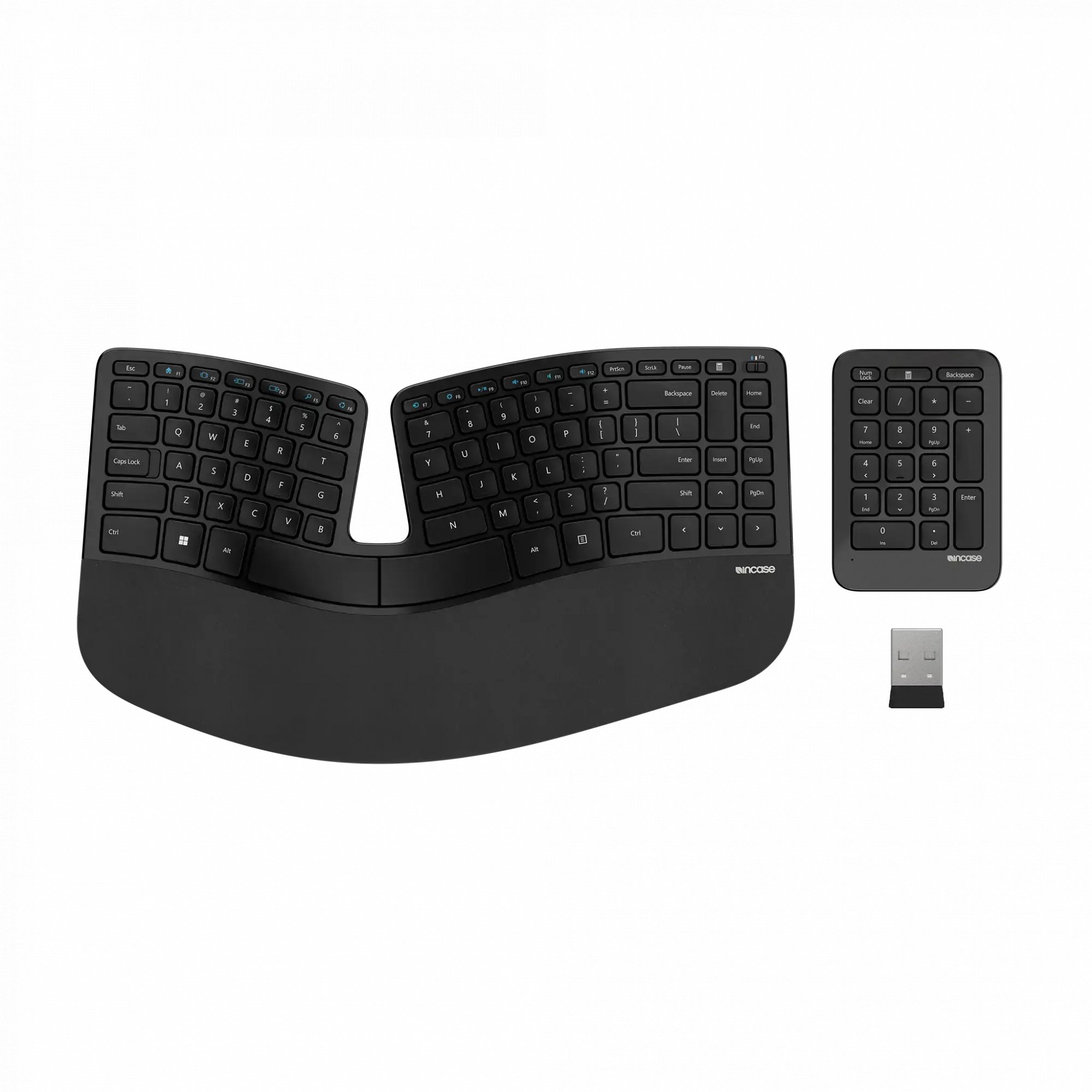
  1. InCase Ergonomic KeyboardInCase Ergonomic Keyboard Compact Split 7.3 DEAS

    Clinical performance7.1

    I.1Neutral posture support8.0
    I.2Adjustability range6.5
    I.3Injury risk reduction7.0
    I.4Population accommodation6.5
    I.5Wrist neutral and key actuation7.5

    Product quality5.4

    II.1Material & construction6.5
    II.2Published certification2.0
    II.3Warranty vs benchmark5.0
    II.4Verified user reliability8.0

    Market value6.5

    III.1Price vs category benchmark6.5
    III.2Ergonomic value ratio6.5
  2. Matias Ergo ProMatias Ergo Pro Tenkeyless Advanced split 7.2 DEAS

    Clinical performance7.8

    I.1Neutral posture support8.5
    I.2Adjustability range7.5
    I.3Injury risk reduction8.0
    I.4Population accommodation6.5
    I.5Wrist neutral and key actuation8.5

    Product quality5.1

    II.1Material & construction7.0
    II.2Published certification2.0
    II.3Warranty vs benchmark5.0
    II.4Verified user reliability6.5

    Market value2.2

    III.1Price vs category benchmark2.0
    III.2Ergonomic value ratio2.5
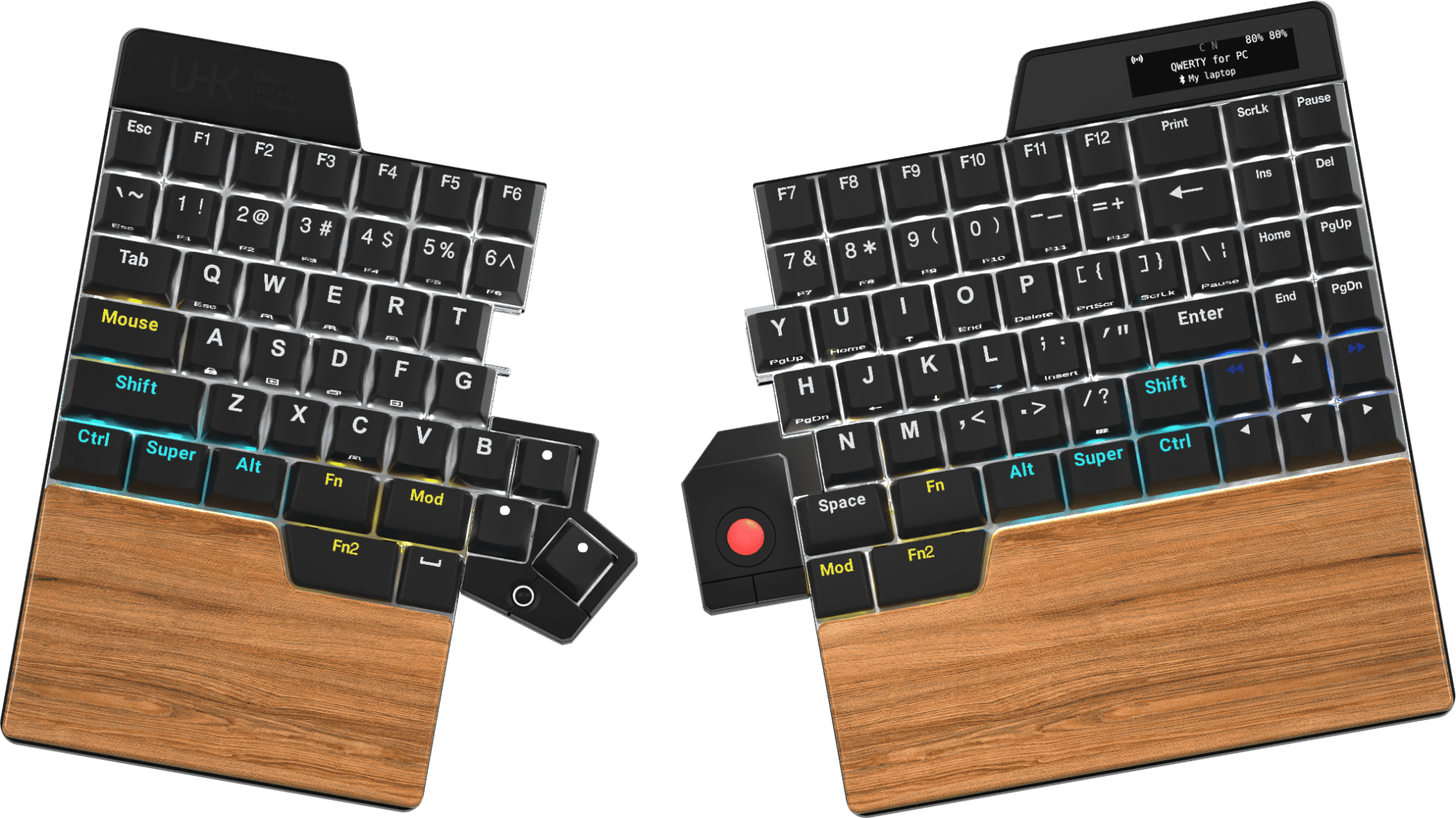
  3. Ultimate Hacking Keyboard UHK v2Ultimate Hacking Keyboard UHK v2 Tenkeyless Advanced split 7.2 DEAS

    Clinical performance7.9

    I.1Neutral posture support8.5
    I.2Adjustability range8.0
    I.3Injury risk reduction8.0
    I.4Population accommodation6.5
    I.5Wrist neutral and key actuation8.5

    Product quality4.8

    II.1Material & construction7.5
    II.2Published certification2.0
    II.3Warranty vs benchmark5.0

    Market value2.2

    III.1Price vs category benchmark2.0
    III.2Ergonomic value ratio2.5
  4. Dygma RaiseDygma Raise Tenkeyless Advanced split 7.2 DEAS

    Clinical performance7.9

    I.1Neutral posture support8.5
    I.2Adjustability range8.0
    I.3Injury risk reduction8.0
    I.4Population accommodation6.5
    I.5Wrist neutral and key actuation8.5

    Product quality4.8

    II.1Material & construction7.5
    II.2Published certification2.0
    II.3Warranty vs benchmark5.0

    Market value2.2

    III.1Price vs category benchmark2.0
    III.2Ergonomic value ratio2.5
  5. Kinesis Freestyle2Kinesis Freestyle2 Tenkeyless Advanced split 7.1 DEAS

    Clinical performance7.3

    I.1Neutral posture support8.0
    I.2Adjustability range7.0
    I.3Injury risk reduction7.5
    I.4Population accommodation6.5
    I.5Wrist neutral and key actuation7.5

    Product quality4.5

    II.1Material & construction6.5
    II.2Published certification2.0
    II.3Warranty vs benchmark5.0

    Market value6.5

    III.1Price vs category benchmark6.5
    III.2Ergonomic value ratio6.5
  6. Goldtouch V2 AdjustableGoldtouch V2 Adjustable Tenkeyless Split 7.0 DEAS

    Clinical performance7.0

    I.1Neutral posture support7.5
    I.2Adjustability range7.0
    I.3Injury risk reduction7.0
    I.4Population accommodation6.0
    I.5Wrist neutral and key actuation7.5

    Product quality5.0

    II.1Material & construction6.0
    II.2Published certification2.0
    II.3Warranty vs benchmark5.0
    II.4Verified user reliability7.0

    Market value6.0

    III.1Price vs category benchmark6.0
    III.2Ergonomic value ratio6.0
  7. Mistel Barocco MD600Mistel Barocco MD600 Tenkeyless Advanced split 7.0 DEAS

    Clinical performance7.2

    I.1Neutral posture support8.0
    I.2Adjustability range7.0
    I.3Injury risk reduction7.5
    I.4Population accommodation6.0
    I.5Wrist neutral and key actuation7.5

    Product quality5.1

    II.1Material & construction6.5
    II.2Published certification2.0
    II.3Warranty vs benchmark5.0
    II.4Verified user reliability7.0

    Market value6.0

    III.1Price vs category benchmark6.0
    III.2Ergonomic value ratio6.0
  8. Kinesis Freestyle Edge RGBKinesis Freestyle Edge RGB Tenkeyless Advanced split 6.9 DEAS

    Clinical performance7.4

    I.1Neutral posture support8.0
    I.2Adjustability range7.5
    I.3Injury risk reduction7.5
    I.4Population accommodation6.5
    I.5Wrist neutral and key actuation7.5

    Product quality5.4

    II.1Material & construction7.0
    II.2Published certification2.0
    II.3Warranty vs benchmark5.0
    II.4Verified user reliability7.5

    Market value3.8

    III.1Price vs category benchmark3.5
    III.2Ergonomic value ratio4.0
  9. Perixx PERIBOARD-512Perixx PERIBOARD-512 Full size Split 6.9 DEAS

    Clinical performance6.5

    I.1Neutral posture support7.0
    I.2Adjustability range6.5
    I.3Injury risk reduction6.5
    I.4Population accommodation6.0
    I.5Wrist neutral and key actuation6.5

    Product quality4.6

    II.1Material & construction5.5
    II.2Published certification2.0
    II.3Warranty vs benchmark5.0
    II.4Verified user reliability6.0

    Market value8.2

    III.1Price vs category benchmark8.5
    III.2Ergonomic value ratio8.0
  10. Adesso Tru-Form 150Adesso Tru-Form 150 Full size Split 6.9 DEAS

    Clinical performance6.5

    I.1Neutral posture support7.0
    I.2Adjustability range6.5
    I.3Injury risk reduction6.5
    I.4Population accommodation6.0
    I.5Wrist neutral and key actuation6.5

    Product quality4.9

    II.1Material & construction5.5
    II.2Published certification2.0
    II.3Warranty vs benchmark5.0
    II.4Verified user reliability7.0

    Market value8.8

    III.1Price vs category benchmark9.0
    III.2Ergonomic value ratio8.5
  11. Arteck Split ErgonomicArteck Split Ergonomic Compact Split 6.9 DEAS

    Clinical performance6.5

    I.1Neutral posture support7.0
    I.2Adjustability range6.5
    I.3Injury risk reduction6.5
    I.4Population accommodation6.0
    I.5Wrist neutral and key actuation6.5

    Product quality4.6

    II.1Material & construction5.0
    II.2Published certification2.0
    II.3Warranty vs benchmark5.0
    II.4Verified user reliability6.5

    Market value8.8

    III.1Price vs category benchmark9.0
    III.2Ergonomic value ratio8.5
  12. X-Bows Ergonomic MechanicalX-Bows Ergonomic Mechanical Compact Split 6.9 DEAS

    Clinical performance7.2

    I.1Neutral posture support8.0
    I.2Adjustability range7.0
    I.3Injury risk reduction7.5
    I.4Population accommodation6.0
    I.5Wrist neutral and key actuation7.5

    Product quality5.1

    II.1Material & construction6.5
    II.2Published certification2.0
    II.3Warranty vs benchmark5.0
    II.4Verified user reliability7.0

    Market value5.0

    III.1Price vs category benchmark5.0
    III.2Ergonomic value ratio5.0
  13. Mistel MD770Mistel MD770 Tenkeyless Advanced split 6.9 DEAS

    Clinical performance7.2

    I.1Neutral posture support8.0
    I.2Adjustability range7.0
    I.3Injury risk reduction7.5
    I.4Population accommodation6.0
    I.5Wrist neutral and key actuation7.5

    Product quality5.1

    II.1Material & construction6.5
    II.2Published certification2.0
    II.3Warranty vs benchmark5.0
    II.4Verified user reliability7.0

    Market value5.0

    III.1Price vs category benchmark5.0
    III.2Ergonomic value ratio5.0
  14. Adesso WKB-7500CB Wireless Ergonomic KeyboardAdesso WKB-7500CB Wireless Ergonomic Keyboard Full size Split 6.8 DEAS

    Clinical performance6.6

    I.1Neutral posture support7.0
    I.2Adjustability range6.5
    I.3Injury risk reduction6.5
    I.4Population accommodation6.5
    I.5Wrist neutral and key actuation6.5

    Product quality5.2

    II.1Material & construction6.0
    II.2Published certification2.0
    II.3Warranty vs benchmark5.0
    II.4Verified user reliability8.0

    Market value7.0

    III.1Price vs category benchmark7.0
    III.2Ergonomic value ratio7.0
  15. Kinesis Freestyle ProKinesis Freestyle Pro Tenkeyless Advanced split 6.8 DEAS

    Clinical performance7.3

    I.1Neutral posture support8.0
    I.2Adjustability range7.0
    I.3Injury risk reduction7.5
    I.4Population accommodation6.5
    I.5Wrist neutral and key actuation7.5

    Product quality4.5

    II.1Material & construction6.5
    II.2Published certification2.0
    II.3Warranty vs benchmark5.0

    Market value4.8

    III.1Price vs category benchmark4.5
    III.2Ergonomic value ratio5.0
  16. Perixx PERIBOARD-612Perixx PERIBOARD-612 Full size Split 6.8 DEAS

    Clinical performance6.5

    I.1Neutral posture support7.0
    I.2Adjustability range6.5
    I.3Injury risk reduction6.5
    I.4Population accommodation6.0
    I.5Wrist neutral and key actuation6.5

    Product quality4.9

    II.1Material & construction5.5
    II.2Published certification2.0
    II.3Warranty vs benchmark5.0
    II.4Verified user reliability7.0

    Market value7.2

    III.1Price vs category benchmark7.5
    III.2Ergonomic value ratio7.0
  17. Matias Sculpted ErgonomicMatias Sculpted Ergonomic Tenkeyless Split 6.8 DEAS

    Clinical performance6.8

    I.1Neutral posture support7.5
    I.2Adjustability range6.5
    I.3Injury risk reduction7.0
    I.4Population accommodation6.0
    I.5Wrist neutral and key actuation7.0

    Product quality4.3

    II.1Material & construction6.0
    II.2Published certification2.0
    II.3Warranty vs benchmark5.0

    Market value6.8

    III.1Price vs category benchmark7.0
    III.2Ergonomic value ratio6.5
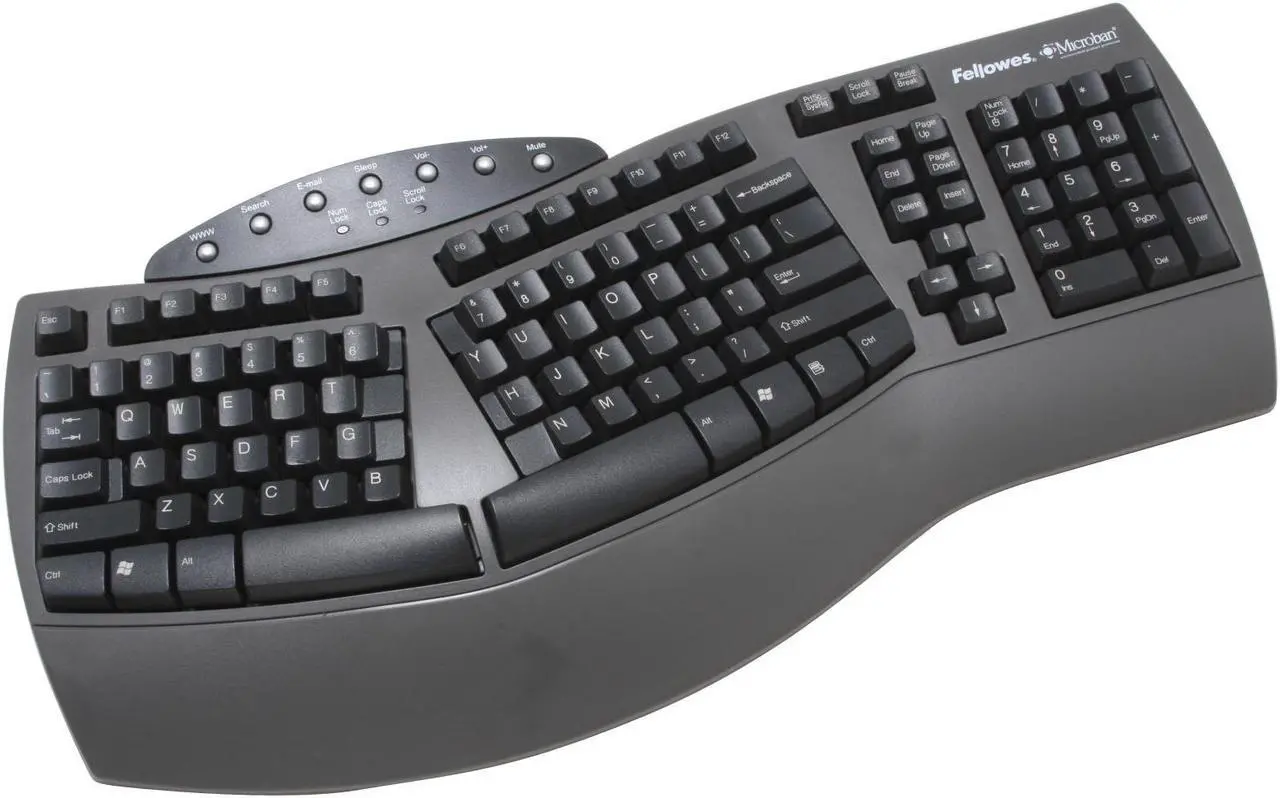
  18. Fellowes Microban SplitFellowes Microban Split Full size Split 6.8 DEAS

    Clinical performance6.5

    I.1Neutral posture support7.0
    I.2Adjustability range6.5
    I.3Injury risk reduction6.5
    I.4Population accommodation6.0
    I.5Wrist neutral and key actuation6.5

    Product quality4.9

    II.1Material & construction5.5
    II.2Published certification2.0
    II.3Warranty vs benchmark5.0
    II.4Verified user reliability7.0

    Market value7.8

    III.1Price vs category benchmark8.0
    III.2Ergonomic value ratio7.5
  19. ProtoArc EK01ProtoArc EK01 Full size Split 6.8 DEAS

    Clinical performance6.5

    I.1Neutral posture support7.0
    I.2Adjustability range6.5
    I.3Injury risk reduction6.5
    I.4Population accommodation6.0
    I.5Wrist neutral and key actuation6.5

    Product quality4.9

    II.1Material & construction5.5
    II.2Published certification2.0
    II.3Warranty vs benchmark5.0
    II.4Verified user reliability7.0

    Market value7.8

    III.1Price vs category benchmark8.0
    III.2Ergonomic value ratio7.5
  20. Monoprice Ergonomic SplitMonoprice Ergonomic Split Full size Split 6.8 DEAS

    Clinical performance6.5

    I.1Neutral posture support7.0
    I.2Adjustability range6.5
    I.3Injury risk reduction6.5
    I.4Population accommodation6.0
    I.5Wrist neutral and key actuation6.5

    Product quality4.0

    II.1Material & construction5.0
    II.2Published certification2.0
    II.3Warranty vs benchmark5.0

    Market value8.8

    III.1Price vs category benchmark9.0
    III.2Ergonomic value ratio8.5
  21. Logitech Wave KeysLogitech Wave Keys Compact Wave 6.7 DEAS

    Clinical performance6.2

    I.1Neutral posture support6.5
    I.2Adjustability range6.0
    I.3Injury risk reduction6.0
    I.4Population accommodation6.5
    I.5Wrist neutral and key actuation6.0

    Product quality5.1

    II.1Material & construction6.0
    II.2Published certification2.0
    II.3Warranty vs benchmark5.0
    II.4Verified user reliability7.5

    Market value7.8

    III.1Price vs category benchmark8.0
    III.2Ergonomic value ratio7.5
  22. Kensington Pro Fit ErgoKensington Pro Fit Ergo Full size Split 6.7 DEAS

    Clinical performance6.4

    I.1Neutral posture support7.0
    I.2Adjustability range6.0
    I.3Injury risk reduction6.5
    I.4Population accommodation6.0
    I.5Wrist neutral and key actuation6.5

    Product quality5.1

    II.1Material & construction6.0
    II.2Published certification2.0
    II.3Warranty vs benchmark6.5
    II.4Verified user reliability6.0

    Market value7.0

    III.1Price vs category benchmark7.0
    III.2Ergonomic value ratio7.0
  23. EPOMAKER Split65EPOMAKER Split65 Tenkeyless Advanced split 6.7 DEAS

    Clinical performance6.8

    I.1Neutral posture support7.5
    I.2Adjustability range6.5
    I.3Injury risk reduction7.0
    I.4Population accommodation6.0
    I.5Wrist neutral and key actuation7.0

    Product quality4.5

    II.1Material & construction6.5
    II.2Published certification2.0
    II.3Warranty vs benchmark5.0

    Market value6.2

    III.1Price vs category benchmark6.5
    III.2Ergonomic value ratio6.0
  24. Perixx PERIBOARD-624BPerixx PERIBOARD-624B Tenkeyless Advanced split 6.6 DEAS

    Clinical performance6.2

    I.1Neutral posture support7.0
    I.2Adjustability range6.0
    I.3Injury risk reduction6.5
    I.4Population accommodation5.5
    I.5Wrist neutral and key actuation6.0

    Product quality4.2

    II.1Material & construction5.5
    II.2Published certification2.0
    II.3Warranty vs benchmark5.0

    Market value7.8

    III.1Price vs category benchmark8.0
    III.2Ergonomic value ratio7.5
  25. Cloud Nine ErgoTKLCloud Nine ErgoTKL Tenkeyless Advanced split 6.6 DEAS

    Clinical performance7.0

    I.1Neutral posture support7.5
    I.2Adjustability range7.0
    I.3Injury risk reduction7.0
    I.4Population accommodation6.0
    I.5Wrist neutral and key actuation7.5

    Product quality4.5

    II.1Material & construction6.5
    II.2Published certification2.0
    II.3Warranty vs benchmark5.0

    Market value3.2

    III.1Price vs category benchmark3.0
    III.2Ergonomic value ratio3.5
  26. Adesso Tru-Form 450Adesso Tru-Form 450 Full size Split 6.6 DEAS

    Clinical performance6.5

    I.1Neutral posture support7.0
    I.2Adjustability range6.5
    I.3Injury risk reduction6.5
    I.4Population accommodation6.0
    I.5Wrist neutral and key actuation6.5

    Product quality4.0

    II.1Material & construction5.0
    II.2Published certification2.0
    II.3Warranty vs benchmark5.0

    Market value7.8

    III.1Price vs category benchmark8.0
    III.2Ergonomic value ratio7.5
  27. EPOMAKER Split70EPOMAKER Split70 Tenkeyless Advanced split 6.6 DEAS

    Clinical performance6.8

    I.1Neutral posture support7.5
    I.2Adjustability range6.5
    I.3Injury risk reduction7.0
    I.4Population accommodation6.0
    I.5Wrist neutral and key actuation7.0

    Product quality4.5

    II.1Material & construction6.5
    II.2Published certification2.0
    II.3Warranty vs benchmark5.0

    Market value5.8

    III.1Price vs category benchmark6.0
    III.2Ergonomic value ratio5.5
  28. ProtoArc EK01 PlusProtoArc EK01 Plus Full size Split 6.6 DEAS

    Clinical performance6.5

    I.1Neutral posture support7.0
    I.2Adjustability range6.5
    I.3Injury risk reduction6.5
    I.4Population accommodation6.0
    I.5Wrist neutral and key actuation6.5

    Product quality4.8

    II.1Material & construction5.5
    II.2Published certification2.0
    II.3Warranty vs benchmark5.0
    II.4Verified user reliability6.5

    Market value7.2

    III.1Price vs category benchmark7.5
    III.2Ergonomic value ratio7.0
  29. Goldtouch Go!2 MobileGoldtouch Go!2 Mobile Tenkeyless Advanced split 6.5 DEAS

    Clinical performance6.3

    I.1Neutral posture support7.0
    I.2Adjustability range6.0
    I.3Injury risk reduction6.5
    I.4Population accommodation5.5
    I.5Wrist neutral and key actuation6.5

    Product quality4.8

    II.1Material & construction5.5
    II.2Published certification2.0
    II.3Warranty vs benchmark5.0
    II.4Verified user reliability6.5

    Market value6.8

    III.1Price vs category benchmark7.0
    III.2Ergonomic value ratio6.5
  30. MOFII Wireless Ergonomic KeyboardMOFII Wireless Ergonomic Keyboard Tenkeyless Split 6.4 DEAS

    Clinical performance6.1

    I.1Neutral posture support6.5
    I.2Adjustability range6.0
    I.3Injury risk reduction6.0
    I.4Population accommodation6.0
    I.5Wrist neutral and key actuation6.0

    Product quality5.1

    II.1Material & construction6.0
    II.2Published certification2.0
    II.3Warranty vs benchmark5.0
    II.4Verified user reliability7.5

    Market value7.0

    III.1Price vs category benchmark7.0
    III.2Ergonomic value ratio7.0
  31. Keychron Q8 AliceKeychron Q8 Alice Tenkeyless Split 6.4 DEAS

    Clinical performance6.3

    I.1Neutral posture support7.0
    I.2Adjustability range6.0
    I.3Injury risk reduction6.5
    I.4Population accommodation6.0
    I.5Wrist neutral and key actuation6.0

    Product quality5.5

    II.1Material & construction7.5
    II.2Published certification2.0
    II.3Warranty vs benchmark5.0
    II.4Verified user reliability7.5

    Market value4.8

    III.1Price vs category benchmark4.5
    III.2Ergonomic value ratio5.0
  32. DeLUX Full Size Ergonomic KeyboardDeLUX Full Size Ergonomic Keyboard Full size Split 6.2 DEAS

    Clinical performance6.1

    I.1Neutral posture support6.5
    I.2Adjustability range6.0
    I.3Injury risk reduction6.0
    I.4Population accommodation6.0
    I.5Wrist neutral and key actuation6.0

    Product quality4.2

    II.1Material & construction5.5
    II.2Published certification2.0
    II.3Warranty vs benchmark5.0

    Market value7.2

    III.1Price vs category benchmark7.5
    III.2Ergonomic value ratio7.0
  33. Perixx Periduo-605Perixx Periduo-605 Full size Split 6.1 DEAS

    Clinical performance6.1

    I.1Neutral posture support6.5
    I.2Adjustability range6.0
    I.3Injury risk reduction6.0
    I.4Population accommodation6.0
    I.5Wrist neutral and key actuation6.0

    Product quality4.2

    II.1Material & construction5.5
    II.2Published certification2.0
    II.3Warranty vs benchmark5.0

    Market value6.8

    III.1Price vs category benchmark7.0
    III.2Ergonomic value ratio6.5
  34. X9 Wired Ergonomic KeyboardX9 Wired Ergonomic Keyboard Full size Split 6.1 DEAS

    Clinical performance6.1

    I.1Neutral posture support6.5
    I.2Adjustability range6.0
    I.3Injury risk reduction6.0
    I.4Population accommodation6.0
    I.5Wrist neutral and key actuation6.0

    Product quality4.2

    II.1Material & construction5.5
    II.2Published certification2.0
    II.3Warranty vs benchmark5.0

    Market value6.8

    III.1Price vs category benchmark7.0
    III.2Ergonomic value ratio6.5
  35. Kinesis Freestyle SoloKinesis Freestyle Solo Tenkeyless Advanced split 6.1 DEAS

    Clinical performance6.0

    I.1Neutral posture support6.5
    I.2Adjustability range5.5
    I.3Injury risk reduction6.0
    I.4Population accommodation6.0
    I.5Wrist neutral and key actuation6.0

    Product quality4.3

    II.1Material & construction6.0
    II.2Published certification2.0
    II.3Warranty vs benchmark5.0

    Market value6.5

    III.1Price vs category benchmark6.5
    III.2Ergonomic value ratio6.5
  36. HP 680 Comfort Dual-Mode KeyboardHP 680 Comfort Dual-Mode Keyboard Full size Wave 5.9 DEAS

    Clinical performance5.7

    I.1Neutral posture support6.0
    I.2Adjustability range5.5
    I.3Injury risk reduction5.5
    I.4Population accommodation6.0
    I.5Wrist neutral and key actuation5.5

    Product quality4.2

    II.1Material & construction5.5
    II.2Published certification2.0
    II.3Warranty vs benchmark5.0

    Market value6.2

    III.1Price vs category benchmark6.5
    III.2Ergonomic value ratio6.0
  37. HP 480 Comfort Wired KeyboardHP 480 Comfort Wired Keyboard Full size Wave 5.9 DEAS

    Clinical performance5.7

    I.1Neutral posture support6.0
    I.2Adjustability range5.5
    I.3Injury risk reduction5.5
    I.4Population accommodation6.0
    I.5Wrist neutral and key actuation5.5

    Product quality4.2

    II.1Material & construction5.5
    II.2Published certification2.0
    II.3Warranty vs benchmark5.0

    Market value7.2

    III.1Price vs category benchmark7.5
    III.2Ergonomic value ratio7.0
  38. Keychron K11 ProKeychron K11 Pro Tenkeyless Split 5.9 DEAS

    Clinical performance5.8

    I.1Neutral posture support6.5
    I.2Adjustability range5.5
    I.3Injury risk reduction6.0
    I.4Population accommodation5.5
    I.5Wrist neutral and key actuation5.5

    Product quality4.9

    II.1Material & construction6.5
    II.2Published certification2.0
    II.3Warranty vs benchmark5.0
    II.4Verified user reliability6.0

    Market value6.8

    III.1Price vs category benchmark7.0
    III.2Ergonomic value ratio6.5
  39. Kensington Pro Fit Ergo Wired KeyboardKensington Pro Fit Ergo Wired Keyboard Full size Split 5.8 DEAS

    Clinical performance5.7

    I.1Neutral posture support6.0
    I.2Adjustability range5.5
    I.3Injury risk reduction5.5
    I.4Population accommodation6.0
    I.5Wrist neutral and key actuation5.5

    Product quality4.2

    II.1Material & construction5.5
    II.2Published certification2.0
    II.3Warranty vs benchmark5.0

    Market value7.2

    III.1Price vs category benchmark7.5
    III.2Ergonomic value ratio7.0

Is it carpal tunnel, or something else?

Thumb, index and middle fingers

Feels like

Numbness or tingling in the fingers, especially the thumb, index and middle fingers, often first at night.1

What helps

The steps on this page, plus the right mouse, and a clinician if it persists.

Little-finger side

Feels like

Numbness in the little finger and the half of the ring finger next to it, often from a bent elbow or leaning on it.

What helps

That’s usually the ulnar nerve: see elbow pain and the ulnar nerve.

Top of the forearm

Feels like

An ache along the top of the forearm toward the outer elbow, worse with a lot of typing or gripping.

What helps

A lighter touch and a split that lets the forearms rest: see keyboards and mice for tennis elbow.

Clinical note

These overlap and can happen together. Numbness that persists, night waking or a weakening grip is a reason to see a clinician, not to shop.

When it isn’t just the keyboard

Your keyboard is one input. Three more matter at the desk:

  • The mouse. In a one-year study of nearly 7,000 computer users, more than 20 hours of mouse use a week was linked to possible carpal tunnel syndrome, and keyboard use wasn’t.12 The best mouse for carpal tunnel has its own finder.
  • Your forearms. A year-long trial gave 182 call-center operators a wide forearm support board: it roughly halved new neck and shoulder disorders and eased neck, shoulder and right-arm pain.22 Armrests at elbow height, or the desk itself, can carry your arms.
  • Desk height. If the desk sits above your elbows, no keyboard can fix the bend back. A keyboard tray or a lower desk can.

Not sure which of these is yours? The free assessment checks your whole desk in about 15 minutes.

Begin the free assessment

Common questions

What is the best keyboard for carpal tunnel?

A split keyboard, set flat or tilted slightly away from you, at elbow height. Our top pick is the Cloud Nine C989M (DEAS 7.7); the Kinesis mWave (7.7) is the pick without a number pad, and the Logitech ERGO K860 (7.3) is the easiest to switch to. If your symptoms are mild and come and go, you may only need your own keyboard set flat and low, with a palm support for pauses. The finder above matches the step to yours.

Do ergonomic keyboards help carpal tunnel?

They fix the wrist angles behind it: split keyboards set up correctly cut the sideways bend from about 12 degrees to within 5 of straight.6 The symptom evidence is mixed. One trial found an improving trend in pain,9 another found no difference in discomfort,10 and no keyboard is a proven treatment.11 See a clinician if numbness persists.

Split or wave keyboard for carpal tunnel?

A split. It straightens the sideways bend that a one-piece wave keyboard only eases, and the finder recommends one once symptoms are moderate most days, or severe. A wave keyboard comes up for milder wrist symptoms when your elbow hurts too.

Should my keyboard tilt toward me or away from me?

Flat, or slightly away from you. A slope of 0 to −4 degrees gave the least wrist extension.7 The fold-out feet at the back do the opposite, so fold them in.

Is a mechanical keyboard better for carpal tunnel?

A little evidence says key feel matters. In a 12-week trial of 20 computer users with tingling hands, using keyboards that differed only in their key switches, one group reported less hand pain from week 6 on.23 It’s a small study, so prefer keys you don’t have to hammer rather than spending heavily on switches.

Should I use a wrist rest when I type?

Only in pauses. Pressing on the palm over the tunnel raises the pressure inside it.19 OSHA’s guidance is to rest the heel of your palm, not your wrist, between bursts of typing.18

Can typing cause carpal tunnel?

The evidence doesn’t point at the keyboard. In a one-year study of nearly 7,000 computer users, keyboard use showed no significant link, while more than 20 hours of mouse use a week did.12 A review of eight studies found too little evidence that computer work causes it, and the associations it did find involved the mouse.13

How long does it take to get used to a split keyboard?

In my experience, one to three weeks; the bigger the change, like contoured key wells, the longer. In a learning-curve study, typists quickly regained the speed they lost on a split and a contoured keyboard.21 Give it a full week before you judge it.

Do I need a number pad?

Only if you use one every day. A full-width keyboard pushes your mouse further out, and OSHA’s guidance is to keep the mouse close to the keyboard.14 Tell the finder whether you use one and it sizes the keyboard to your frame.

References

  1. National Institute of Arthritis and Musculoskeletal and Skin Diseases. Carpal tunnel syndrome. niams.nih.gov
  2. Gelberman RH, Hergenroeder PT, Hargens AR, Lundborg GN, Akeson WH. The carpal tunnel syndrome: a study of carpal canal pressures. J Bone Joint Surg Am. 1981;63(3):380–383. PMID: 7204435. doi:10.2106/00004623-198163030-00009
  3. Keir PJ, Bach JM, Hudes M, Rempel DM. Guidelines for wrist posture based on carpal tunnel pressure thresholds. Hum Factors. 2007;49(1):88–99. PMID: 17315846. PubMed
  4. Simoneau GG, Marklin RW, Monroe JF. Wrist and forearm postures of users of conventional computer keyboards. Hum Factors. 1999;41(3):413–424. PMID: 10665209. doi:10.1518/001872099779610978
  5. Rempel DM, Keir PJ, Bach JM. Effect of wrist posture on carpal tunnel pressure while typing. J Orthop Res. 2008;26(9):1269–1273. PMID: 18383144. doi:10.1002/jor.20599
  6. Marklin RW, Simoneau GG, Monroe JF. Wrist and forearm posture from typing on split and vertically inclined computer keyboards. Hum Factors. 1999;41(4):559–569. PMID: 10774127. doi:10.1518/001872099779656770
  7. Rempel D, Nathan-Roberts D, Chen BY, Odell D. The effects of split keyboard geometry on upper body postures. Ergonomics. 2009;52(1):104–111. PMID: 19308823. doi:10.1080/00140130802481040
  8. Baker NA, Cidboy EL. The effect of three alternative keyboard designs on forearm pronation, wrist extension, and ulnar deviation: a meta-analysis. Am J Occup Ther. 2006;60(1):40–49. PMID: 16541983. doi:10.5014/ajot.60.1.40
  9. Tittiranonda P, Rempel D, Armstrong T, Burastero S. Effect of four computer keyboards in computer users with upper extremity musculoskeletal disorders. Am J Ind Med. 1999;35(6):647–661. PMID: 10332518.
  10. Baker NA, Moehling KK, Park SY. The effect of an alternative keyboard on musculoskeletal discomfort: a randomized cross-over trial. Work. 2015;50(4):677–686. CDC Stacks
  11. O'Connor D, Page MJ, Marshall SC, Massy-Westropp N. Ergonomic positioning or equipment for treating carpal tunnel syndrome. Cochrane Database Syst Rev. 2012;(1):CD009600. PMID: 22259003. doi:10.1002/14651858.CD009600
  12. Andersen JH, Thomsen JF, Overgaard E, et al. Computer use and carpal tunnel syndrome: a 1-year follow-up study. JAMA. 2003;289(22):2963–2969. PMID: 12799404. doi:10.1001/jama.289.22.2963
  13. Thomsen JF, Gerr F, Atroshi I. Carpal tunnel syndrome and the use of computer mouse and keyboard: a systematic review. BMC Musculoskelet Disord. 2008;9:134. PMID: 18838001. doi:10.1186/1471-2474-9-134
  14. OSHA. Computer Workstations eTool: pointer/mouse. osha.gov
  15. OSHA. Computer Workstations eTool: neutral working postures. osha.gov
  16. OSHA. Computer Workstations eTool: keyboards. osha.gov
  17. Rempel D, Barr A, Brafman D, Young E. The effect of six keyboard designs on wrist and forearm postures. Appl Ergon. 2007;38(3):293–298. PMID: 16806042. doi:10.1016/j.apergo.2006.05.001
  18. OSHA. Computer Workstations eTool: wrist/palm supports. osha.gov
  19. Cobb TK, An KN, Cooney WP. Externally applied forces to the palm increase carpal tunnel pressure. J Hand Surg Am. 1995;20(2):181–185. PMID: 7775748. doi:10.1016/S0363-5023(05)80004-8
  20. McLean L, Tingley M, Scott RN, Rickards J. Computer terminal work and the benefit of microbreaks. Appl Ergon. 2001;32(3):225–237. PMID: 11394463. doi:10.1016/S0003-6870(00)00071-5
  21. Anderson AM, Mirka GA, Joines SMB, Kaber DB. Analysis of alternative keyboards using learning curves. Hum Factors. 2009;51(1):35–45. PMID: 19634307. CDC Stacks
  22. Rempel DM, Krause N, Goldberg R, Benner D, Hudes M, Goldner GU. A randomised controlled trial evaluating the effects of two workstation interventions on upper body pain and incident musculoskeletal disorders among computer operators. Occup Environ Med. 2006;63(5):300–306. oem.bmj.com
  23. Rempel D, Tittiranonda P, Burastero S, Hudes M, So Y. Effect of keyboard keyswitch design on hand pain. J Occup Environ Med. 1999;41(2):111–119. PMID: 10029956. doi:10.1097/00043764-199902000-00006

This article is general education, not medical advice. Carpal tunnel syndrome can cause lasting nerve damage; if you have numbness that persists, night symptoms, a weak grip or wasting at the base of the thumb, see a licensed clinician.

AJ Prince, HEAS

Healthcare Ergonomic Assessment Specialist. Conducts over a thousand workstation assessments a year across a multi-campus health system, and authored the DEAS standard used to rank every product on this site.

Not sure it’s just the keyboard?

The free assessment checks your whole desk against your body in 15 minutes and names exactly what to change, what it costs, and what costs nothing.


Begin the free assessment