Desk Doctor Free assessment
Ergonomic products

The Best Ergonomic Mouse for Thumb Pain in 2026

Short answer: a sculpted ergonomic mouse with a thumb rest, sized to your hand and held lightly, so your thumb rests instead of gripping or steering. Skip trackballs and trackpads. If your wrist hurts too, moderately or worse most days, choose a vertical mouse with a thumb support; for severe wrist pain most days, a roller bar is the next step.

By AJ Prince, HEAS

Healthcare Ergonomic Assessment Specialist. Updated 19 Nov 2026. An 8-minute read.

Desk Doctor earns a commission on some links, at no cost to you. It never changes a score. How we make money

Top picks for thumb pain

  1. Best overall for thumb pain

    Microsoft Sculpt Ergonomic Mouse

    The top-scoring sculpted mouse we’ve rated: it rests your hand without asking you to learn a new way to point. Medium hands, right-handed.

  2. Best for left-handers

    Kensington Pro Fit Left Ergo

    Tied for the top score of the sculpted mice, made for the left hand. Medium hands, under $50.

  3. Best for small hands

    Logitech Signature M750

    A sculpted mouse for small to medium hands, under $50. Right-handed.

  4. Best for large hands

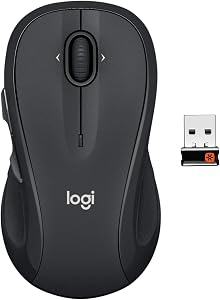
    Logitech Signature M550 L

    The top-scoring sculpted mouse for large hands, under $50.

  5. If your wrist hurts too

    Contour Unimouse

    A vertical mouse with an adjustable thumb support, for wrist pain that’s moderate or worse most days. Right- and left-handed.

Not sure which one fits you? Use the finder above: it checks every mouse we’ve scored against your hand and your symptoms.

Why a mouse that lets your thumb rest

Here’s why the finder picks what it does, and then how to set your mouse up so your thumb gets a break.

Your thumb works hardest on a mouse when it grips, pinches or steers. A mouse that’s too small or too slippery makes you pinch it between your thumb and fingers; a thumb-operated trackball turns the thumb into the thing that moves the pointer, all day; side buttons and a tight grip add more. OSHA’s guidance is to avoid gripping the mouse tightly and to choose one designed to fit the hand that operates it.1

Shape helps too. In a lab study of 15 software engineers, a mouse slanted 30 or 50 degrees lowered activity in the long muscle that bends the thumb, and in two forearm extensors, compared with a standard mouse, a trackball and a trackpad.2 An earlier comparison of mice slanted from 0 to 30 degrees found the more slanted mice lowered activity in the forearm muscles that hold and turn the wrist.3 These are small lab studies of muscle effort, not trials of thumb pain, so treat them as a direction, not a cure.

0trackballs or trackpads the finder shows once you tell it your thumb hurts.

40mice it can still pick from: sculpted, vertical and roller bar.

That’s the finder’s thumb rule, the same one the Desk Doctor assessment uses. With thumb pain alone, it recommends a sculpted ergonomic mouse in your size, with a rest for the thumb. If your wrist hurts too, it moves up the ladder: a vertical mouse once wrist pain is moderate most days, or severe, and a roller bar, moved with the fingers and palm, for severe wrist pain most days.

When to see someone

Thumb pain that comes with swelling, a click or catch when you move the thumb, pain that wakes you, or numbness in the thumb and first fingers deserves a clinician’s look. A mouse can take load off; it can’t tell you what’s causing it.

Why these five

Microsoft Sculpt Ergonomic Mouse (DEAS 6.8). The top score of the sculpted mice we’ve rated, tied with one left-handed model. It’s what the finder recommends first for thumb pain in a medium, right hand. Less good: right-handed only, and medium hands only.

Kensington Pro Fit Left Ergo (6.8). The left-handed tie for that top score, under $50. Left-handers have far fewer sculpted mice to choose from, so this is the one to start with.

Logitech Signature M750 (6.6). Made for small to medium hands, under $50, right-handed. A mouse that fits a small hand stops the pinch. For medium hands on a budget, the Kensington MY630 EQ (6.7) is another sculpted choice under $50.

Logitech Signature M550 L (6.6). The top-scoring sculpted mouse for large hands, under $50. A large hand on a small mouse ends up gripping it; this one gives the thumb room to rest.

Contour Unimouse (8.0). When the wrist hurts as well, this is the vertical mouse I’d choose for a sore thumb: the thumb support adjusts, and the hinge tilts from 35 to 70 degrees. Right- and left-handed. Less good: Contour publishes no hand-size range, so try it if you can. For severe wrist pain most days, the Contour RollerMouse Red (6.4) is moved with the fingers and palm, not the thumb.

How to set up your mouse for thumb pain

  1. Let the thumb rest. On the mouse’s thumb rest or against its side, relaxed, not wrapped around the shell.

  2. Hold it lightly. OSHA’s guidance is to avoid gripping the mouse tightly and to set the sensitivity so you can control it with a light touch.1 A faster pointer means shorter moves and less steering.

  3. Check the size. Credit cards, long side, from your wrist crease to the tip of your middle finger: under two is small, about two medium, more than two and a quarter large. Too small and you pinch it; too big and you stretch.

  4. Move the work off the thumb. Reassign the side buttons, use keyboard shortcuts for copy, paste and back, and scroll with the wheel, not a thumb wheel.

  5. Put the mouse right beside the keyboard, as OSHA suggests, and move from the elbow, not by flicking the wrist.1

  6. Support your forearm. Armrests at elbow height, or the desk. Paired with an alternative mouse, it’s the change with the best trial evidence.4

  7. Break every 20 minutes. Microbreaks every 20 minutes eased discomfort the most in a study of computer workers, with no loss of productivity.5 Open and spread your hand during them.

How to tell it’s working

In my experience a new mouse feels strange for a few days and normal within a couple of weeks. Change one thing at a time, and notice whether the ache at the base of the thumb starts later in the day.

Which mouse styles work with thumb pain?

The finder uses the same rules as the Desk Doctor assessment. Thumb pain takes two styles off the table; the rest follow the usual ladder, with the lowest step that suits your symptoms marked Recommended.

StyleWhat it does for the thumbWith thumb pain, the finder
Standard ergonomicA sculpted shape with a thumb rest; the thumb rests instead of gripping.Recommended for thumb pain alone, or with mild wrist pain.
Vertical (lift)Turns your hand toward a handshake; pick one with a thumb support.6Recommended once wrist pain is moderate most days, or severe.
Roller barMoved with the fingers and palm, in front of the keyboard.A next step for severe wrist pain most days.
TrackballThe ball does the moving; on thumb-operated models, the thumb rolls it all day.Left out with thumb pain: on many models the thumb rolls the ball or works the buttons.
TrackpadFingers and thumb tap, drag and pinch on the pad.Left out with thumb pain.

Every mouse the finder allows with thumb pain, ranked

All 40 sculpted, vertical and roller mice we’ve scored, best to worst by DEAS score, with trackballs and trackpads left out. After you use the finder, this list keeps only the ones made for your hand size and mousing hand. Tap a row for its score breakdown. Every mouse is in the full mouse ranking.

  1. Contour Unimouse RightContour Unimouse Right Small to medium hands, right-handed Lift (vertical) 8.0 DEAS

    Clinical performance8.4

    I.1Neutral posture support9.0
    I.2Adjustability range8.5
    I.3Injury risk reduction9.0
    I.4Population accommodation6.5
    I.5Wrist neutral and grip position9.0

    Product quality5.1

    II.1Material & construction7.0
    II.2Published certification2.5
    II.3Warranty vs benchmark5.0
    II.4Verified user reliability6.0

    Market value6.8

    III.1Price vs category benchmark6.5
    III.2Ergonomic value ratio7.0
  2. Contour Unimouse LeftContour Unimouse Left Small to medium hands, left-handed Lift (vertical) 8.0 DEAS

    Clinical performance8.4

    I.1Neutral posture support9.0
    I.2Adjustability range8.5
    I.3Injury risk reduction9.0
    I.4Population accommodation6.5
    I.5Wrist neutral and grip position9.0

    Product quality5.1

    II.1Material & construction7.0
    II.2Published certification2.5
    II.3Warranty vs benchmark5.0
    II.4Verified user reliability6.0

    Market value6.8

    III.1Price vs category benchmark6.5
    III.2Ergonomic value ratio7.0
  3. Logitech Lift RightLogitech Lift Right Small to medium hands, right-handed Lift (vertical) 7.7 DEAS

    Clinical performance7.4

    I.1Neutral posture support8.5
    I.2Adjustability range6.5
    I.3Injury risk reduction8.0
    I.4Population accommodation5.5
    I.5Wrist neutral and grip position8.5

    Product quality5.8

    II.1Material & construction6.5
    II.2Published certification3.0
    II.3Warranty vs benchmark5.0
    II.4Verified user reliability8.5

    Market value8.0

    III.1Price vs category benchmark8.0
    III.2Ergonomic value ratio8.0
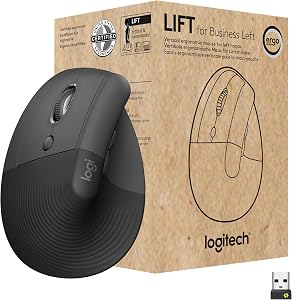
  4. Logitech Lift LeftLogitech Lift Left Small to medium hands, left-handed Lift (vertical) 7.7 DEAS

    Clinical performance7.4

    I.1Neutral posture support8.5
    I.2Adjustability range6.5
    I.3Injury risk reduction8.0
    I.4Population accommodation5.5
    I.5Wrist neutral and grip position8.5

    Product quality5.8

    II.1Material & construction6.5
    II.2Published certification3.0
    II.3Warranty vs benchmark5.0
    II.4Verified user reliability8.5

    Market value8.0

    III.1Price vs category benchmark8.0
    III.2Ergonomic value ratio8.0
  5. R-Go HE Left Vertical MouseR-Go HE Left Vertical Mouse Medium to large hands, left-handed Lift (vertical) 7.5 DEAS

    Clinical performance8.0

    I.1Neutral posture support9.0
    I.2Adjustability range6.5
    I.3Injury risk reduction8.5
    I.4Population accommodation7.5
    I.5Wrist neutral and grip position8.5

    Product quality5.9

    II.1Material & construction7.0
    II.2Published certification3.0
    II.3Warranty vs benchmark6.5
    II.4Verified user reliability7.0

    Market value6.0

    III.1Price vs category benchmark5.5
    III.2Ergonomic value ratio6.5
  6. Logitech MX VerticalLogitech MX Vertical Medium to large hands, right-handed Lift (vertical) 7.4 DEAS

    Clinical performance7.5

    I.1Neutral posture support8.5
    I.2Adjustability range6.5
    I.3Injury risk reduction8.0
    I.4Population accommodation6.0
    I.5Wrist neutral and grip position8.5

    Product quality5.4

    II.1Material & construction6.5
    II.2Published certification3.0
    II.3Warranty vs benchmark5.0
    II.4Verified user reliability7.0

    Market value7.5

    III.1Price vs category benchmark7.5
    III.2Ergonomic value ratio7.5
  7. Evoluent VerticalMouse 4 RightEvoluent VerticalMouse 4 Right Medium to large hands, right-handed Lift (vertical) 7.1 DEAS

    Clinical performance7.3

    I.1Neutral posture support8.5
    I.2Adjustability range6.0
    I.3Injury risk reduction8.0
    I.4Population accommodation5.5
    I.5Wrist neutral and grip position8.5

    Product quality4.9

    II.1Material & construction6.0
    II.2Published certification2.5
    II.3Warranty vs benchmark5.0
    II.4Verified user reliability6.0

    Market value6.8

    III.1Price vs category benchmark6.5
    III.2Ergonomic value ratio7.0
  8. Evoluent VerticalMouse 4 LeftEvoluent VerticalMouse 4 Left Medium to large hands, left-handed Lift (vertical) 7.1 DEAS

    Clinical performance7.3

    I.1Neutral posture support8.5
    I.2Adjustability range6.0
    I.3Injury risk reduction8.0
    I.4Population accommodation5.5
    I.5Wrist neutral and grip position8.5

    Product quality4.9

    II.1Material & construction6.0
    II.2Published certification2.5
    II.3Warranty vs benchmark5.0
    II.4Verified user reliability6.0

    Market value6.8

    III.1Price vs category benchmark6.5
    III.2Ergonomic value ratio7.0
  9. Evoluent VMC Vertical Mouse Wireless RightEvoluent VMC Vertical Mouse Wireless Right Medium to large hands, right-handed Lift (vertical) 6.9 DEAS

    Clinical performance7.0

    I.1Neutral posture support8.0
    I.2Adjustability range6.0
    I.3Injury risk reduction7.5
    I.4Population accommodation5.5
    I.5Wrist neutral and grip position8.0

    Product quality4.5

    II.1Material & construction6.0
    II.2Published certification2.5
    II.3Warranty vs benchmark5.0

    Market value7.0

    III.1Price vs category benchmark7.0
    III.2Ergonomic value ratio7.0
  10. Anker Vertical Ergonomic Mouse WirelessAnker Vertical Ergonomic Mouse Wireless Medium hands, right-handed Lift (vertical) 6.8 DEAS

    Clinical performance6.6

    I.1Neutral posture support7.5
    I.2Adjustability range5.5
    I.3Injury risk reduction7.0
    I.4Population accommodation5.5
    I.5Wrist neutral and grip position7.5

    Product quality4.5

    II.1Material & construction5.5
    II.2Published certification2.0
    II.3Warranty vs benchmark4.5
    II.4Verified user reliability6.0

    Market value8.5

    III.1Price vs category benchmark9.0
    III.2Ergonomic value ratio8.0
Show all 40
  1. Anker Vertical Ergonomic Mouse WiredAnker Vertical Ergonomic Mouse Wired Medium hands, right-handed Lift (vertical) 6.8 DEAS

    Clinical performance6.6

    I.1Neutral posture support7.5
    I.2Adjustability range5.5
    I.3Injury risk reduction7.0
    I.4Population accommodation5.5
    I.5Wrist neutral and grip position7.5

    Product quality4.5

    II.1Material & construction5.5
    II.2Published certification2.0
    II.3Warranty vs benchmark4.5
    II.4Verified user reliability6.0

    Market value8.5

    III.1Price vs category benchmark9.0
    III.2Ergonomic value ratio8.0
  2. Microsoft Sculpt Ergonomic MouseMicrosoft Sculpt Ergonomic Mouse Medium hands, right-handed Standard ergonomic 6.8 DEAS

    Clinical performance6.3

    I.1Neutral posture support7.0
    I.2Adjustability range5.5
    I.3Injury risk reduction6.5
    I.4Population accommodation6.0
    I.5Wrist neutral and grip position6.5

    Product quality5.4

    II.1Material & construction6.5
    II.2Published certification3.0
    II.3Warranty vs benchmark5.0
    II.4Verified user reliability7.0

    Market value7.0

    III.1Price vs category benchmark7.5
    III.2Ergonomic value ratio6.5
  3. Razer Pro Click V2 VerticalRazer Pro Click V2 Vertical Large hands, right-handed Lift (vertical) 6.8 DEAS

    Clinical performance7.1

    I.1Neutral posture support8.0
    I.2Adjustability range6.5
    I.3Injury risk reduction7.5
    I.4Population accommodation5.5
    I.5Wrist neutral and grip position8.0

    Product quality5.1

    II.1Material & construction6.5
    II.2Published certification3.0
    II.3Warranty vs benchmark5.0
    II.4Verified user reliability6.0

    Market value5.2

    III.1Price vs category benchmark5.0
    III.2Ergonomic value ratio5.5
  4. Kensington Pro Fit Left ErgoKensington Pro Fit Left Ergo Medium hands, left-handed Standard ergonomic 6.8 DEAS

    Clinical performance6.4

    I.1Neutral posture support7.0
    I.2Adjustability range5.5
    I.3Injury risk reduction6.5
    I.4Population accommodation6.5
    I.5Wrist neutral and grip position6.5

    Product quality5.4

    II.1Material & construction6.5
    II.2Published certification3.0
    II.3Warranty vs benchmark5.0
    II.4Verified user reliability7.0

    Market value6.8

    III.1Price vs category benchmark7.0
    III.2Ergonomic value ratio6.5
  5. MEETION Left Vertical MouseMEETION Left Vertical Mouse Medium hands, left-handed Lift (vertical) 6.8 DEAS

    Clinical performance6.8

    I.1Neutral posture support8.0
    I.2Adjustability range5.5
    I.3Injury risk reduction7.5
    I.4Population accommodation5.5
    I.5Wrist neutral and grip position7.5

    Product quality4.5

    II.1Material & construction5.5
    II.2Published certification2.0
    II.3Warranty vs benchmark4.5
    II.4Verified user reliability6.0

    Market value8.5

    III.1Price vs category benchmark9.0
    III.2Ergonomic value ratio8.0
  6. Evoluent VerticalMouse D RightEvoluent VerticalMouse D Right Medium to large hands, right-handed Lift (vertical) 6.7 DEAS

    Clinical performance7.3

    I.1Neutral posture support8.5
    I.2Adjustability range6.0
    I.3Injury risk reduction8.0
    I.4Population accommodation5.5
    I.5Wrist neutral and grip position8.5

    Product quality4.8

    II.1Material & construction6.0
    II.2Published certification2.5
    II.3Warranty vs benchmark5.0
    II.4Verified user reliability5.5

    Market value5.2

    III.1Price vs category benchmark5.0
    III.2Ergonomic value ratio5.5
  7. Kensington MY630 EQ WirelessKensington MY630 EQ Wireless Medium hands, right-handed Standard ergonomic 6.7 DEAS

    Clinical performance6.5

    I.1Neutral posture support7.5
    I.2Adjustability range5.5
    I.3Injury risk reduction6.5
    I.4Population accommodation6.0
    I.5Wrist neutral and grip position7.0

    Product quality5.0

    II.1Material & construction6.0
    II.2Published certification3.0
    II.3Warranty vs benchmark5.0
    II.4Verified user reliability6.0

    Market value7.2

    III.1Price vs category benchmark7.5
    III.2Ergonomic value ratio7.0
  8. Logitech Signature M750Logitech Signature M750 Small to medium hands, right-handed Standard ergonomic 6.6 DEAS

    Clinical performance5.6

    I.1Neutral posture support6.0
    I.2Adjustability range5.5
    I.3Injury risk reduction5.5
    I.4Population accommodation6.0
    I.5Wrist neutral and grip position5.0

    Product quality5.8

    II.1Material & construction6.5
    II.2Published certification3.0
    II.3Warranty vs benchmark5.0
    II.4Verified user reliability8.5

    Market value8.0

    III.1Price vs category benchmark8.5
    III.2Ergonomic value ratio7.5
  9. Microsoft Bluetooth Ergonomic MouseMicrosoft Bluetooth Ergonomic Mouse Small to medium hands, right-handed Standard ergonomic 6.6 DEAS

    Clinical performance6.0

    I.1Neutral posture support6.5
    I.2Adjustability range5.5
    I.3Injury risk reduction6.0
    I.4Population accommodation6.0
    I.5Wrist neutral and grip position6.0

    Product quality5.1

    II.1Material & construction6.0
    II.2Published certification3.0
    II.3Warranty vs benchmark5.0
    II.4Verified user reliability6.5

    Market value7.5

    III.1Price vs category benchmark8.0
    III.2Ergonomic value ratio7.0
  10. Logitech Signature M550 LLogitech Signature M550 L Large hands, either hand Standard ergonomic 6.6 DEAS

    Clinical performance5.8

    I.1Neutral posture support6.0
    I.2Adjustability range5.5
    I.3Injury risk reduction5.5
    I.4Population accommodation6.5
    I.5Wrist neutral and grip position5.5

    Product quality5.6

    II.1Material & construction6.5
    II.2Published certification3.0
    II.3Warranty vs benchmark5.0
    II.4Verified user reliability8.0

    Market value8.0

    III.1Price vs category benchmark8.5
    III.2Ergonomic value ratio7.5
  11. Contour Design Ultimate Workstation RollerMouse RedContour Design Ultimate Workstation RollerMouse Red Any hand size, either hand Roller bar 6.4 DEAS

    Clinical performance8.5

    I.1Neutral posture support9.0
    I.2Adjustability range8.0
    I.3Injury risk reduction9.0
    I.4Population accommodation7.5
    I.5Wrist neutral and grip position9.0

    Product quality5.5

    II.1Material & construction8.0
    II.2Published certification2.5
    II.3Warranty vs benchmark5.0
    II.4Verified user reliability6.5

    Market value1.5

    III.1Price vs category benchmark1.0
    III.2Ergonomic value ratio2.0
  12. Logitech M720 TriathlonLogitech M720 Triathlon Medium hands, right-handed Standard ergonomic 6.3 DEAS

    Clinical performance5.6

    I.1Neutral posture support6.0
    I.2Adjustability range5.5
    I.3Injury risk reduction5.5
    I.4Population accommodation6.0
    I.5Wrist neutral and grip position5.0

    Product quality5.6

    II.1Material & construction6.5
    II.2Published certification3.0
    II.3Warranty vs benchmark5.0
    II.4Verified user reliability8.0

    Market value7.5

    III.1Price vs category benchmark8.0
    III.2Ergonomic value ratio7.0
  13. Contour RollerMouse RedContour RollerMouse Red Any hand size, either hand Roller bar 6.3 DEAS

    Clinical performance8.1

    I.1Neutral posture support9.0
    I.2Adjustability range7.0
    I.3Injury risk reduction8.5
    I.4Population accommodation7.0
    I.5Wrist neutral and grip position9.0

    Product quality5.4

    II.1Material & construction7.5
    II.2Published certification2.5
    II.3Warranty vs benchmark5.0
    II.4Verified user reliability6.5

    Market value2.0

    III.1Price vs category benchmark1.5
    III.2Ergonomic value ratio2.5
  14. Microsoft Classic IntelliMouseMicrosoft Classic IntelliMouse Large hands, right-handed Standard ergonomic 6.3 DEAS

    Clinical performance5.6

    I.1Neutral posture support6.0
    I.2Adjustability range5.0
    I.3Injury risk reduction5.5
    I.4Population accommodation6.0
    I.5Wrist neutral and grip position5.5

    Product quality5.2

    II.1Material & construction6.5
    II.2Published certification3.0
    II.3Warranty vs benchmark5.0
    II.4Verified user reliability6.5

    Market value7.5

    III.1Price vs category benchmark8.0
    III.2Ergonomic value ratio7.0
  15. Logitech M510Logitech M510 Medium hands, right-handed Standard ergonomic 6.2 DEAS

    Clinical performance5.2

    I.1Neutral posture support5.5
    I.2Adjustability range5.0
    I.3Injury risk reduction5.0
    I.4Population accommodation6.0
    I.5Wrist neutral and grip position4.5

    Product quality5.2

    II.1Material & construction6.0
    II.2Published certification3.0
    II.3Warranty vs benchmark5.0
    II.4Verified user reliability7.0

    Market value8.2

    III.1Price vs category benchmark9.0
    III.2Ergonomic value ratio7.5
  16. Logitech MX Master 3SLogitech MX Master 3S Medium to large hands, right-handed Standard ergonomic 6.1 DEAS

    Clinical performance5.9

    I.1Neutral posture support6.5
    I.2Adjustability range6.0
    I.3Injury risk reduction6.0
    I.4Population accommodation6.0
    I.5Wrist neutral and grip position5.0

    Product quality5.8

    II.1Material & construction7.0
    II.2Published certification3.0
    II.3Warranty vs benchmark5.0
    II.4Verified user reliability8.0

    Market value6.0

    III.1Price vs category benchmark6.0
    III.2Ergonomic value ratio6.0
  17. Logitech M705 MarathonLogitech M705 Marathon Medium hands, right-handed Standard ergonomic 6.1 DEAS

    Clinical performance5.2

    I.1Neutral posture support5.5
    I.2Adjustability range5.0
    I.3Injury risk reduction5.0
    I.4Population accommodation6.0
    I.5Wrist neutral and grip position4.5

    Product quality5.4

    II.1Material & construction6.0
    II.2Published certification3.0
    II.3Warranty vs benchmark5.0
    II.4Verified user reliability7.5

    Market value7.8

    III.1Price vs category benchmark8.5
    III.2Ergonomic value ratio7.0
  18. Adesso iMouse E10Adesso iMouse E10 Medium hands, right-handed Lift (vertical) 6.1 DEAS

    Clinical performance6.2

    I.1Neutral posture support7.0
    I.2Adjustability range5.0
    I.3Injury risk reduction6.5
    I.4Population accommodation5.5
    I.5Wrist neutral and grip position7.0

    Product quality4.1

    II.1Material & construction4.5
    II.2Published certification2.0
    II.3Warranty vs benchmark4.5
    II.4Verified user reliability5.5

    Market value8.0

    III.1Price vs category benchmark8.5
    III.2Ergonomic value ratio7.5
  19. Razer Pro ClickRazer Pro Click Medium to large hands, right-handed Standard ergonomic 6.1 DEAS

    Clinical performance6.0

    I.1Neutral posture support6.5
    I.2Adjustability range6.0
    I.3Injury risk reduction6.0
    I.4Population accommodation6.0
    I.5Wrist neutral and grip position5.5

    Product quality5.2

    II.1Material & construction6.5
    II.2Published certification3.0
    II.3Warranty vs benchmark5.0
    II.4Verified user reliability6.5

    Market value6.0

    III.1Price vs category benchmark6.0
    III.2Ergonomic value ratio6.0
  20. Acer Wireless Vertical Ergonomic MouseAcer Wireless Vertical Ergonomic Mouse Medium hands, right-handed Lift (vertical) 6.0 DEAS

    Clinical performance6.2

    I.1Neutral posture support7.0
    I.2Adjustability range5.0
    I.3Injury risk reduction6.5
    I.4Population accommodation5.5
    I.5Wrist neutral and grip position7.0

    Product quality3.8

    II.1Material & construction5.0
    II.2Published certification2.0
    II.3Warranty vs benchmark4.5

    Market value8.2

    III.1Price vs category benchmark9.0
    III.2Ergonomic value ratio7.5
  21. Incase Bluetooth Ergonomic MouseIncase Bluetooth Ergonomic Mouse Medium hands, right-handed Standard ergonomic 6.0 DEAS

    Clinical performance5.6

    I.1Neutral posture support6.0
    I.2Adjustability range5.5
    I.3Injury risk reduction5.5
    I.4Population accommodation5.5
    I.5Wrist neutral and grip position5.5

    Product quality4.5

    II.1Material & construction6.0
    II.2Published certification2.5
    II.3Warranty vs benchmark5.0

    Market value7.0

    III.1Price vs category benchmark7.5
    III.2Ergonomic value ratio6.5
  22. Adesso iMouse E50Adesso iMouse E50 Medium hands, right-handed Lift (vertical) 5.9 DEAS

    Clinical performance6.2

    I.1Neutral posture support7.0
    I.2Adjustability range5.0
    I.3Injury risk reduction6.5
    I.4Population accommodation5.5
    I.5Wrist neutral and grip position7.0

    Product quality3.7

    II.1Material & construction4.5
    II.2Published certification2.0
    II.3Warranty vs benchmark4.5

    Market value7.5

    III.1Price vs category benchmark8.0
    III.2Ergonomic value ratio7.0
  23. Adesso iMouse X1Adesso iMouse X1 Medium hands, right-handed Standard ergonomic 5.9 DEAS

    Clinical performance5.5

    I.1Neutral posture support6.0
    I.2Adjustability range5.0
    I.3Injury risk reduction5.5
    I.4Population accommodation5.5
    I.5Wrist neutral and grip position5.5

    Product quality3.8

    II.1Material & construction5.0
    II.2Published certification2.0
    II.3Warranty vs benchmark4.5

    Market value8.2

    III.1Price vs category benchmark9.0
    III.2Ergonomic value ratio7.5
  24. Razer Pro Click MiniRazer Pro Click Mini Small hands, right-handed Standard ergonomic 5.9 DEAS

    Clinical performance5.4

    I.1Neutral posture support6.0
    I.2Adjustability range5.5
    I.3Injury risk reduction5.5
    I.4Population accommodation5.0
    I.5Wrist neutral and grip position5.0

    Product quality5.0

    II.1Material & construction6.0
    II.2Published certification3.0
    II.3Warranty vs benchmark5.0
    II.4Verified user reliability6.0

    Market value6.8

    III.1Price vs category benchmark7.0
    III.2Ergonomic value ratio6.5
  25. Logitech G Pro WirelessLogitech G Pro Wireless Medium hands, either hand Standard ergonomic 5.9 DEAS

    Clinical performance5.2

    I.1Neutral posture support5.5
    I.2Adjustability range5.5
    I.3Injury risk reduction5.0
    I.4Population accommodation5.5
    I.5Wrist neutral and grip position4.5

    Product quality5.9

    II.1Material & construction7.0
    II.2Published certification3.0
    II.3Warranty vs benchmark5.0
    II.4Verified user reliability8.5

    Market value6.0

    III.1Price vs category benchmark6.0
    III.2Ergonomic value ratio6.0
  26. Logitech MX Anywhere 2SLogitech MX Anywhere 2S Small hands, right-handed Standard ergonomic 5.7 DEAS

    Clinical performance4.7

    I.1Neutral posture support5.0
    I.2Adjustability range5.0
    I.3Injury risk reduction4.5
    I.4Population accommodation5.0
    I.5Wrist neutral and grip position4.0

    Product quality5.5

    II.1Material & construction6.5
    II.2Published certification3.0
    II.3Warranty vs benchmark5.0
    II.4Verified user reliability7.5

    Market value6.5

    III.1Price vs category benchmark7.0
    III.2Ergonomic value ratio6.0
  27. Logitech G502 X LightspeedLogitech G502 X Lightspeed Medium to large hands, right-handed Standard ergonomic 5.6 DEAS

    Clinical performance5.3

    I.1Neutral posture support5.5
    I.2Adjustability range6.0
    I.3Injury risk reduction5.0
    I.4Population accommodation5.5
    I.5Wrist neutral and grip position4.5

    Product quality5.5

    II.1Material & construction7.0
    II.2Published certification3.0
    II.3Warranty vs benchmark5.0
    II.4Verified user reliability7.0

    Market value4.8

    III.1Price vs category benchmark4.5
    III.2Ergonomic value ratio5.0
  28. Logitech G Pro X SuperlightLogitech G Pro X Superlight Medium hands, either hand Standard ergonomic 5.6 DEAS

    Clinical performance4.9

    I.1Neutral posture support5.0
    I.2Adjustability range5.5
    I.3Injury risk reduction4.5
    I.4Population accommodation5.5
    I.5Wrist neutral and grip position4.0

    Product quality6.0

    II.1Material & construction7.0
    II.2Published certification3.0
    II.3Warranty vs benchmark5.0
    II.4Verified user reliability9.0

    Market value5.0

    III.1Price vs category benchmark5.0
    III.2Ergonomic value ratio5.0
  29. SteelSeries Aerox 5 WirelessSteelSeries Aerox 5 Wireless Medium to large hands, right-handed Standard ergonomic 5.6 DEAS

    Clinical performance5.2

    I.1Neutral posture support5.5
    I.2Adjustability range5.5
    I.3Injury risk reduction5.0
    I.4Population accommodation5.5
    I.5Wrist neutral and grip position4.5

    Product quality5.5

    II.1Material & construction7.0
    II.2Published certification3.0
    II.3Warranty vs benchmark5.0
    II.4Verified user reliability7.0

    Market value4.8

    III.1Price vs category benchmark4.5
    III.2Ergonomic value ratio5.0
  30. Razer Naga V2 HyperSpeedRazer Naga V2 HyperSpeed Large hands, right-handed Standard ergonomic 5.4 DEAS

    Clinical performance4.9

    I.1Neutral posture support5.0
    I.2Adjustability range5.5
    I.3Injury risk reduction4.5
    I.4Population accommodation5.5
    I.5Wrist neutral and grip position4.0

    Product quality5.2

    II.1Material & construction6.5
    II.2Published certification3.0
    II.3Warranty vs benchmark5.0
    II.4Verified user reliability6.5

    Market value5.8

    III.1Price vs category benchmark6.0
    III.2Ergonomic value ratio5.5

Where does your thumb hurt?

Base of the thumb

Feels like

An ache where the thumb meets the wrist, worse when you grip, pinch or click.

What helps

A sculpted mouse that fits, held lightly, with the thumb resting. Swelling or stiffness in the joint needs a clinician’s look. If it’s arthritis, see the best mouse for arthritis.

Thumb side of the wrist

Feels like

Pain along the thumb side of the wrist when you move the thumb or turn the wrist.

What helps

The same mouse changes, and less thumb steering. If it’s the wrist more than the thumb, see the best mouse for wrist pain.

Tingling in the thumb and first fingers

Feels like

Numbness or tingling in the thumb, index and middle fingers, often at night.

What helps

That’s the carpal tunnel pattern: see the best mouse for carpal tunnel.

When it isn’t just the mouse

The thumb works at the rest of the desk too:

  • Your phone. Typing and scrolling with the thumb all day adds to the load. A headset or speaker for calls, and the computer for long messages, spread it out.
  • The keyboard. Thumb clusters and hard-to-press space bars load the thumb. The keyboard finder picks one for your frame and symptoms.
  • Your forearm. If nothing carries your arm, your hand grips harder to steady it. In a year-long trial, a wide forearm support board eased neck, shoulder and right-arm pain.7

Not sure which of these is yours? The free assessment checks your whole desk in about 15 minutes.

Begin the free assessment

Common questions

What is the best mouse for thumb pain?

A sculpted ergonomic mouse with a thumb rest, sized to your hand. Our top pick is the Microsoft Sculpt Ergonomic Mouse (DEAS 6.8); left-handers should start with the Kensington Pro Fit Left Ergo (6.8). If your wrist hurts too, moderately or worse most days, the Contour Unimouse (8.0) is a vertical mouse with an adjustable thumb support. The finder above matches the step to yours.

Is a trackball good for thumb pain?

Not a thumb-operated one: it makes the thumb move the pointer all day. The finder leaves out trackballs and trackpads once you say your thumb hurts. In a year-long trial of 182 call-center workers, a trackball didn’t reduce right-arm disorders, and some people found it hard to use.7

Is a vertical mouse good for thumb pain?

It can be, if it has a thumb support and fits your hand. A slanted mouse lowered activity in the long thumb muscle in one small lab study.2 The finder recommends a vertical mouse when your wrist hurts too, moderately or worse most days; for the thumb alone, it starts with a sculpted mouse.

Why does my thumb hurt when I use a mouse?

Usually from gripping, pinching or steering: a mouse that’s too small or slippery, a thumb-operated trackball, or thumb buttons used all day. OSHA’s guidance is to avoid gripping the mouse tightly.1

Should I use a trackpad with thumb pain?

The finder leaves trackpads out with thumb pain, because tapping, dragging and pinching on the pad still work the thumb. A roller bar, moved with the fingers and palm, is the next step if severe wrist pain comes with it.

Are there left-handed mice for thumb pain?

Yes: the Kensington Pro Fit Left Ergo and the left-handed Contour Unimouse, and roller bars work with either hand. Pick Left hand in the finder and it shows only the mice made for it.

References

  1. OSHA. Computer Workstations eTool: pointer/mouse. osha.gov
  2. Labbafinejad Y, Eslami-Farsani M, Mohammadi S, Ghasemi MS, Reiszadeh M, Dehghan N. Evaluating muscle activity during work with trackball, trackpad, slanted, and standard mice. Iran Rehabil J. 2019;17(2):121–128. doi:10.32598/irj.17.2.121
  3. Chen HM, Leung CT. The effect on forearm and shoulder muscle activity in using different slanted computer mice. Clin Biomech. 2007;22:518–523. ScienceDirect
  4. Hoe VCW, Urquhart DM, Kelsall HL, Zamri EN, Sim MR. Ergonomic interventions for preventing work-related musculoskeletal disorders of the upper limb and neck among office workers. Cochrane Database Syst Rev. 2018;10(10):CD008570. PMID: 30350850. doi:10.1002/14651858.CD008570.pub3
  5. McLean L, Tingley M, Scott RN, Rickards J. Computer terminal work and the benefit of microbreaks. Appl Ergon. 2001;32(3):225–237. PMID: 11394463. doi:10.1016/S0003-6870(00)00071-5
  6. Quemelo PRV, Vieira ER. Biomechanics and performance when using a standard and a vertical computer mouse. Ergonomics. 2013;56(8):1336–1344. PMID: 23777482. doi:10.1080/00140139.2013.805251
  7. Rempel DM, Krause N, Goldberg R, Benner D, Hudes M, Goldner GU. A randomised controlled trial evaluating the effects of two workstation interventions on upper body pain and incident musculoskeletal disorders among computer operators. Occup Environ Med. 2006;63(5):300–306. oem.bmj.com

This article is general education, not medical advice. If you have numbness that persists, night symptoms, a weak grip, swelling or pain after an injury, see a licensed clinician.

AJ Prince, HEAS

Healthcare Ergonomic Assessment Specialist. Conducts over a thousand workstation assessments a year across a multi-campus health system, and authored the DEAS standard used to rank every product on this site.

Not sure it’s just the mouse?

The free assessment checks your whole desk against your body in 15 minutes and names exactly what to change, what it costs, and what costs nothing.


Begin the free assessment